> ## Documentation Index
> Fetch the complete documentation index at: https://www.ayrshare.com/docs/llms.txt
> Use this file to discover all available pages before exploring further.
# Ads API Overview
> Boost your posts by making them into Facebook ads using Ayrshare's API.
export const PlansAvailable = ({plans = [], maxPackRequired}) => {
let displayPlans = plans;
if (plans && plans.length === 1) {
const lowerCasePlan = plans[0].toLowerCase();
if (lowerCasePlan === "business") {
displayPlans = ["Launch", "Business", "Enterprise"];
} else if (lowerCasePlan === "premium") {
displayPlans = ["Premium", "Launch", "Business", "Enterprise"];
}
}
return
Available on {displayPlans.length === 1 ? "the " : ""}
{displayPlans.join(", ").replace(/\b\w/g, l => l.toUpperCase())}{" "}
{displayPlans.length > 1 ? "plans" : "plan"}.
{maxPackRequired && window.open('https://www.ayrshare.com/docs/additional/maxpack', '_self')} className="flex items-center mt-2 cursor-pointer">
Max Pack required
}
;
};
## Introduction to the Ads API
The Ayrshare Ads API provides programmatic access to create, manage, and analyze social media ads.
Currently supporting **Facebook**, the Facebook Ads API, also known as the Facebook Marketing API, allows you to transform existing posts into paid advertisements.
This includes boosting posts (transforming a post into an ad), managing ads, tracking performance, and analyzing ad spend.
Ads created and updated via Ayrshare can always be found in the Facebook Ads Manager.
Ayrshare handles all of the settings at the ad, ad set, and campaign levels.
There is never a need to manually edit any of the settings directly in the Facebook Ads Manager.
1. The Ads capabilites require the paid Ads add-on which can be enabled on the
Account page of the [web dashboard](https://app.ayrshare.com/account).
2. The
user must have [linked a payment
method](https://business.facebook.com/billing_hub/payment_settings/?placement=ads_manager)
at Facebook (Meta) prior to creating an ad.
3. User Profiles linked with a Facebook Page prior to April 1, 2025 should be
re-linked to enable ads.
For more information, see our [Facebook Ads API guide](https://www.ayrshare.com/blog/facebook-ads-api-boosting-with-the-marketing-api/).
## Create an Ad Flow
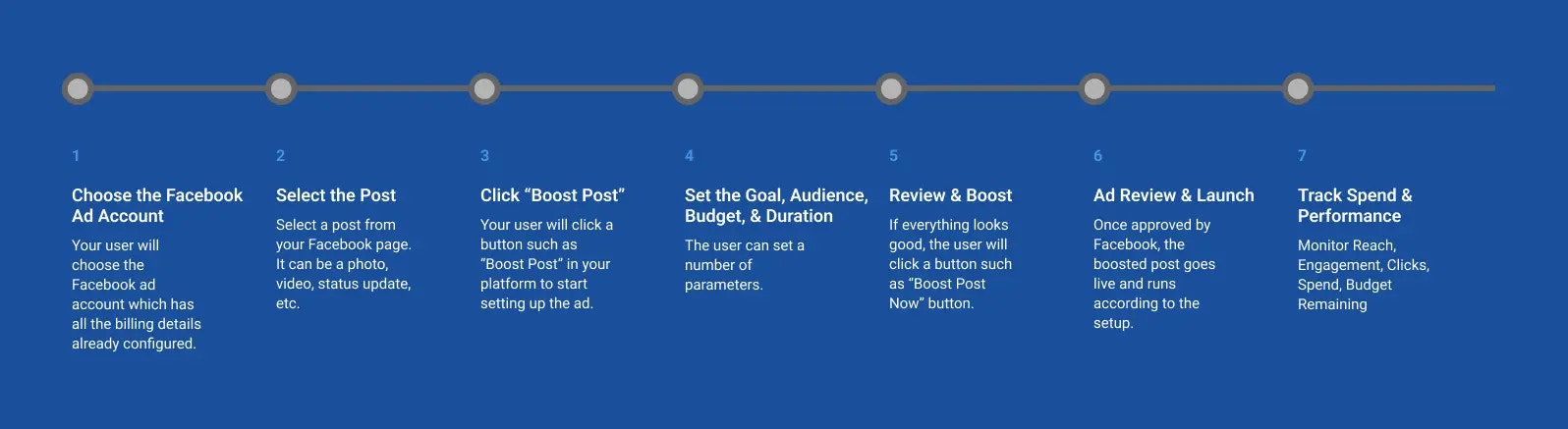 Boosting a post on Facebook is a quick and simple way to turn one of your
existing posts into an ad. Here is a high-level flow of how to implement it in
your platform:
Your user will choose the Facebook ad account which has all the billing details already configured.
Select a post from your Facebook page. It can be a photo, video, status update, etc.
> **Tip:** Posts with good organic engagement (likes, shares, comments) tend to perform better when boosted.
Your user will click a button such as "Boost Post" in your platform to start
setting up the ad.
The user can set a number of parameters.
Boosting a post on Facebook is a quick and simple way to turn one of your
existing posts into an ad. Here is a high-level flow of how to implement it in
your platform:
Your user will choose the Facebook ad account which has all the billing details already configured.
Select a post from your Facebook page. It can be a photo, video, status update, etc.
> **Tip:** Posts with good organic engagement (likes, shares, comments) tend to perform better when boosted.
Your user will click a button such as "Boost Post" in your platform to start
setting up the ad.
The user can set a number of parameters.
-
Choose the goal strategy for this
boosted post by selecting a goal.
- Customize the audience based on age, gender,
location, interests, etc.
- Choose how much to spend total.
- Set the
time period to run the ad.
Double-check all the settings. If everything looks good, the user will click a button such as **"Boost Post Now"** button.
Facebook will review the ad — this usually takes anywhere from a few minutes
to a few hours. Once approved, the boosted post goes live and runs according
to the setup.
Monitor the following:
* Reach
* Engagement
* Clicks
* Spend
* Budget Remaining
## Ads API Best Practices
1. **Budget Management**: Start with small test budgets (e.g., \$5-10/day) to optimize performance before scaling.
2. **Ad Duration**: Facebook requires a minimum ad runtime of approximately 30 hours between start and end times.
3. **Interest Targeting**: Choose 2-5 relevant interests for optimal targeting precision.
4. **Creative Guidelines**: Use high-quality images and concise messaging to improve engagement rates.
5. **Performance Monitoring**: Regularly check your ad performance and adjust targeting or creative elements as needed.
For detailed information about each endpoint, including request parameters, response formats, and examples, please refer to the individual API endpoint documentation pages.