> ## Documentation Index
> Fetch the complete documentation index at: https://www.ayrshare.com/docs/llms.txt
> Use this file to discover all available pages before exploring further.
# TikTok API
> Options for posting using the TikTok API
Ayrshare offers [direct publishing of TikTok videos](https://www.ayrshare.com/blog/introducing-tiktok-direct-publishing-analytics-and-commenting/), comment management, and retrieval of advanced analytics for either your personal or business TikTok account using the TikTok API.
TikTok asynchronously processes video and photos, so the JSON response will be status: "pending" for both immediate and scheduled posts. Once TikTok has completed processing, your registered [Scheduled Action webhook](/docs/apis/webhooks/actions#scheduled-action) will be called.
## TikTok Video Post
JSON for a basic TikTok video post that is directly published:
```json TikTok Video Post theme={"system"}
{
"post": "The best TikTok \n video ever #bestvideo", // Max 2,200 characters with a line break
"mediaUrls": ["https://img.ayrshare.com/012/tiktok.mp4"],
"platforms": ["tiktok"]
}
```
Example JSON post response:
```json TikTok Video Post Response theme={"system"}
{
"status": "success",
"errors": [],
"postIds": [
{
"status": "success",
"idShare": "video.7088122496758679353.nzLqBWbf",
"id": "pending",
"isVideo": true,
"platform": "tiktok"
}
],
"id": "lb42orDhySAZmLWtj6b6",
"refId": "23a9da9e0df1184a7a6a1fc2c60b8023aa9a32a1",
"post": "The best TikTok video ever #bestvideo"
}
```
-
TikTok does not currently support line breaks in the post text. Included line breaks will be
ignored.
-
Either one video or up to 35 images may be published. TikTok does not support a combination of
video and images. Please see below for more details.
-
If the video does not end in a known extension, use
[isVideo](/docs/apis/post/overview#video-extension).
-
TikTok also supports sending media without post text. If you do not want post text included send
an empty String `post: ""`.
-
See [TikTok Media Guidelines](/docs/media-guidelines/tiktok) and [TikTok
Authorization](/docs/dashboard/connect-social-accounts/tiktok) for more information.
### TikTok Video Requirements
- Please see [TikTok Video Requirements](/docs/media-guidelines/tiktok#video).
-
The video must end in a known video extension such as mp4. Please either reverse proxy the URL,
add on a [vanity URL with a
CDN](https://www.ayrshare.com/blog/how-to-put-a-cdn-in-front-of-firebase-cloud-storage/), or use the
[/media](/docs/apis/media/overview) endpoint.
- TikTok's post text character limit is 2,200.
TikTok limits the API video publishing to 6 videos per minute with an upper limit of 15 videos per
day.
## TikTok Image Post
JSON for a basic TikTok image (photo) post that is directly published:
```json TikTok Image Post theme={"system"}
{
"post": "The best TikTok \n video ever #bestvideo", // Max 2,200 characters with a line break
"mediaUrls": [
"https://img.ayrshare.com/012/gb.jpg",
"https://img.ayrshare.com/random/photo-1.jpg"
], // Up to 35 images
"platforms": ["tiktok"]
}
```
Example JSON response:
```json TikTok Image Post Response theme={"system"}
{
"status": "success",
"errors": [],
"postIds": [
{
"status": "success",
"idShare": "p_pub_url~v2.7408974036430047275",
"id": "pending",
"isVideo": false,
"platform": "tiktok"
}
],
"id": "8815mJ5bWApEebWjE233",
"tikTokId": "p_pub_url~v2.7408974036430047333",
"refId": "9abf1426d6ce9122ef11c72bd62e59807c5cc333",
"post": "Opportunity is missed by most people because it is dressed in overalls and looks like work - Thomas Edison"
}
```
-
TikTok does not currently support line breaks in the post text. Included line breaks will be
ignored.
- Either one video or up to 35 images may be published.
-
TikTok does not support a combination of video and images. Please see below for more details.
- The images must be of type JPG, JPEG, or WEBP. TikTok does not accept PNG media files.
-
You may also select one of the images as the cover photo with the `imageCoverIndex`. By default,
the first image is used. Please see below for details.
### TikTok Image Requirements
- Please see [TikTok Image Requirements](/docs/media-guidelines/tiktok#images).
- Up to 35 images may be included in a post, at 20 MB per image.
- The images must be of type JPG, JPEG, or WEBP. TikTok does not accept PNG media files.
- TikTok's post text character limit is 2,200.
TikTok limits the API video publishing to 6 photos per minute with an upper limit of 15 photos per
day.
## TikTok Processing
TikTok does asynchronous processing of videos and images, so the response will have the `id` field set to `"pending"`.
After TikTok completes their processing, usually within 1 - 2 minutes, the `id` field will be updated with the TikTok video `id` and a `postUrl` will be added.
-
You can retrieve the final status of the TikTok post using
[webhooks](/docs/apis/webhooks/actions#tiktok-publishing-webhook) or the
[/history](/docs/apis/history/overview) endpoint and usually takes up to 1-2 minutes to be available.
-
When the user publishes the video in the TikTok mobile app, a "scheduled" webhook will be sent
with the `subAction: "tikTokPublished"`.
-
A [first comment](/docs/apis/post/overview#first-comment) on a TikTok post is deferred: it is posted
automatically once the `tikTokPublished` webhook resolves the real video `id`, not at publish
time. The video `visibility` must be `public`, otherwise the first comment cannot be posted and a
comment error is returned.
-
If an error occurs, such as TikTok was unable to process the video or Ayrshare internal tests
failed, the `id` field will be set to "failed" and the `errors` field will contain the error
details.
- The `idShare` is used for internal referencing the pending video.
## TikTok Options
When publishing a TikTok video or images [additional options](/docs/apis/post/social-networks/tiktok#available-tiktok-options) are available.
Video Publishing Example:
```json TikTok Video Publishing theme={"system"}
{
"tikTokOptions": {
"disableComments": true, // Default false. Disable comments on the published video.
"disableDuet": true, // Default false. Disable duets on the published video.
"disableStitch": true // Default false. Disable stitches on the published video.
}
}
```
Image Publishing Example:
```json TikTok Image Publishing theme={"system"}
{
"tikTokOptions": {
"imageCoverIndex": 1, // Use the second image in the mediaUrls.
"title": "Amazing images"
}
}
```
### Options
The following options are available for TikTok posts.
They should be added to the `tikTokOptions` object.
Please see below for more details on each option.
```json TikTok Options theme={"system"}
{
"post": "The best TikTok video ever #bestvideo",
"mediaUrls": ["https://img.ayrshare.com/012/tiktok.mp4"],
"platforms": ["tiktok"],
"tikTokOptions": {
"autoAddMusic": true,
"disableComments": true,
"disableDuet": true,
"disableStitch": true,
"draft": true,
"isAIGenerated": true,
"isBrandedContent": true,
"isBrandOrganic": true,
"imageCoverIndex": 1,
"title": "Amazing images",
"thumbNailOffset": 30000,
"visibility": "public"
}
}
```
Whether to automatically add recommended music to the post.
If you set this field to `true`, you can change the music later in the TikTok app.
Media type: image
Whether to disable comments on the published post.
Media type: video, image
Disable duets on the published video.
Media type: video
Disable stitch on the published video.
Media type: video
Whether to create a draft post.
See [draft options](/docs/apis/post/social-networks/tiktok#tiktok-video-draft-post) for more information.
Media type: video or image
Whether to enable the AI-generated content toggle for the video post.
If you enable the toggle, your video will be labeled as "Creator labeled as AI-generated" once posted and can't be changed.
The "Creator labeled as AI-generated" label indicates that the content was completely AI-generated or significantly edited with AI.
Turning on the AI-generated content setting won't affect the distribution of your video as long as
it doesn't violate TikTok's [Community
Guidelines](https://www.tiktok.com/community-guidelines/en/).
Media type: video
Whether to enable the Branded Content toggle. If this field is set to `true`, the video will be labeled as Branded Content, indicating you are in a paid partnership with a brand. A "Paid partnership" label will be attached to the video.
Media type: video, image
Whether to enable the Brand Organic Content toggle. If this field is set to `true`, the video will be labeled as Brand Organic Content, indicating you are promoting yourself or your own business. A "Promotional content" label will be attached to the video.
Media type: video, image
The index of the `mediaUrls` to be used as the cover for the post.
Media type: image
The title of the post.
Media type: image
The frame to use for the video cover.
See [video thumbnail options](/docs/apis/post/social-networks/tiktok#video-thumbnail) for more information.
Media type: video
How the post is shared and who can see it.
Values: `public`, `private`, `followers`, or `friends`.
See [visibility options](/docs/apis/post/social-networks/tiktok#visibility-options) for more information.
Media type: image
### Visibility Options
| Visibility | Description |
| :--------- | :------------------------------------------- |
| public | Visible to all TikTok users. |
| private | Private, only visible to the account itself. |
| followers | Only visible to followers of the account. |
| friends | Only visible to mutual followers. |
Private posts will remain in a status `pending` and no TikTok webhook will be sent until the post is made public.
## Video Thumbnail
There are two ways to set a thumbnail, also known as a cover photo, for a TikTok video:
1. Using the `thumbNailOffset` parameter to set a thumbnail frame.
2. Using the `thumbNail` parameter to set a thumbnail image from a URL.
Only videos are supported for setting a thumbnail.
### Thumbnail Offset
Set a thumbnail for a TikTok video by selecting an offset frame.
```json TikTok Video Thumbnail Offset theme={"system"}
{
"tikTokOptions": {
"thumbNailOffset": 30000 // milliseconds of offset image
}
}
```
The offset is the location in milliseconds of the thumbnail frame. Default value is `0`, which is the first frame of the video.
### Thumbnail URL
Set a thumbnail for a TikTok video by uploading an image from a URL.
```json TikTok Video Thumbnail URL theme={"system"}
{
"tikTokOptions": {
"thumbNail": "https://img.ayrshare.com/012/gb.jpg"
}
}
```
If you use the `thumbNail` parameter, the `thumbNailOffset` parameter will be ignored.
Please see [TikTok Thumbnail Requirements](/docs/media-guidelines/tiktok#video-thumbnail) for more information.
## TikTok Mentions
Mention another TikTok handle by adding `@handle` in the post text. For example:
```json TikTok Mention theme={"system"}
{
"post": "Love the @ayrshare social media api"
}
```
Please review the [important rules](/docs/testing/post-verification#mentions) on mentions.
## TikTok Draft Post
Create a draft post for a TikTok video or image, allowing you to edit the video or image before publishing.
```json TikTok Video Draft Post theme={"system"}
{
"post": "The best TikTok video ever #bestvideo", // empty string is allowed
"mediaUrls": ["https://img.ayrshare.com/012/tiktok.mp4"],
"platforms": ["tiktok"],
"tikTokOptions": {
"draft": true
}
}
```
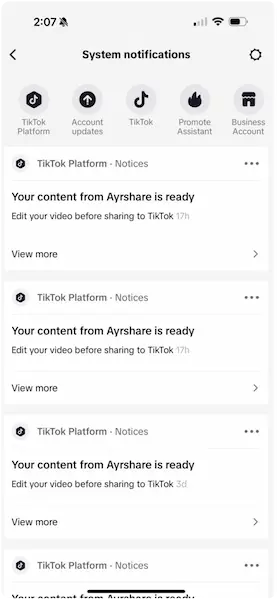
The draft video or image post will be found under the notifications **Inbox** in bottom row of the TikTok app.
Look for a **System notifications** message and then click the top **Your content from Ayrshare is ready** message.
The Ayrshare `postUrl` will remain in `pending` status until the video is published. First comment not supported on draft posts.
 ## Authorization Refresh
TikTok must be reauthorized *every year* via the Social Accounts page.
## Authorization Refresh
TikTok must be reauthorized *every year* via the Social Accounts page.
-
An email and webhook social action notification will be sent 15 days in advance of authorization
expiration.
-
The refresh required date and remaining days can be retrieved from the
[/user](/docs/apis/user/overview) endpoint.
## Character Limits
Please see [TikTok Character Limits](/docs/help-center/technical-support/character_limits#tiktok-character-limits) for more information.
## Additional Information
Additional [examples on using the TikTok API](https://www.ayrshare.com/blog/tiktok-api-how-to-post-to-tiktok-using-a-social-media-api/).