> ## Documentation Index
> Fetch the complete documentation index at: https://www.ayrshare.com/docs/llms.txt
> Use this file to discover all available pages before exploring further.
# X API
> Options for posting using the X API
## X BYO API Keys
Starting March 31, 2026, all X/Twitter operations require your own API credentials. After linking your X account via OAuth, include these 2 headers in every request that targets X:
| Header | Value |
| ----------------------------- | ------------------------------------- |
| `X-Twitter-OAuth1-Api-Key` | Your API Key (Consumer Key) |
| `X-Twitter-OAuth1-Api-Secret` | Your API Key Secret (Consumer Secret) |
Not linked yet? See the [X BYO Key Setup Guide](/docs/dashboard/connect-social-accounts/x-twitter-byo-keys) to connect your X account.
Ayrshare no longer imposes its own monthly or daily X/Twitter rate limits. Because X requests use
your own credentials (BYO), your usage is governed solely by your own X Developer App limits. See
the [X API rate limits
documentation](https://developer.x.com/en/docs/x-api/rate-limits) for details.
## Posting to X (Twitter)
JSON for a basic post with a link and image using the X API, formerly known as the Twitter API:
```json X Post theme={"system"}
{
"post": "The best Tweet ever #best https://www.twitter.com", // empty string is allowed
"mediaUrls": ["https://img.ayrshare.com/012/gb.jpg"],
"platforms": ["twitter"]
}
```
-
X will automatically preview the link in the Tweet unless there is an image or video included.
In the above example the image will show. Removing the image will cause the link preview to
show.
-
If your video doesn't end in a known video extension such as mp4, please use the `isVideo`
parameter. See the [/post endpoint](/docs/apis/post/post) for details.
-
X also supports sending media without post text. If you do not want post text included send an
empty String `post: ""`.
-
You may upload up to 4 images or videos in a single Tweet. Please see the important guidelines
and restrictions [posting Twitter videos](/docs/media-guidelines/x_twitter).
-
See [X Media Guidelines](/docs/media-guidelines/x_twitter) and [X
Authorization](/docs/dashboard/connect-social-accounts/x-twitter) for more information.
## X Options
You can set additional options for a post by using the `twitterOptions` parameter.
```json X Options theme={"system"}
{
"twitterOptions": {
"altText": ["This is my best pic", "😃 here is the next one"],
"blockCountries": ["US", "CA"], // or "allowCountries": ["GB", "IE"]
"longPost": true,
"longVideo": true,
"poll": {
"duration": 5, // required. Number in minutes
"options": ["yes", "maybe", "no"] // required
},
"quoteTweetId": "651601430669664256",
"replySettings": "mentioned",
"subscribersOnly": true,
"thumbNail": "https://img.ayrshare.com/012/gb.jpg",
// Video Metadata
"videoTitle": "My Product Demo",
"videoDescription": "A short walkthrough of our latest release.",
// Subtitles / Captions for Videos
"subTitleUrl": "https://img.ayrshare.com/012/captions.srt",
"subTitleLanguage": "en",
"subTitleName": "English",
// Thread Options
"thread": true,
"threadNumber": true,
"mediaUrls": ["https://img.ayrshare.com/012/gb.jpg"],
}
}
```
X options are optional fields that can be used to control the post.
Alternative text for images to help with accessibility and screen readers. Maximum 1,000 characters per alt text.
See [Alt Text](/docs/apis/post/social-networks/x-twitter#alt-text) for more information.
Restrict media to specific countries by blocking certain regions. Use [country codes](/docs/iso-codes/country).
Cannot be used with `allowCountries`. See [Geo Restrictions](/docs/apis/post/social-networks/x-twitter#geo-restrictions) for more information.
Restrict media to specific countries by allowing certain regions. Use [country codes](/docs/iso-codes/country).
Cannot be used with `blockCountries`. See [Geo Restrictions](/docs/apis/post/social-networks/x-twitter#geo-restrictions) for more information.
Enable posting of longer posts up to 25,000 characters for Premium users.
See [Long Post](/docs/apis/post/social-networks/x-twitter#long-post) for more information.
Allow posting videos longer than 2 minutes 20 seconds for approved accounts.
See [Long Video](/docs/apis/post/social-networks/x-twitter#long-video) for more information.
Conduct polls with custom options and duration.
Required fields: `duration` (number in minutes), `options` (array of strings).
See [Polls](/docs/apis/post/social-networks/x-twitter#polls) for more information.
Quote another tweet by specifying the Tweet ID.
See [Quote Tweet](/docs/apis/post/social-networks/x-twitter#quote-tweet) for more information.
Control who can reply to the post.
Values: `following`, `mentioned`, `subscribers`, or `verified`.
See [Reply Settings](/docs/apis/post/social-networks/x-twitter#reply-settings) for more information.
Make the post visible only to subscribers.
See [Subscribers Only](/docs/apis/post/social-networks/x-twitter#subscribers-only) for more information.
Add subtitles/captions to videos using SRT files. Must be a valid SRT file URL ending in `.srt`.
See [Subtitles / Captions for Videos](/docs/apis/post/social-networks/x-twitter#subtitles-captions-for-videos) for more information.
The language of the subtitles. Must be a valid [language code](/docs/iso-codes/language).
The name of the caption track. Maximum 150 characters.
Set a thumbnail (cover image) for videos. Must be a URL to a JPEG, PNG, BMP, or WebP image file.
See [Video Thumbnail](/docs/apis/post/social-networks/x-twitter#video-thumbnail) for more information and [X Media Guidelines](/docs/media-guidelines/x_twitter#video-thumbnail) for image requirements.
Set the title for a video. Maps to the title field in X Media Studio.
See [Video Metadata](/docs/apis/post/social-networks/x-twitter#video-metadata) for more information.
Set the description for a video. Maps to the description field in X Media Studio.
See [Video Metadata](/docs/apis/post/social-networks/x-twitter#video-metadata) for more information.
Break long posts into connected thread series with optional numbering and media.
See [Threads](/docs/apis/post/social-networks/x-twitter#thread) for more information.
Automatically add numbers at the end of threads in the format of 1/n.
Requires `thread: true`.
Add media objects to threads. One media object will be added to each thread in order.
Use `null` to skip media for a specific thread. Use objects with multiple URLs for multiple media per thread.
## Alt Text
Add alternative text, also known as alt text, to a Tweet's image. X alt text is an accessibility feature used for additional user info and screen readers.
Use the `altText` in the `twitterOptions` object.
```json X Alt Text theme={"system"}
{
"twitterOptions": {
"altText": ["This is my best pic", "😃 here is the next one"] // Array of Alt Texts
}
}
```
Each alt text must correspond to an image in the `mediaUrls` array. The alt text will be applied to each image in order.
Alt text cannot be applied to videos. If a video is included in the `mediaUrls` with `altText`,
the video will not be posted. Alt text must be 1,000 characters or less.
## Geo Restrictions
You can restrict X media, such as an image or video, to a specific countries by using the `blockCountries` and `allowCountries` parameters with [country codes](/docs/iso-codes/country).
The post will still show in all countries, but the media will not be available in the countries specified.
```json Block Countries theme={"system"}
{
"twitterOptions": {
"blockCountries": ["US", "CA"]
}
}
```
```json Allow Countries theme={"system"}
{
"twitterOptions": {
"allowCountries": ["GB", "IE"]
}
}
```
-
`blockCountries`: An array of country codes to block. See [country codes](/docs/iso-codes/country).
-
`allowCountries`: An array of country codes to allow. See [country codes](/docs/iso-codes/country).
You must only use one of the parameters `blockCountries` or `allowCountries` at a time.
If both parameters are used or a country is not supported by X, the geo restrictions will be ignored.
## Long Post
Users with Premium X accounts, such as Premium or Premium Plus, have the ability to post longer posts of up to 25,000 characters. Ayrshare automatically allows long from posts for users with Premium X accounts.
If the user changes their X Premium status, please wait 24 hours for it to reflect in Ayrshare. You can check the Premium subscription status of a user with the [/user](/docs/apis/user/overview) or [/analytics](/docs/apis/analytics/social) endpoints.
You may also force a long form post to be accepted with the `longPost` body parameter. This can be done by including the following JSON in your request:
```json X Long Post theme={"system"}
{
"twitterOptions": {
"longPost": true
}
}
```
However, if a user without a Premium account attempts to post a long tweet, the system will return a `code: 111` error.
## Long Video
*Business or Enterprise Plan required.*
X requires videos have a [maximum video length](/docs/media-guidelines/x_twitter#video) of 2 minutes and 20 seconds.
However, if you have been approved by X to upload longer videos, such if ther user's X account is Premium account or in the [Amplify Partner Program](https://media.twitter.com/en/articles/products/2018/in-stream-video-ads-for-publishers), you can post videos up to 10+ minutes in length.
Please verify that your user's X account is Premium or in the [Amplify Partner
Program](https://media.twitter.com/en/articles/products/2018/in-stream-video-ads-for-publishers)
before using the `longVideo` parameter. If your user's X account is not authorized to post long
videos, the system will return an error.
Use the `longVideo` twitterOptions parameter when posting a long video:
```json X Long Video theme={"system"}
{
"twitterOptions": {
"longVideo": true
}
}
```
## Mentions
Mention another X handle by adding `@handle` in the post text. For example:
```json X Mention theme={"system"}
{
"post": "The best social media API @Ayrshare ever!",
"platforms": ["twitter"]
}
```
Please review the [important rules](/docs/testing/post-verification#mentions) on mentions.
## Polls
Conduct an X Poll with the `twitterOptions` `poll` parameter.
```json X Poll theme={"system"}
{
"twitterOptions": {
"poll": {
"duration": 5, // required. Number in minutes
"options": ["yes", "maybe", "no"] // required
}
}
}
```
- `duration`: A number of minutes specifying the duration the poll will be conducted.
- `options`: An array of strings of the poll options.
## Quote Tweet
You can quote another Tweet by specifying the low-level Tweet ID. The ID can be retrieved via the [`/post`](/docs/apis/post/post) response in the `postIds` field, [get history](/docs/apis/history/get-history), or directly from the Tweet URL: [https://twitter.com/Ayrshare/status/**1651601430669664256**](https://twitter.com/Ayrshare/status/1651601430669664256)
```json X Quote Tweet theme={"system"}
{
"twitterOptions": {
"quoteTweetId": "651601430669664256" // low-level Tweet Id
}
}
```
## Reply Settings
You can set the reply settings for a post to only allow replies by certian types of users.
```json X Reply Settings theme={"system"}
{
"twitterOptions": {
"replySettings": "mentioned"
}
}
```
The `replySettings` parameter can be one of the following values:
- `following`: Only users who the X account is following can reply.
- `mentioned`: Only users who are mentioned in the post can reply.
-
`subscribers`: Only users who are subscribers to the X account who posted the post can reply.
- `verified`: Only users who are verified on X can reply to the post.
## Subscribers Only
You can set a post to only be visible to subscribers by using the `subscribersOnly` parameter.
```json X Subscribers Only theme={"system"}
{
"twitterOptions": {
"subscribersOnly": true
}
}
```
## Subtitles / Captions for Videos
You can add X subtitles, also known as X captions, to videos by including an [SRT file](https://en.wikipedia.org/wiki/SubRip). Use the `subTitleUrl` field in the `twitterOptions` object to specify the URL to your SRT file.
```json X Subtitles theme={"system"}
{
"twitterOptions": {
"subTitleUrl": "https://img.ayrshare.com/012/captions.srt",
"subTitleLanguage": "en",
"subTitleName": "English"
}
}
```
-
`subTitleUrl`: A valid SRT file. The URL must start with `https://` and end in `.srt` and be a
valid SRT file.
-
`subTitleLanguage`: Optional: The language of the subtitles. Must be a valid [language
code](/docs/iso-codes/language). Default: "en".
-
`subTitleName`: Optional: The name of the caption track. The name is intended to be visible to
the user as an option during playback. The maximum name length supported is 150 characters.
Default: "English".
## Video Thumbnail
Set a thumbnail (cover image) for Twitter/X videos. The thumbnail is displayed before the video plays and helps users understand the video content. Use the `thumbNail` in the `twitterOptions` object.
```json Twitter/X Video Thumbnail theme={"system"}
{
"twitterOptions": {
"thumbNail": "https://img.ayrshare.com/012/gb.jpg"
}
}
```
-
"thumbNail": A URL to the thumbnail image. Supported image formats are JPEG, PNG, BMP, and WebP.
-
The thumbnail image should represent the video content and be visually appealing to encourage engagement.
-
See [X Media Guidelines](/docs/media-guidelines/x_twitter#video-thumbnail) for image requirements.
## Video Metadata
Set a title and description for a video posted to X. These map to the title and description fields in X Media Studio. Use the `videoTitle` and `videoDescription` fields in the `twitterOptions` object.
```json X Video Metadata theme={"system"}
{
"twitterOptions": {
"videoTitle": "My Product Demo",
"videoDescription": "A short walkthrough of our latest release."
}
}
```
- `videoTitle`: The title for the video, mapped to the X Media Studio title field.
-
`videoDescription`: The description for the video, mapped to the X Media Studio description
field.
## Video Monetization (Pro Media)
Ayrshare supports X (Twitter) video monetization for eligible accounts through X's Pro Media program. This is a limited-access capability — [contact us](mailto:support@ayrshare.com) if you'd like access.
## Thread
An X Thread, also known as a tweetstorm, is a connected series of posts on X (formerly Twitter) that allows you to share longer ideas beyond a single post's character limit, appearing as one continuous narrative when viewed together.
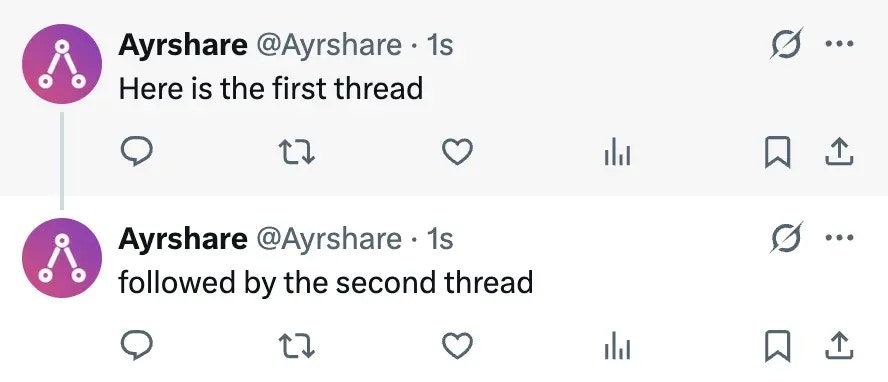 ### Posting a Thread
A X Thread can be posted via the API.
A thread is a post broken up into a set of reply threads and associated in X with a line.
You cna either automatically break up the post or specify the [thread breaks](/docs/apis/post/social-networks/x-twitter#thread-breaks) in the post text.
```json X Thread theme={"system"}
{
"twitterOptions": {
"thread": true, // required for TweetStorm
"threadNumber": true, // optional to add numbers to each thread
"mediaUrls": ["https://site.com/image1.png", "https://site.com/image2.png", ...] // optional one media object is added to a thread in order
}
}
```
### Posting a Thread
A X Thread can be posted via the API.
A thread is a post broken up into a set of reply threads and associated in X with a line.
You cna either automatically break up the post or specify the [thread breaks](/docs/apis/post/social-networks/x-twitter#thread-breaks) in the post text.
```json X Thread theme={"system"}
{
"twitterOptions": {
"thread": true, // required for TweetStorm
"threadNumber": true, // optional to add numbers to each thread
"mediaUrls": ["https://site.com/image1.png", "https://site.com/image2.png", ...] // optional one media object is added to a thread in order
}
}
```
-
`thread: true` to automatically break apart the post text into threads based on line breaks.
-
`threadNumber: true` to automatically add numbers at the end of threads in the format of 1/n.
For example the 2nd of 5 threads will have appended: 2/5
-
`mediaUrls: [array of urls]` to add each media object, an image or video, to a thread in order.
Only one media object will be added to a thread in order.
If the post is sent as a X Thread, the returned post analytics will be an array of Tweets, `"twitter": []`. See [Post Analytics 200 Response](/docs/apis/analytics/post) for more information.
#### Thread Media
##### Skip Media
Skip media for the thread by using `null` in the array. For example:
`["https://site.com/image1.png", null, "https://site.com/image2.png"]`
This will place image1 on the first Tweet, no image on the second Tweet, and image2 on the third Tweet.
##### Multiple Media
Multiple media objects can be added to a Tweet in a Thread by adding an object `{}` with the media URLs in the `mediaUrls` array. Any unique object keys can be used. For example:
```json X Thread with Multiple Media URLs theme={"system"}
{
"twitterOptions": {
"thread": true,
"threadNumber": true,
"mediaUrls": [
"https://img.ayrshare.com/random/photo-1.jpg",
{
"1": "https://img.ayrshare.com/random/photo-2.jpg",
"2": "https://img.ayrshare.com/random/photo-3.jpg"
},
"https://img.ayrshare.com/random/photo-4.jpg"
]
}
}
```
In this example, the first Tweet will contain photo-1.jpg, the second Tweet photo-2.jpg and photo-3.jpg, and the third Tweet photo-4.jpg.
#### Thread Breaks
Ayrshare automatically breaks up the post text into appropriate length tweet (> 280 characters).
When creating threads, we prioritize keeping complete sentences in one post when possible.
If a sentence won't fit, we split between sentences.
For very long sentences, we split between words.
In rare cases where a word is too long, we split the word itself.
You may also manually add paragraphs with `\n\n` to the post text to indicate a unique thread should be created.
If you have `\n\n` in the post text, we will not automatically break the post into threads.
For example:
```json Example X Thread theme={"system"}
{
"post": "This is tweet 1\n\nThis is tweet 2.",
"platforms": ["twitter"],
"twitterOptions": {
"thread": true
}
}
```
will result in two Tweets in the thread.
If you want to add paragraphs, but not break into Tweets, use `\u2063\n\u2063\n`
```json X Thread with Paragraphs theme={"system"}
{
"post": "This is paragraph 1\u2063\n\u2063\nThis is paragraph 2.",
"platforms": ["twitter"],
"twitterOptions": {
"thread": true
}
}
```
will result in one Tweet with two paragraphs since the post is below 280 characters.
### Delete a Thread
To delete a Tweet Storm, call the [/post delete endpoint](/docs/apis/post/delete-post) with the top level post ID returned in the response. All threads will be deleted.
## Character Limits
Please see [X/Twitter Character Limits](/docs/help-center/technical-support/character_limits#x%2Ftwitter-character-limits) for more information.
## X Video Compatibility
Some video software creates MP4 files that are not compatible with X. For example, Camtasia versions older than 2019.0.9 create MP4 files that X rejects. Also more than one audio track often causes problems.
If you receive back the following message while posting, it indicates the video is not compatible with Twitter and needs to be re-encoded.
`"file is currently unsupported"`
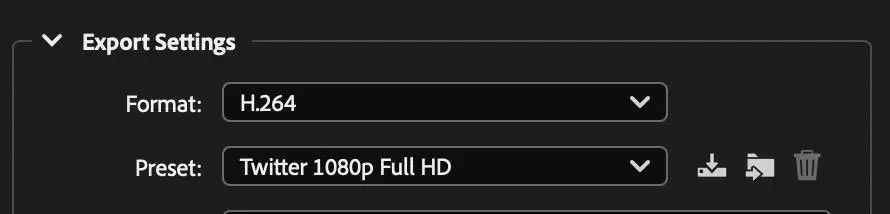
Please check your video software for compatibility. For example, Adobe Media Encoder has an export preset for Twitter 1080p Full HD.
 Please see here for [more X API examples](https://www.ayrshare.com/twitter-api-how-to-post-and-get-analytics-with-the-twitter-api#twitter-api-examples).
## Subscribers Only
You can set a post to only be visible to subscribers by using the `subscribersOnly` parameter.
```json X Subscribers Only theme={"system"}
{
"twitterOptions": {
"subscribersOnly": true
}
}
```
## Reply Settings
You can set the reply settings for a post to only allow replies by certian types of users.
```json X Reply Settings theme={"system"}
{
"twitterOptions": {
"replySettings": "mentioned"
}
}
```
The `replySettings` parameter can be one of the following values:
Please see here for [more X API examples](https://www.ayrshare.com/twitter-api-how-to-post-and-get-analytics-with-the-twitter-api#twitter-api-examples).
## Subscribers Only
You can set a post to only be visible to subscribers by using the `subscribersOnly` parameter.
```json X Subscribers Only theme={"system"}
{
"twitterOptions": {
"subscribersOnly": true
}
}
```
## Reply Settings
You can set the reply settings for a post to only allow replies by certian types of users.
```json X Reply Settings theme={"system"}
{
"twitterOptions": {
"replySettings": "mentioned"
}
}
```
The `replySettings` parameter can be one of the following values:
- `following`: Only users who the X account is following can reply.
- `mentioned`: Only users who are mentioned in the post can reply.
-
`subscribers`: Only users who are subscribers to the X account who posted the post can reply.
- `verified`: Only users who are verified on X can reply to the post.