> ## Documentation Index
> Fetch the complete documentation index at: https://www.ayrshare.com/docs/llms.txt
> Use this file to discover all available pages before exploring further.
# YouTube API
> Options for posting using the YouTube API
YouTube posting requires your YouTube account to have at least one Channel and be an owner on the Channel.
To create a YouTube Channel, click on your profile in the YouTube Dashboard and choose "Create a Channel".
You may also use this direct link to create a YouTube Channel: [http://m.youtube.com/create\_channel](http://m.youtube.com/create_channel)
If you're having issues viewing YouTube channels please see the [YouTube channel troubleshooting guide](/help-center/technical-support/youtube_channels_not_showing).
YouTube upload failures may return error codes **453** (timeout) or **454**
(service unavailable) with `retryAvailable: true`. Your integration can branch
on this flag to retry transient failures automatically with backoff. See the
[error codes reference](/errors/errors-ayrshare) for the full list.
Please see [YouTube Media Guidelines](/media-guidelines/youtube) and [YouTube Authorization](/dashboard/connect-social-accounts/youtube) for more information.
## Posting to YouTube
### Posting Overview
Posting using the YouTube API requires the `youTubeOptions` object with at a `title` parameter - max 100 characters.
The `title` is the only required field and can use autogenerated with the [transcribe endpoint](/apis/generate/transcribe-video).
For example, to post a YouTube video with default settings:
```json YouTube Post theme={"system"}
{
// Required: Video description
"post": "My Best YouTube Description", // empty string is allowed
// Required: Platform to post to
"platforms": ["youtube"],
// Required: URL of video (only 1 allowed)
"mediaUrls": ["https://img.ayrshare.com/012/vid.mp4"],
"youTubeOptions": {
// Required: Video title (max 100 characters)
"title": "Your Best Title"
}
}
```
YouTube videos are `private` by default, but the visibility can be set to `public` or `unlisted`.
Please see the optional fields below for more details.
### YouTube Post Optional Fields
There are several other optional fields listed below, including the video `visibility`, `tags`, and `publishAt` date. Please see the comments for requirements and descriptions.
```json YouTube Post Optional Fields theme={"system"}
{
// Required fields
"post": "My Best YouTube Description", // Video description, up to 5,000 characters
"platforms": ["youtube"], // Platform to post to
"mediaUrls": ["https://img.ayrshare.com/012/vid.mp4"], // URL of video (1 allowed)
"youTubeOptions": {
// Required fields
"title": "Your Best Title", // Video Title (max 100 characters)
/** Optional Fields **/
// Visibility: "public", "unlisted", or "private" (default: "private")
"visibility": "private",
// Thumbnail settings - JPEG/PNG URL under 2MB, must end in png/jpg/jpeg
"thumbNail": "https://img.ayrshare.com/012/gb.jpg",
// Video organization
"playListId": "PLrav6EfwgDX5", // Playlist ID to add the video
"tags": ["dancing", "dogs"], // Tag array (400 chars total, 2+ chars each)
// Video settings
"madeForKids": false, // Self-declared kids content (default: false)
"license": "youtube", // "youtube" (default) or "creativeCommon"
"embeddable": true, // default: true
"publicStatsViewable": true, // default: true
"shorts": true, // Post as YouTube Short (max 3 minutes, adds #shorts)
"notifySubscribers": true, // Send notification to subscribers (default: true)
"categoryId": 24, // Video category (24 = Entertainment)
"containsSyntheticMedia": true, // Disclose that a video contains realistic Altered or Synthetic (A/S) content
// YouTube controlled publishing - UTC publish time. See below for details.
"publishAt": "2022-10-08T21:18:36Z",
}
}
```
The `title` must be 100 characters or less. The `post` must be 5,000 characters or less. The `post` and `title` may contain any characters except \< and >.
The Playlist Id can be found by opening the playlist in a browser and copying the value after `list=`. The authenticated user and channel must be the owner of the playlist to add videos.
If your video doesn't end in a known video extension such as mp4, please use the `isVideo` parameter. See the [/post endpoint](/apis/post/post) for details.
The `publishAt` field will allow YouTube to control the publishing time.
The video will be to private until the publish time when it will be made public.
If the publish time is in the past, the video will be made public immediately.
Do not use the post `scheduleDate` field when using the `publishAt` field.
The `containsSyntheticMedia` field is used to disclose that a video contains realistic Altered or Synthetic (A/S) content: Make a real person appear to say or do something they didn't actually say or do, alter footage of a real event or place, generate a realistic-looking scene that did not actually occur.
`license` - Sets the video license type. Accepted values: `"youtube"` (Standard YouTube License, default) or `"creativeCommon"` (Creative Commons - Attribution).
`embeddable` - Boolean (or the strings `"true"` / `"false"`). Controls whether the video can be embedded on third-party websites. Default: `true`.
`publicStatsViewable` - Boolean (or the strings `"true"` / `"false"`). Controls whether the **extended statistics panel** on the video's watch page is publicly viewable. The basic view count and like count remain publicly visible regardless of this setting. Default: `true`. See [`status.publicStatsViewable` in the YouTube Data API reference](https://developers.google.com/youtube/v3/docs/videos#status.publicStatsViewable) for details.
See [YouTube Media Guidelines](/media-guidelines/youtube) for more information.
**Monetization & Content Controls**
The fields `madeForKids`, `license`, `embeddable`, and `publicStatsViewable` are settable via the Ayrshare API at upload time. However, direct monetization toggles (enabling/disabling ads), ad type selection (pre-roll, mid-roll, post-roll), revenue sharing, and Content ID require YouTube CMS credentials — available only to MCNs and enterprise content owners — and are **not** available through standard YouTube OAuth or the Ayrshare API.
## YouTube Shorts
A YouTube Short is a short-form vertical video that can be up to three minutes long.
These are similar to TikTok videos and Instagram or Facebook Reels.
### Posting YouTube Shorts
You can post a YouTube Shorts video of up to 3 minutes by adding the `shorts` parameter to the `youTubeOptions` object.
```json YouTube Shorts Post theme={"system"}
{
"youTubeOptions": {
"shorts": true
}
}
```
The #shorts hashtag will be added to the YouTube description.
### Important Information on YouTube Shorts
Sending a video as a Short is an indication to YouTube that you would like the video to appear
as a Short, but does not guarantee it will appear as a Short. The video must meet the [Short
video](/media-guidelines/youtube#shorts) requirements, such as being 3 minutes or less and
vertical aspect ratio of 9:16 to be considered a Short by YouTube.
YouTube Shorts do not support thumbnails.
Additional information on using the [API to post YouTube
Shorts](https://www.ayrshare.com/post-youtube-shorts-with-an-api/).
## YouTube Thumbnails
Custom thumbnails require a **verified YouTube channel**. The most common reason a thumbnail fails to apply (while the video still posts) is an unverified channel — verify at [https://www.youtube.com/verify](https://www.youtube.com/verify) (phone verification). Your `thumbNail` must also be a **PNG or JPG/JPEG**, **2MB or less**, and served from a **reachable URL**; Ayrshare validates these before publishing where possible. When a video posts but the thumbnail fails, the YouTube result keeps `status: "success"` and adds a `warnings` array (`feature: "thumbnail"`, `code: 307`) describing the failure. See [YouTube Thumbnail Not Applied (Unverified Channel)](/help-center/technical-support/youtube_thumbnail_unverified_channel) for the full fix.
### Adding YouTube Thumbnails
YouTube Thumbnails and other features, such as uploading 15 minute videos, require verification of your phone number.
A `thumbNail` is a URL of a JPEG or PNG and less than 2MB in size. The file extension must end in png, jpg, or jpeg.
```json YouTube Thumbnail theme={"system"}
{
"youTubeOptions": {
"thumbNail": "https://img.ayrshare.com/012/gb.jpg"
}
}
```
YouTube Shorts do not currently support thumbnails.
### Enable Thumbnails in YouTube Studio
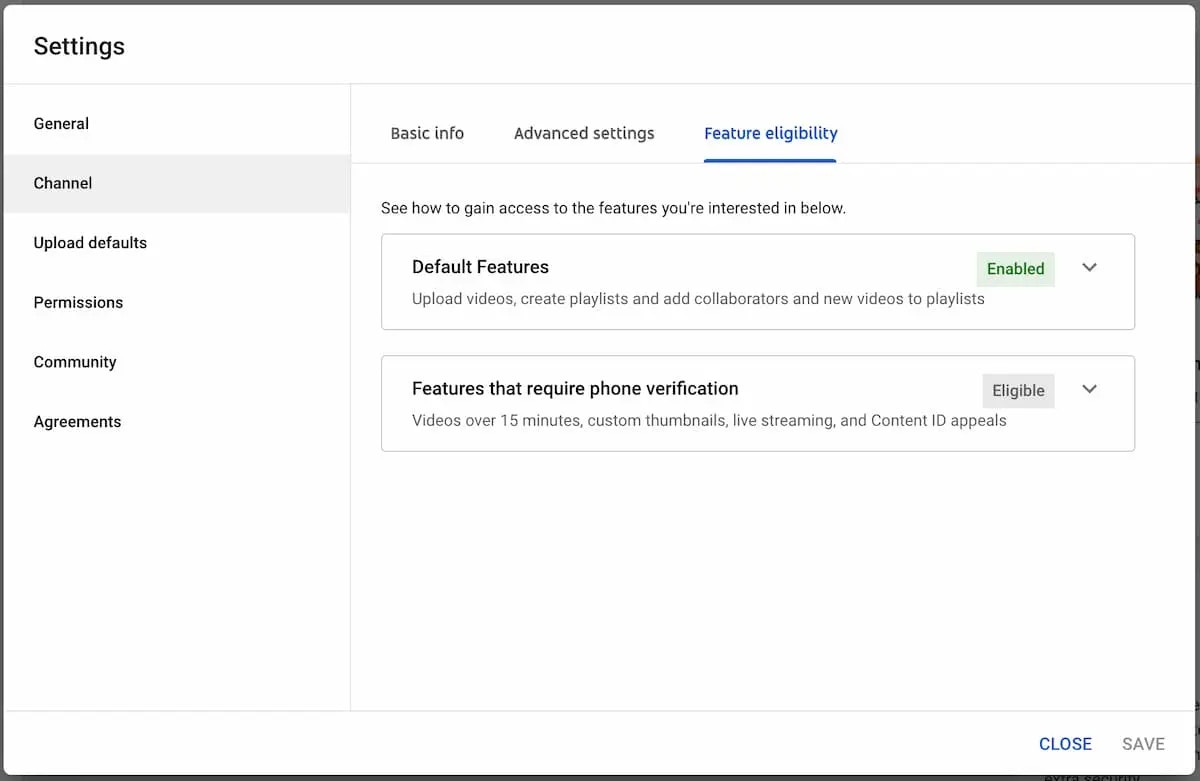
You must be granted YouTube permissions to post thumbnails. In [YouTube Studio](https://studio.youtube.com/) go to *Settings->Channel*. Select "*Feature Eligibility*" and click "*Features that require phone verification*". Enter your phone number to enable.
YouTube may take up to 24 hours to enable thumbnails after you verify your phone number. Please note, YouTube determines eligibility for adding thumbnails. "Enabled" phone verification does not guarantee YouTube will allow thumbnail uploads.
If you have been verified for 24 hours and still have issues check that:
1. You are able to manually upload thumbnails in YouTube Studio.
2. If you're working with a Brand Content Owner Account (often used for business or organization channels), make sure you have the necessary permissions. We recommend "Owner" rights.
3. If you are still having issues, please see this video on [solving the Thumbnail issue](https://www.youtube.com/watch?v=1bFmX2uQk0Y).
## Video: Posting to YouTube via the API
## Upload Limits
YouTube limits how many videos a channel can upload in a 24-hour period via the YouTube API.
Depending on a creator's location, a channel might be able to increase their daily limit by
getting access to advanced features. To learn more visit this
[article](https://notifications.google.com/g/p/ACnX6LbjUElgT-OfRLVjenkpdldv6pIJ5JYGZyPGTdJwRYmo3fXFkfXJsPGnswgns0BjJ6Bjxn2bqpqfBt6gBdkLoqESKA7mqLNllzcR2qnYUJn5KlJN5jPqCWl6DGr58cZEt94mMvxXATN6_PaBR1RYEpNMTYWN).
Limits may vary by country/region or channel history. Copyright strikes may impact channel
history eligibility and [Community Guidelines
strikes](https://support.google.com/youtube/answer/2802032) will affect how much a channel can
upload.
If you receive and upload limit error please wait and try again in 24 hours.
## Description Links
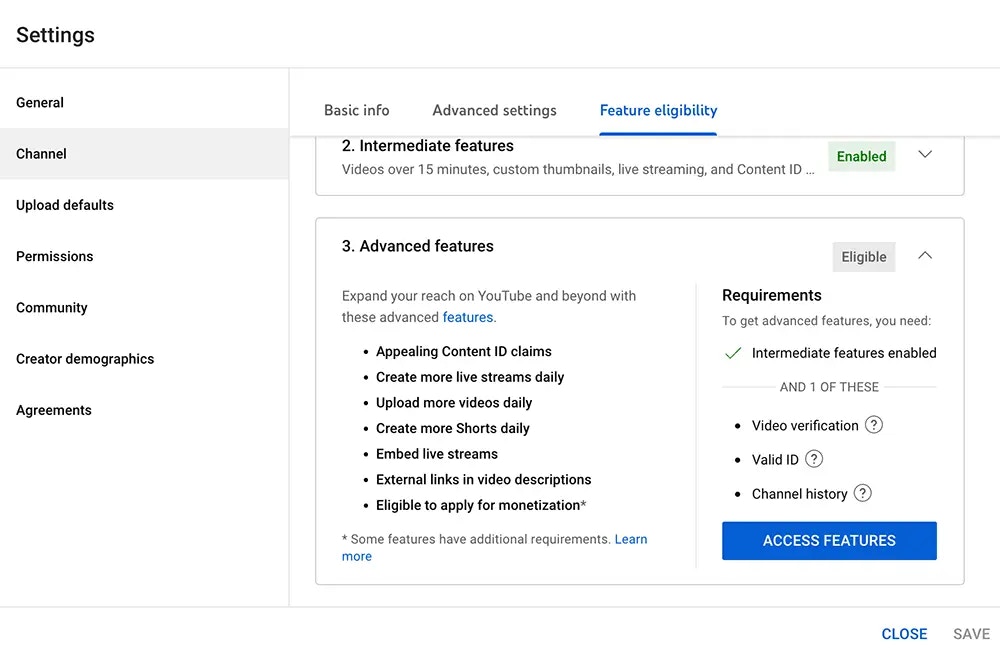
You must activate **Advanced Features** in YouTube Studio to have clickable links in the YouTube video description.
Go to **YouTube Studio -> Settings -> Channel -> Feature Eligibility -> Advanced Features -> Access Features** to activate the advanced features.
## Playlists
You can add videos to a YouTube playlist by including the `playListId` in the `youTubeOptions` object.
Be sure that the authenticated user and channel are the owner of the playlist.
```json YouTube Playlist theme={"system"}
{
"youTubeOptions": {
"playListId": "PLrav6EfwgDX5"
}
}
```
## Subtitles / Captions for Videos
You can add YouTube subtitles, also known as YouTube captions, to videos by including an [SRT file](https://en.wikipedia.org/wiki/SubRip) or a YouTube [SBV file](https://support.google.com/youtube/answer/2734698). Use the `subTitleUrl` field in the `youTubeOptions` object to specify the URL to your SRT or SBV file.
```json YouTube Subtitles theme={"system"}
{
"youTubeOptions": {
"title": "My new post from Ayrshare to Youtube",
"subTitleUrl": "https://img.ayrshare.com/012/captions.srt",
"subTitleLanguage": "en",
"subTitleName": "English"
}
}
```
`subTitleUrl`: A valid SRT or SBV file. The URL must start with `https://` and end in `.srt` or
`.sbv` and be a valid SRT or SBV file. The file must be under 100 MB.
`subTitleLanguage`: Optional: The language of the subtitles. Much be a valid [language
code](/iso-codes/language). Default: "en".
`subTitleName`: Optional: The name of the caption track. The name is intended to be visible to
the user as an option during playback. The maximum name length supported is 150 characters.
Default: "English".
**What are SRT and SBV files?**
SRT (SubRip Subtitle) and SBV (YouTube SubViewer) are subtitle file formats used for displaying
timed text in videos. The main difference is that SRT uses timestamps in HH:MM:SS,MS format with
arrow separators, while SBV uses HH:MM:SS.MS format with commas.
```text theme={"system"}
## SRT Format Example
1
00:00:01,000 --> 00:00:04,000
Welcome to our tutorial on subtitle formats.
2
00:00:04,500 --> 00:00:08,000
Today we'll learn about SRT and SBV files.
## SBV Format Example
0:00:01.000,0:00:04.000
Welcome to our tutorial on subtitle formats.
0:00:04.500,0:00:08.000
Today we'll learn about SRT and SBV files.
```
## Tags
You can add YouTube tags to your videos by including the `tags` array in the `youTubeOptions` object.
Tags must be at least 2 characters in length each and the total length of all tags must be 500 characters or less.
```json YouTube Tags theme={"system"}
{
"youTubeOptions": {
"tags": ["dancing", "dogs"]
}
}
```
## YouTube Mentions
While you can add a `@handle` to a YouTube post, YouTube does not support resolving mentions in the post text.
The `@handle` will remain as plain text.
## Character Limits
Please see [YouTube Character Limits](/help-center/technical-support/character_limits#youtube-character-limits) for more information.
## Additional Endpoints
 ## Playlists
You can add videos to a YouTube playlist by including the `playListId` in the `youTubeOptions` object.
Be sure that the authenticated user and channel are the owner of the playlist.
```json YouTube Playlist theme={"system"}
{
"youTubeOptions": {
"playListId": "PLrav6EfwgDX5"
}
}
```
## Subtitles / Captions for Videos
You can add YouTube subtitles, also known as YouTube captions, to videos by including an [SRT file](https://en.wikipedia.org/wiki/SubRip) or a YouTube [SBV file](https://support.google.com/youtube/answer/2734698). Use the `subTitleUrl` field in the `youTubeOptions` object to specify the URL to your SRT or SBV file.
```json YouTube Subtitles theme={"system"}
{
"youTubeOptions": {
"title": "My new post from Ayrshare to Youtube",
"subTitleUrl": "https://img.ayrshare.com/012/captions.srt",
"subTitleLanguage": "en",
"subTitleName": "English"
}
}
```
## Playlists
You can add videos to a YouTube playlist by including the `playListId` in the `youTubeOptions` object.
Be sure that the authenticated user and channel are the owner of the playlist.
```json YouTube Playlist theme={"system"}
{
"youTubeOptions": {
"playListId": "PLrav6EfwgDX5"
}
}
```
## Subtitles / Captions for Videos
You can add YouTube subtitles, also known as YouTube captions, to videos by including an [SRT file](https://en.wikipedia.org/wiki/SubRip) or a YouTube [SBV file](https://support.google.com/youtube/answer/2734698). Use the `subTitleUrl` field in the `youTubeOptions` object to specify the URL to your SRT or SBV file.
```json YouTube Subtitles theme={"system"}
{
"youTubeOptions": {
"title": "My new post from Ayrshare to Youtube",
"subTitleUrl": "https://img.ayrshare.com/012/captions.srt",
"subTitleLanguage": "en",
"subTitleName": "English"
}
}
```