> ## Documentation Index
> Fetch the complete documentation index at: https://www.ayrshare.com/docs/llms.txt
> Use this file to discover all available pages before exploring further.

# ربط حسابات وسائل التواصل الاجتماعي | Ayrshare Dashboard

> تعرّف على كيفية ربط Facebook و Instagram و X و LinkedIn و TikTok والمزيد بـ Ayrshare Dashboard حتى تتمكن من البدء في جدولة ونشر المنشورات في دقائق.

## الربط والنشر عبر Web Dashboard

كيفية ربط ونشر حسابات وسائل التواصل الاجتماعي عبر Ayrshare Dashboard.

<div class="video-container">
  <iframe width="560" height="315" src="https://www.youtube.com/embed/Aav2Njv-AkY" title="Linking and Posting via the Ayrshare Dashboard" frameborder="0" allow="accelerometer; autoplay; clipboard-write; encrypted-media; gyroscope; picture-in-picture" />
</div>

### كيفية ربط شبكة وسائل تواصل اجتماعي

يعد ربط حسابات وسائل التواصل الاجتماعي الخاصة بك أمرًا سهلاً ببضع نقرات.

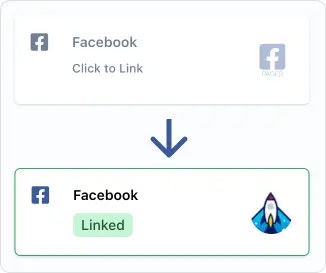
في صفحة Social Account linkage، أو [صفحة ربط الحسابات الاجتماعية](/multiple-users/user-integration#user-experience) الخاصة بملف المستخدم المستخدمة لإدارة مستخدمين متعددين، ما عليك سوى النقر أو الضغط على الشبكة الاجتماعية التي تريد الاتصال بها. ستُطلب منك بعد ذلك تفويض الوصول إلى Ayrshare عبر نافذة منبثقة أو إعادة توجيه الصفحة.

<img src="https://mintcdn.com/ayrshare-docs/BkNwRAXLA9nG0LQA/images/dashboard/link.webp?fit=max&auto=format&n=BkNwRAXLA9nG0LQA&q=85&s=dfb1f4a9936c8a7a174cc5749963ab08" alt="Click to link" width="245" class="center" data-path="images/dashboard/link.webp" />

<Info>
  يرجى منح جميع الأذونات التي تطلبها Ayrshare أثناء التفويض. قد تؤدي إزالة الأذونات إلى
  مشكلات غير مقصودة على الشبكات الاجتماعية أو واجهات برمجة تطبيقات Ayrshare. اسمح أيضًا بالنوافذ المنبثقة في
  المتصفح.
</Info>

بمجرد أن يتم تفويض الشبكات الاجتماعية، سترى شعار حسابك وستظهر شارة "Linked" الخضراء، مما يشير إلى أن الرابط الخاص بك نشط.

### كيفية إلغاء ربط شبكة اجتماعية

فقط انقر على شارة "Linked" الخضراء وستُطلب منك إلغاء ربط الحساب.

لن تتأثر المنشورات التي تم إرسالها بالفعل إلى الشبكة. ومع ذلك، لن يتم إرسال المنشورات المجدولة والمنشورات الجديدة حتى تتم إعادة تأسيس الارتباط بالشبكة.

### مساعدة إضافية

#### اختيار Page أو Brand

<ul class="custom-bullets">
  <li>
    ستطلب منك بعض الشبكات الاجتماعية اختيار حساب أو علامة تجارية. على سبيل المثال، إذا كان لديك
    عدة صفحات Facebook، فسيتم منحك خيار اختيار الصفحة المراد ربطها.
  </li>
</ul>

### أدلة الربط الإضافية

<CardGroup cols={2}>
  <Card title="Bluesky Linking" href="/dashboard/connect-social-accounts/bluesky" icon="bluesky" />

  <Card title="Facebook Linking" href="/dashboard/connect-social-accounts/facebook" icon="facebook" />

  <Card title="Instagram Linking" href="/dashboard/connect-social-accounts/instagram" icon="instagram" />

  <Card title="Google Business Linking" href="/dashboard/connect-social-accounts/google-business" icon="google" />

  <Card title="Linkedin Linking" href="/dashboard/connect-social-accounts/linkedin" icon="linkedin" />

  <Card title="Pinterest Linking" href="/dashboard/connect-social-accounts/pinterest" icon="pinterest" />

  <Card title="Reddit Linking" href="/dashboard/connect-social-accounts/reddit" icon="reddit" />

  <Card title="Telegram Linking" href="/dashboard/connect-social-accounts/telegram" icon="telegram" />

  <Card title="Threads Linking" href="/dashboard/connect-social-accounts/threads" icon="threads" />

  <Card title="Snapchat Linking" href="/dashboard/connect-social-accounts/snapchat" icon="snapchat" />

  <Card title="TikTok Linking" href="/dashboard/connect-social-accounts/tiktok" icon="tiktok" />

  <Card title="YouTube Linking" href="/dashboard/connect-social-accounts/youtube" icon="youtube" />

  <Card title="X/Twitter Linking (retiring March 31, 2026)" href="/dashboard/connect-social-accounts/x-twitter" icon="x" />

  <Card title="Set Up Your Own X API Key" href="/dashboard/connect-social-accounts/x-twitter-byo-keys" icon="x" />
</CardGroup>
