> ## Documentation Index
> Fetch the complete documentation index at: https://www.ayrshare.com/docs/llms.txt
> Use this file to discover all available pages before exploring further.

# استكشاف أخطاء النشر على Facebook | وثائق Ayrshare

> أصلح مشكلات النشر على Facebook الأكثر شيوعًا في Ayrshare، بما في ذلك المنشورات الفاشلة والأذونات وأخطاء الوسائط، مع استكشاف الأخطاء خطوة بخطوة.

إذا تلقيت خطأً عند النشر يشير إلى مشكلات في أذونات Facebook أو لا ترى صفحة Facebook مُدرجة، فقد يكون بعض أذونات الوصول لم تُمنح.

## إعدادات مسؤول أعمال Facebook

<div class="video-container">
  <iframe width="560" height="315" src="https://www.youtube.com/embed/xQv2TakQSVw" title="Post a video to Facebook with an API" frameborder="0" allow="accelerometer; autoplay; clipboard-write; encrypted-media; gyroscope; picture-in-picture" allowfullscreen />
</div>

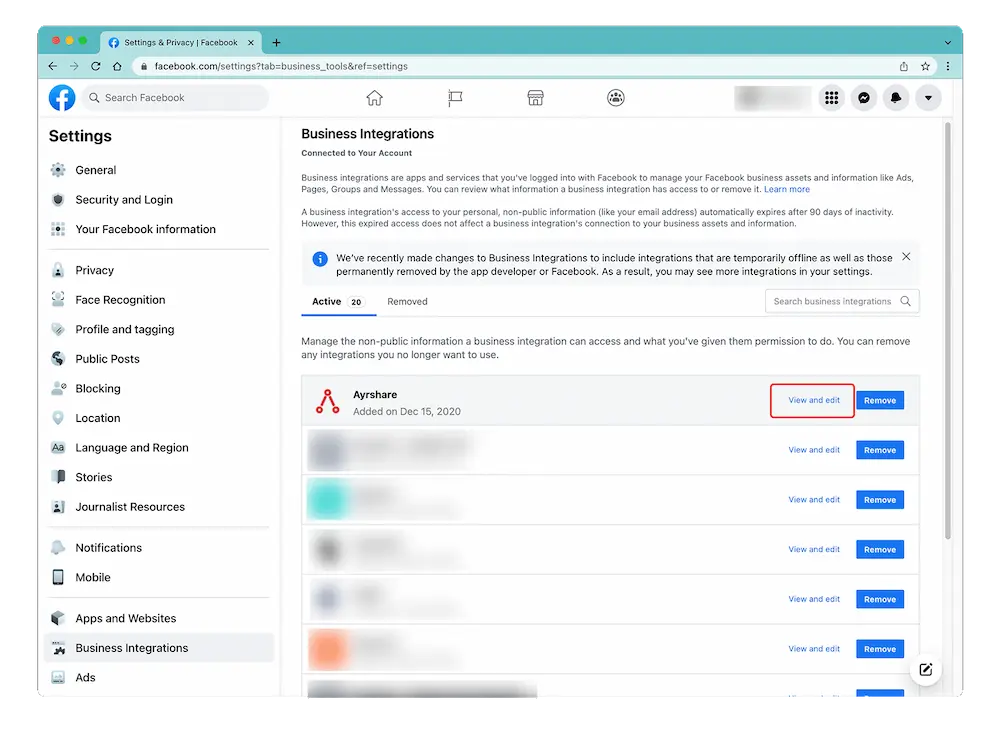
قم بالوصول إلى صفحة Business Integration بتسجيل الدخول إلى Facebook والانتقال إلى "Setting" -> "Settings & Privacy" -> "Security & Login" -> "Business Integration".

<Card title="Facebook Settings & Privacy" icon="facebook" href="https://www.facebook.com/settings?tab=business_tools%5C&ref=settings" horizontal>
  انقر هنا للحصول على رابط مباشر إلى صفحة Facebook Setting & Privacy.
</Card>

## تحرير أذونات Facebook

في [صفحة Business Integration](https://www.facebook.com/help/405094243235242/)، انقر على تطبيق Ayrshare واختر "View and Edit".

<img src="https://mintcdn.com/ayrshare-docs/Nmrhj2Gh7WSf62Bh/images/additional/fb%20permissions.webp?fit=max&auto=format&n=Nmrhj2Gh7WSf62Bh&q=85&s=a2ccb0beb288155744a7d5d63ca7bdb0" alt="Verify Facebook permissions" class="center" width="1000" height="746" data-path="images/additional/fb permissions.webp" />

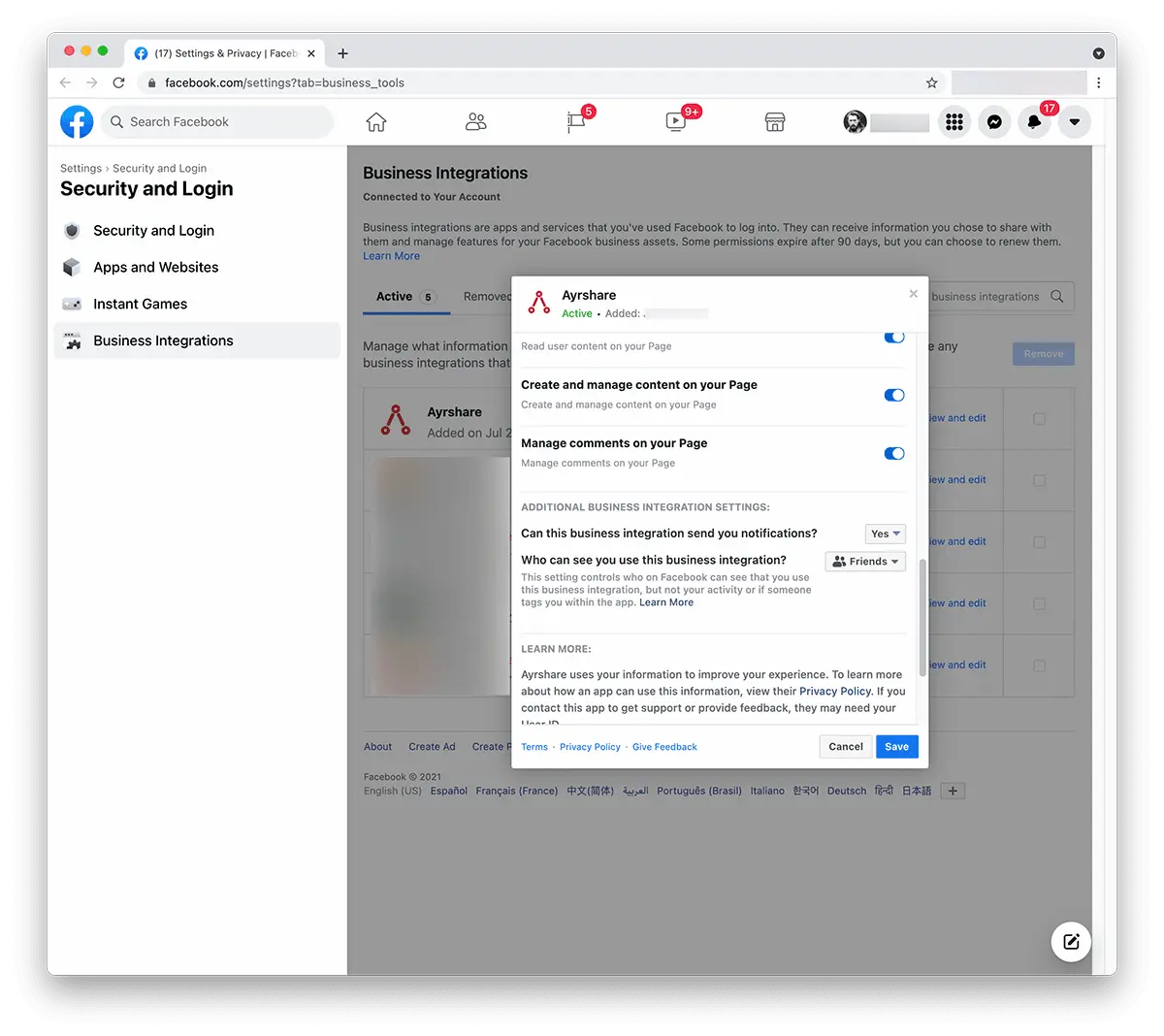
ستظهر نافذة منبثقة. مرّر لأسفل إلى "Create and Manage Content on Your Page" وتأكد من أنه مُفعّل. إذا رأيت مربع اختيار مع "Pages"، فحدّده لتحديد جميع الصفحات.
<img src="https://mintcdn.com/ayrshare-docs/Nmrhj2Gh7WSf62Bh/images/additional/allow%20FB%20permissions.webp?fit=max&auto=format&n=Nmrhj2Gh7WSf62Bh&q=85&s=8d450d467fc1b866eab59aad0090fba5" alt="Review Ayrshare Facebook permissions" class="center" width="1200" height="1068" data-path="images/additional/allow FB permissions.webp" />

انقر على "**Save**".

عد إلى [Ayrshare Dashboard](https://app.ayrshare.com/social-accounts) و**ألغِ الربط** و**أعد الربط** مع Facebook. يجب أن يكون لديك الآن الأذونات الصحيحة.

## لا تزال تواجه مشكلة في أذونات Facebook؟

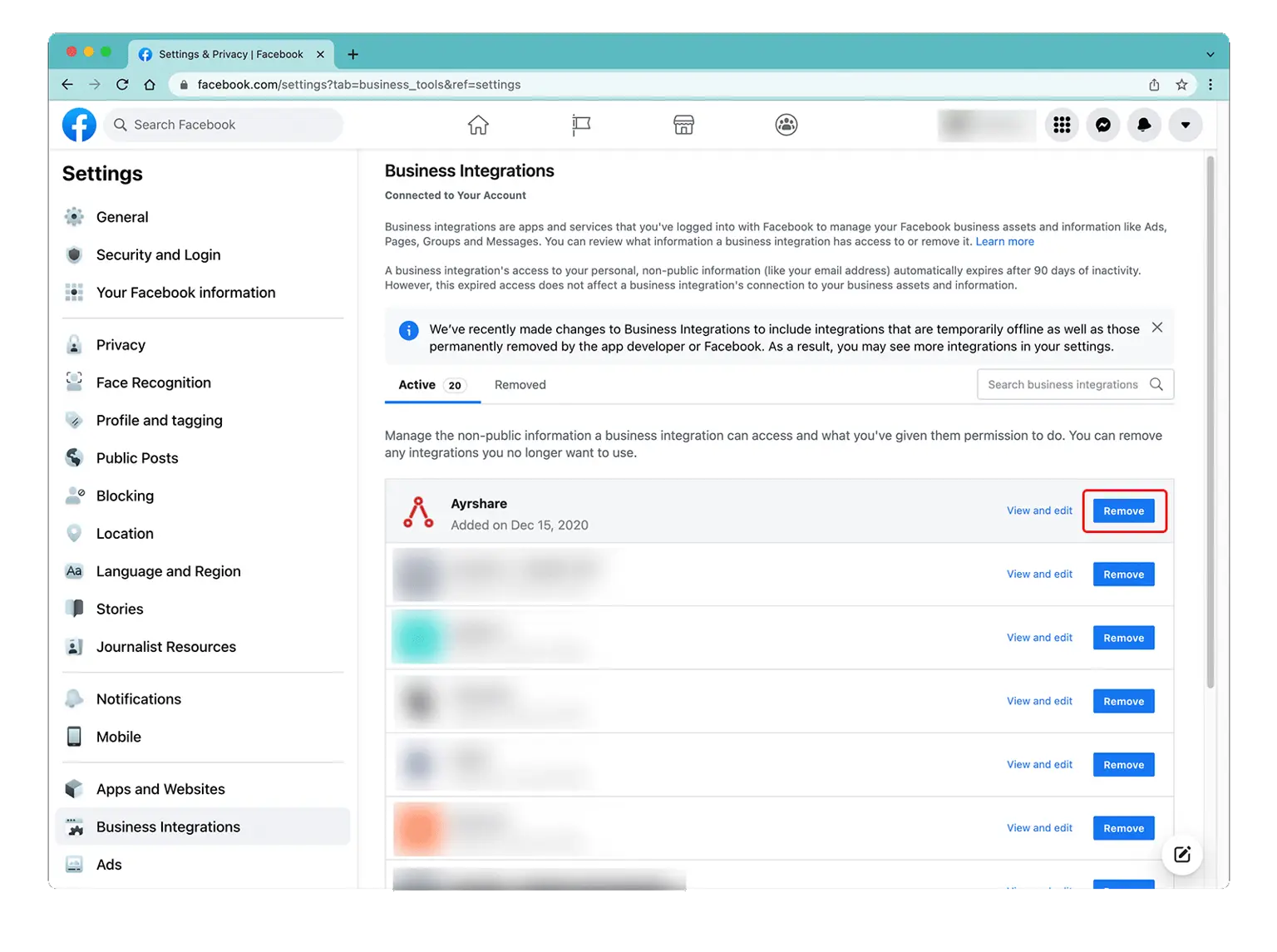
*إذا استمرت المشكلة*، يُرجى العودة إلى [إعدادات مسؤول Facebook](/help-center/technical-support/facebook_posting_issues#facebook-business-admin-settings) تحت Business Integration و"Remove" تطبيق Ayrshare.
عد إلى [Ayrshare Dashboard](https://app.ayrshare.com/social-accounts) و**ألغِ الربط** و**أعد الربط** مع Facebook.
<img src="https://mintcdn.com/ayrshare-docs/dKBti0xVDJrOZ19f/images/help-center/remove-a.webp?fit=max&auto=format&n=dKBti0xVDJrOZ19f&q=85&s=de39550a66cbbdc0c67f9b9f327729e7" alt="Remove the Ayrshare app" class="center" width="1536" height="1145" data-path="images/help-center/remove-a.webp" />
