> ## Documentation Index
> Fetch the complete documentation index at: https://www.ayrshare.com/docs/llms.txt
> Use this file to discover all available pages before exploring further.
# Messages API 概览
> 在 Facebook、Instagram 和 X/Twitter 上收发私信
export const PlansAvailable = ({plans = [], maxPackRequired}) => {
let displayPlans = plans;
if (plans && plans.length === 1) {
const lowerCasePlan = plans[0].toLowerCase();
if (lowerCasePlan === "business") {
displayPlans = ["Launch", "Business", "Enterprise"];
} else if (lowerCasePlan === "premium") {
displayPlans = ["Premium", "Launch", "Business", "Enterprise"];
}
}
return
Available on {displayPlans.length === 1 ? "the " : ""}
{displayPlans.join(", ").replace(/\b\w/g, l => l.toUpperCase())}{" "}
{displayPlans.length > 1 ? "plans" : "plan"}.
{maxPackRequired && window.open('https://www.ayrshare.com/docs/additional/maxpack', '_self')} className="flex items-center mt-2 cursor-pointer">
Max Pack required
}
;
};
Messaging API 允许你管理与联系 User Profile 的通信对象之间的私信(DM)。
通信对象是指与你的用户(User Profile)进行沟通的人。
一次会话是你的用户(User Profile)与其通信对象之间的一系列消息。
-
Messaging API 包含在所有 Ayrshare Business Plan 中,对 Premium 计划则作为付费附加组件提供。
-
无论是 Business 计划还是 Premium 计划,你都必须在 Ayrshare 控制台的 Account 页面中激活 Messaging。
-
Messaging 支持 Facebook Messenger、Instagram Direct Messenger 和 X Direct Messages。
## 主要 Messaging 功能
- 管理你的用户与通信对象之间的会话。
-
代表你的用户发送文本、图片、视频和表情消息。
- 检索完整的会话历史。
- 设置自动消息回复。
-
通过 webhook 实时接收收到消息、消息反应、已读回执的更新。
## 启用 Messaging
### 为你的 Ayrshare 账户和 User Profile 启用
要管理 DM,首先必须为你的整个 Ayrshare 账户启用 Messaging。在 Ayrshare 控制台中进入 [Account 页面](https://app.ayrshare.com/account),点击 "Learn More" 按钮,然后点击 "Enable"。此时,你已为整体账户启用了 Messaging,*但尚未为单个 User Profile 激活 Messaging*。
你可以在 [User Profiles 页面](https://app.ayrshare.com/manage-profiles) 中点击每个 profile 的 "Messaging Active" 复选框,或者使用创建/更新 [profiles 端点](/apis/profiles/overview)来为各个 User Profile 激活 Messaging。
为某个 User Profile 启用 Messaging 后,你必须在 Social Accounts/Social Linking 页面中重新绑定社交账户(Facebook 和 Instagram)。
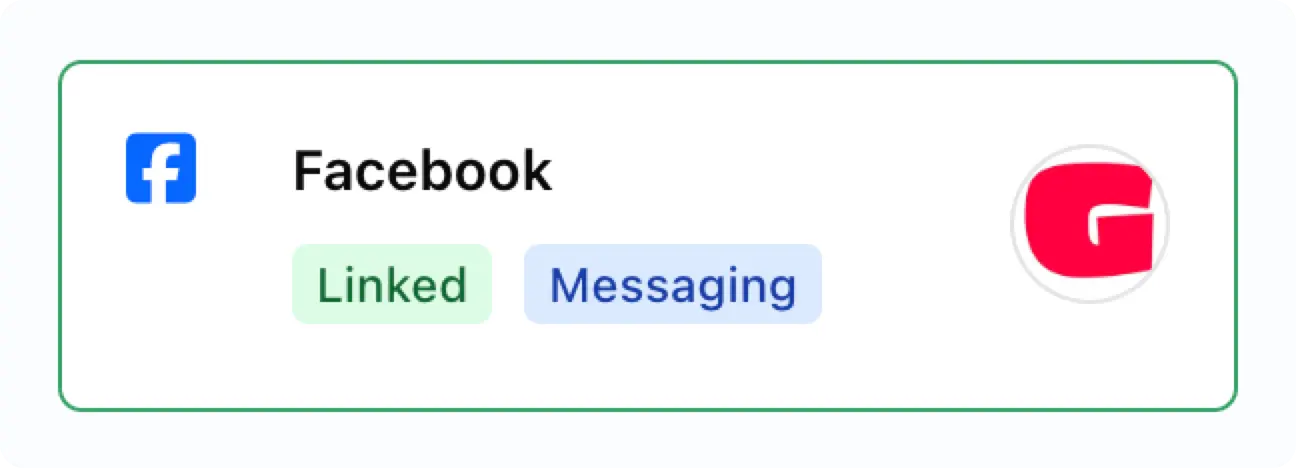
启用后,你将在已绑定的社交账户上看到 "Messaging" 徽章。
 ### 在 Instagram App 中启用 Messaging
你可能需要为你的 Instagram 账户启用 Messaging:
### 在 Instagram App 中启用 Messaging
你可能需要为你的 Instagram 账户启用 Messaging:
-
在 Instagram 移动 App 中进入个人主页,点击右上角的菜单图标 ≡ 进入 **Settings and activity** 页面。
- 向下滚动至 **How others can interact with you** 部分。
- 点击 **Messages and story replies**。
- 点击 **Message requests**。
-
在 **Connected tool** 下,打开 **Allow access to messages** 开关。
## 关于 Messaging 的重要信息
**会话必须由通信对象发起。** 一旦建立会话,你就可以代表你的用户自由发送消息、接收消息、获取反应(例如点赞)或获取已读回执。
**你的用户必须在通信对象最后一条消息发送后的 7 天内回复 Instagram 会话。** 如果通信对象在 7 天内未发送消息,则该会话被视为非活跃,无法再进行回复。
### Facebook 和 Instagram 的消息历史检索
首次为绑定了 Facebook 或 Instagram 的 user profile 启用 Messaging 时,访问会话历史有一些重要限制:
#### 初次连接的限制
-
Facebook 和 Instagram 仅允许在首次为 Messaging 绑定账户时检索现有会话的**最近 20 条消息**
-
如果一个会话包含超过 20 条消息,初始只能访问最近的 20 条
#### 初次设置之后
-
一旦启用 Messaging,**所有新发送和接收的消息**都可完整访问
-
Ayrshare 会持续保留完整的会话历史
-
例如:如果最初检索到 20 条消息,之后又收发了 100 条新消息,你将可以访问全部 120 条消息
此限制仅适用于启用 Messaging 之前已经存在的历史消息 —— Facebook 和 Instagram 后续的所有会话活动都会被完整保留并可访问。
### 会话数量限制与定价
-
每个 Ayrshare User Profile **每个计费周期最多可有 1,000 个活跃会话**。活跃会话数为所有社交网络的总和。
-
**Premium 计划**:Messaging 为每账户每月 **\$49** 的统一附加费。
-
**Launch 与 Business 计划**:Messaging 通过 Stripe 按量计费,每个活跃会话 **\$0.09**。可根据用量提供折扣,详情请联系你的 Ayrshare 客户代表。
-
当你在某个计费周期内向收件人发送消息时,该会话就被计为活跃。仅收到通信对象发来的消息本身不会将会话标记为活跃。
-
如果达到了 1,000 个会话上限,你仍然可以接收消息,但在下一个计费周期开始之前无法回复。
-
活跃会话中收发的消息数量不限。
-
如果你需要提高会话数量上限,请联系你的 Ayrshare 客户代表。
你可以通过 [user 端点](/apis/user/overview)查看当前的会话数量。
### Facebook 和 Instagram 上的 Messaging 控制问题
Meta(Facebook 和 Instagram)对消息会话使用 "thread control"(会话控制)机制。这意味着在同一会话中,同一时间只能有一个应用发送消息,其他应用只能接收消息。
#### 这意味着什么?
如果你看到错误 **"Message failed to send because another app is controlling this thread now"**,这意味着:
* 目前有另一个第三方应用控制着该会话
* Ayrshare 只能在该会话中接收消息
* 在重新获得控制权之前,Ayrshare 无法发送消息
#### 如何解决此问题
要让 Ayrshare 再次能够发送消息,你需要移除控制该会话的第三方应用。
请注意,Meta(Facebook 和 Instagram)可能会更新移除第三方应用的流程,因此下面的步骤仅作为一般指引。
**针对 Facebook Pages:**
1. 前往 [Facebook.com](https://facebook.com) 并登录你的账户
2. 点击右上角菜单 (☰) → **Settings & Privacy** → **Settings**
3. 在左侧边栏中点击 **Apps and Websites**
4. 找到正在控制你 Messaging 的第三方应用
5. 点击该应用旁的 **Remove**
6. 确认移除
**针对 Instagram Business Accounts:**
1. 在手机上打开 Instagram App
2. 进入 **Profile** → 点击菜单 (☰) → **Settings and Privacy**
3. 点击 **Apps and Websites**
4. 找到并移除该第三方应用
**Instagram 的替代方法:**
1. 前往 [business.facebook.com](https://business.facebook.com)
2. 进入 **Business Settings**
3. 在 **Accounts** 下,点击 **Instagram Accounts**
4. 选择你的 Instagram 账户
5. 查看已连接的应用并移除有问题的那个
#### 移除后
一旦你移除了该第三方应用:
- 会话控制权将自动交还给 Ayrshare
- 你应该可以像往常一样发送消息
- 无需你再做任何额外操作
如果在移除应用后仍然遇到问题,请联系我们的支持团队。
## Message WebHook
请参见 [Messages Webhooks](/apis/webhooks/actions#messages-action) 以自动接收消息、已读回执或反应。