> ## Documentation Index
> Fetch the complete documentation index at: https://www.ayrshare.com/docs/llms.txt
> Use this file to discover all available pages before exploring further.
# 校验 JSON
> 发送 JSON 校验其格式是否正确
export const HeaderAPI = ({noProfileKey, profileKeyRequired}) => <>
API Key of the Primary Profile.
Format: Authorization: Bearer API_KEY
{!noProfileKey && (profileKeyRequired ?
Profile Key of a User Profile.
Format: Profile-Key: PROFILE_KEY
:
Profile Key of a User Profile.
Format: Profile-Key: PROFILE_KEY
)}
;
export const PlansAvailable = ({plans = [], maxPackRequired}) => {
let displayPlans = plans;
if (plans && plans.length === 1) {
const lowerCasePlan = plans[0].toLowerCase();
if (lowerCasePlan === "business") {
displayPlans = ["Launch", "Business", "Enterprise"];
} else if (lowerCasePlan === "premium") {
displayPlans = ["Premium", "Launch", "Business", "Enterprise"];
}
}
return
Available on {displayPlans.length === 1 ? "the " : ""}
{displayPlans.join(", ").replace(/\b\w/g, l => l.toUpperCase())}{" "}
{displayPlans.length > 1 ? "plans" : "plan"}.
{maxPackRequired && window.open('https://www.ayrshare.com/docs/additional/maxpack', '_self')} className="flex items-center mt-2 cursor-pointer">
Max Pack required
}
;
};
发送 JSON 校验其格式是否正确。
你也可以使用在线 lint 工具(如 [https://jsonlint.com/](https://jsonlint.com/))或 [Postman](/testing/postman) 来校验 JSON。
如果你在使用 Bubble 或 Make 这类无代码工具,或收到 500 "Bad Request" 响应,那么此端点可用于调试 JSON 请求。
## Header 参数
- 以文本形式发送数据。如果使用 Postman,请务必将类型选择为 "Text"。
- 设置 `"Content-Type": "text/plain"`。
## 请求示例
将任意 JSON 发送到此端点进行校验。
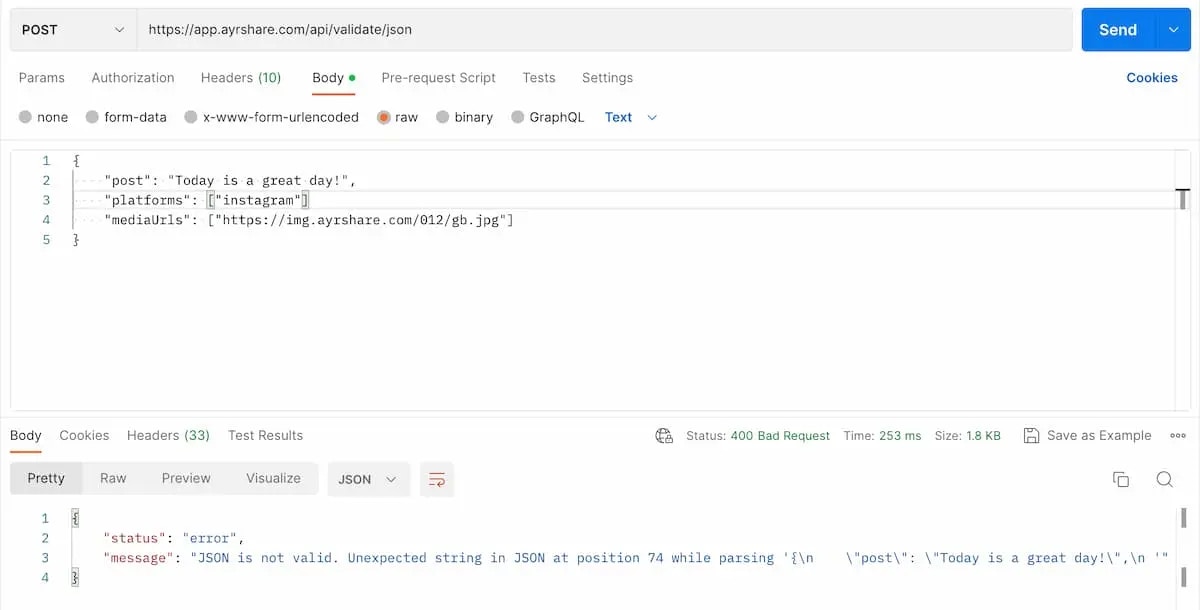
以下是使用 Postman 发送的一个无效 JSON 示例。你能看出问题吗?在第二个参数 `platforms` 末尾少了一个逗号。
请务必在 header 中将 `Content-Type` 设为 `text/plain`,并在发送时选择 "Text"。
 ```json 200: OK Valid JSON theme={"system"}
{
"status": "success",
"message": "Valid JSON. Nice Job!"
}
```
```json 400: Bad Request Invalid JSON theme={"system"}
{
"status": "error",
"message": "JSON is not valid. Unexpected end of JSON input while parsing near '{\"test\": \"happy}'"
}
```
```json 200: OK Valid JSON theme={"system"}
{
"status": "success",
"message": "Valid JSON. Nice Job!"
}
```
```json 400: Bad Request Invalid JSON theme={"system"}
{
"status": "error",
"message": "JSON is not valid. Unexpected end of JSON input while parsing near '{\"test\": \"happy}'"
}
```