> ## Documentation Index
> Fetch the complete documentation index at: https://www.ayrshare.com/docs/llms.txt
> Use this file to discover all available pages before exploring further.

# Bubble.io

> 使用 Bubble Ayrshare 插件或 API Connector 管理用户的社交媒体账户

## 概览

[Bubble.io](https://www.bubble.io) 是一个流行的无代码平台，让你无需编写任何代码就可以构建 Web 和移动应用。
通过集成 Ayrshare 的社交媒体 API，你可以直接在 Bubble 应用中管理用户的社交媒体账户。

有两种实现方式：

<ul className="custom-bullets">
  <li>
    **Bubble Ayrshare 插件**：这个选项操作简单、配置最少。不过相比 Bubble API Connector，
    它的功能相对有限。
  </li>

  <li>
    **Bubble API Connector**：如果需要更高的灵活性和控制度，可使用 Bubble API Connector。
    通过它可以直接调用 Ayrshare 的 API，在你的 Bubble.io 应用中启用更广泛的
    功能。
  </li>
</ul>

本指南将带你了解这两种集成方式。

## 快速上手：Bubble.io Ayrshare 插件

[Bubble 是最强大的无代码软件开发平台之一](https://www.ayrshare.com/blog/the-definitive-bubble-review-a-flexible-no-code-app-builder-growing-over-50/)。上手最简单的方式就是使用 Ayrshare 的 [Bubble.io 插件](https://bubble.io/plugin/ayrshare-social-media-api-1607956467620x490188301088063500)。有关更[进阶的 Bubble 集成方式](/packages-guides/bubble#the-bubble-api-connector-plugin)请参见下文。

<div class="video-container">
  <iframe width="520" height="315" src="https://www.youtube.com/embed/x5e2pcKhkPI" title="Bubble Social Plugin" frameborder="0" allow="accelerometer; autoplay; clipboard-write; encrypted-media; gyroscope; picture-in-picture" />
</div>

首先在 [ayrshare.com](https://www.ayrshare.com) 创建账号，然后连接你的社交媒体账户。

<Card title="连接社交账户" icon="link" href="/dashboard/connect-social-accounts/overview" horizontal />

账户连接完成后，你可以进入 API Dashboard 并复制你的 API key。

<Tip>
  在 Bubble 应用中粘贴 API key 时，请务必在 API key 前加上单词 "Bearer"。

  例如：

  `Bearer bf55cc6f-76ac-46ce-b497-439d766f6c12`
</Tip>

在 Bubble 应用中通过 Bubble 插件市场添加 Ayrshare 插件。在插件的 "API Key" 字段中填入你的 API Key。

现在你就可以通过 Bubble 应用向你的社交媒体账户发帖了。

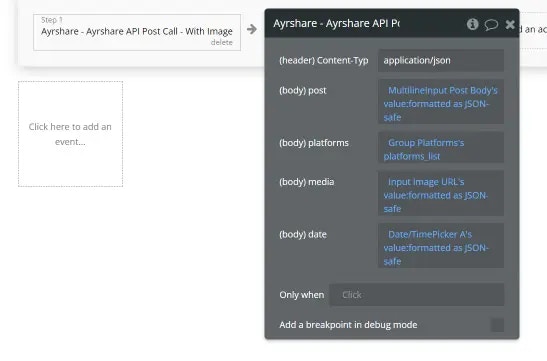
下图展示了一个 Bubble 中调用该插件、发送带图片帖子的工作流示例。
上方视频对此做了更详细的说明。请确保使用以下参数类型：

<ul class="custom-bullets">
  <li>post：一段格式化为 JSON-safe 的文本</li>

  <li>
    platforms：一个文本列表，每个文本用括号括起来，例如
    `"facebook","instagram"`
  </li>

  <li>media：一个格式化为 JSON-safe 的 URL 文本</li>
  <li>date：一个格式化为 JSON-safe 的日期/时间</li>
</ul>

<img class="center" src="https://mintcdn.com/ayrshare-docs/6mPR4kmwNEz1kMbX/images/packages-guides/bubble-ayrshare-example.webp?fit=max&auto=format&n=6mPR4kmwNEz1kMbX&q=85&s=e36f8c8ecd4ca4447b5b36ba77c06dcd" alt="Bubble Ayrshare Plugin Call Example" width="547" height="361" data-path="images/packages-guides/bubble-ayrshare-example.webp" />

Ayrshare 插件支持发帖和删除帖子。要发挥 Ayrshare 的全部能力，我们建议使用 Bubble API Connector 插件，并按你应用所需的端点进行配置。

## Bubble API Connector 插件

你也可以使用 Bubble API Connector 插件来使用 Ayrshare API 的全部能力。以下视频将带你开始使用 Bubble API Connector 与 Ayrshare 的集成，并演示如何在单条帖子中发布多张图片。

<Info>
  Bubble 的 API Connector 有时颇为讲究，缺少一个结尾引号或空格都可能导致连接失败。
  我们建议仔细观看下方视频，如果遇到问题请多回顾几次。
</Info>

<div class="video-container">
  <iframe width="560" height="315" src="https://www.youtube.com/embed/5xXvIDViUzY" title="Create a Post from Bubble" frameborder="0" allow="accelerometer; autoplay; clipboard-write; encrypted-media; gyroscope; picture-in-picture" />
</div>

以下是另一段教程视频，演示如何在 Bubble 中获取社交主页分析。

<div class="video-container">
  <iframe width="560" height="315" src="https://www.youtube.com/embed/OunO2IS-A7Y" title="Get Analytics in Bubble" frameborder="0" allow="accelerometer; autoplay; clipboard-write; encrypted-media; gyroscope; picture-in-picture" />
</div>

## 发布到多个社交媒体账户

以下是相关概览文章：

<Card title="从 Bubble 发布到多个账户" icon="link" href="https://www.ayrshare.com/post-to-multiple-social-media-accounts-from-bubble/" horizontal />

## 校验 Bubble 的发帖数据

通过 API Connector 从 Bubble 发帖时，很难判断你发送的是否是合法的 JSON。发送到 Ayrshare 的 JSON 不合法时，返回的响应往往是 HTML。

Ayrshare 提供了 /validateJSON 这个 URL，你可以将请求发送到这里，而不是常规的 /post 接口。它会返回 "Valid" 或 "Not Valid"。请务必将 Content-Type 设为 `text/plain`，而不是常见的 `application/json`。

请点击 "Response Returns as Bad Request" 的故障排查链接查看详情。

<Card title="故障排查" icon="link" href="/help-center/technical-support/response_returns_as_bad_request" horizontal />

## 在 Bubble 中上传媒体文件

使用 Bubble 的 File Uploader 上传你的媒体文件。这些文件将保存在 Amazon S3 上。你会得到一个 URL，可用于 `/post` 接口的 `mediaUrls` 请求体参数。

## 在 Bubble 中生成 JWT Token

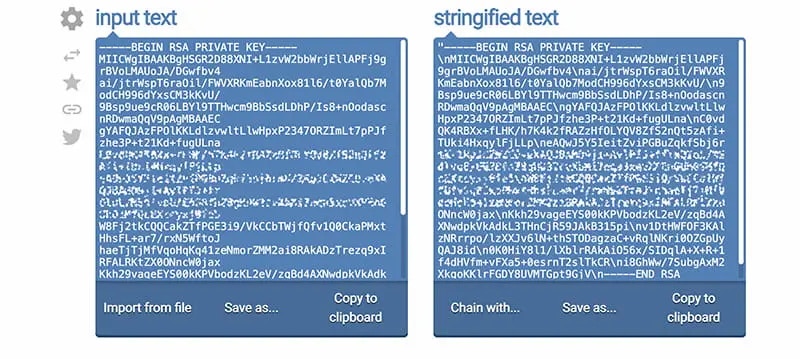
要在 Bubble 中生成 JWT Token，你首先需要把发送到 [/profiles/generateJWT](/apis/profiles/generate-jwt) 接口的 private.key 进行 Stringify 处理。

**步骤 1：** 前往 [https://onlinetexttools.com/json-stringify-text](https://onlinetexttools.com/json-stringify-text)，将你的 private.key 粘贴到左侧的输入文本区域。然后将右侧生成的 stringified 文本复制到剪贴板。

<img class="center" src="https://mintcdn.com/ayrshare-docs/6mPR4kmwNEz1kMbX/images/packages-guides/jwt-token.webp?fit=max&auto=format&n=6mPR4kmwNEz1kMbX&q=85&s=01928d50ee7f94b05c7ce241f34ca904" alt="Verify your JWT Token" width="800" height="359" data-path="images/packages-guides/jwt-token.webp" />

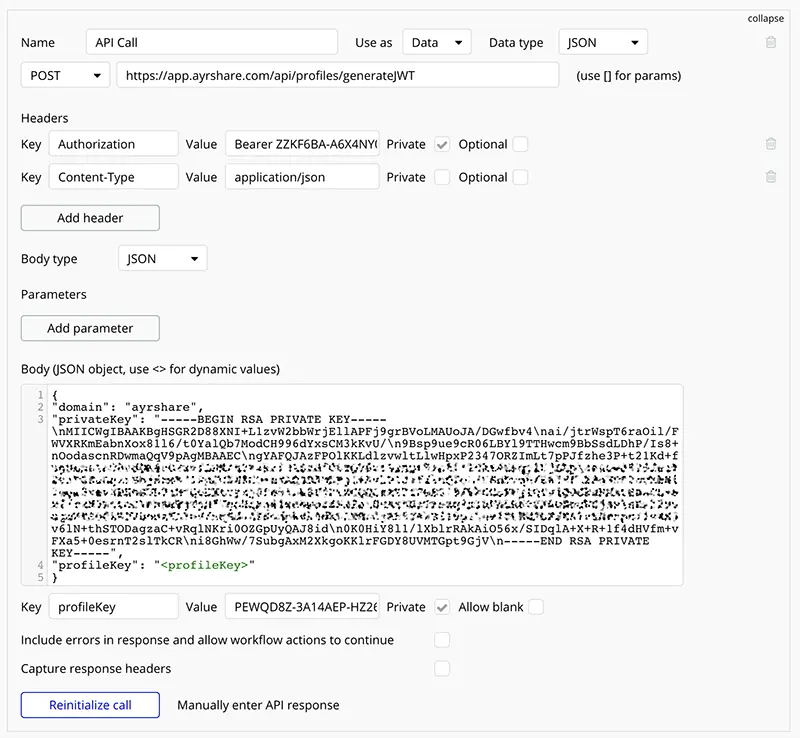
**步骤 2：** 在你的 Bubble 应用中使用 API Connector 新建一次调用，如下图所示。Body 区域中 `privateKey` 字段填入的正是你在步骤 1 中生成的 stringified 文本。

同时，如下所示填入你被分配的 `domain` 和 `profileKey`。

<img class="center" src="https://mintcdn.com/ayrshare-docs/6mPR4kmwNEz1kMbX/images/packages-guides/Enter%20the%20JWT%20Token%20in%20Bubble.webp?fit=max&auto=format&n=6mPR4kmwNEz1kMbX&q=85&s=73120fa7aa6b671ebabe1ec0dcd15ad4" alt="Enter the JWT Token in Bubble" width="800" height="738" data-path="images/packages-guides/Enter the JWT Token in Bubble.webp" />

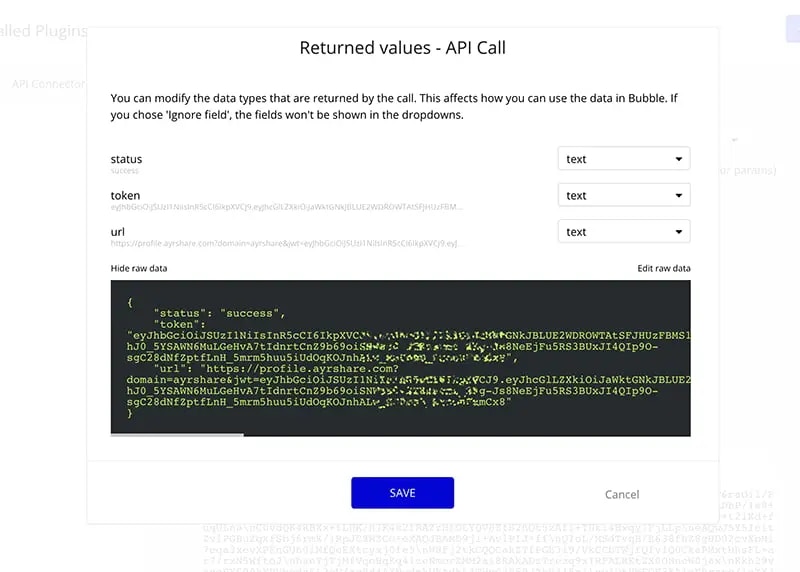
**步骤 3：** 点击 **Initialize call** 按钮并保存响应。响应中的 `url` 字段就是你的用户点击后进入社交媒体账户关联页面的链接。

<img class="center" src="https://mintcdn.com/ayrshare-docs/6mPR4kmwNEz1kMbX/images/packages-guides/Verify%20API%20connector%20return%20in%20Bubble.webp?fit=max&auto=format&n=6mPR4kmwNEz1kMbX&q=85&s=c32681f3e73024eb8c4f561595f222f6" alt="Verify API connector return in Bubble" width="800" height="572" data-path="images/packages-guides/Verify API connector return in Bubble.webp" />

## 让用户关联自己的社交账户

如果你使用的是 Launch Plan、Business Plan 或 Enterprise Plan，以下视频展示了如何在 Bubble 中配置，让所有用户都能关联自己的社交账户。

<div class="video-container">
  <iframe width="560" height="315" src="https://www.youtube.com/embed/C2QWLMkBbKg" title="Social Media Account Linking" frameborder="0" allow="accelerometer; autoplay; clipboard-write; encrypted-media; gyroscope; picture-in-picture" />
</div>

## 在 Bubble 中用 AI 改写文本并发布到社交平台

介绍如何使用 Ayrshare 和 Bubble.io 构建一个可以改写内容并发帖的应用。该应用接收一段文本，将其以 5 种不同方式改写，然后发布到你的社交账户。

<div class="video-container">
  <iframe width="560" height="315" src="https://www.youtube.com/embed/Szrt6hUEzkw" title="Rewrite your Text" frameborder="0" allow="accelerometer; autoplay; clipboard-write; encrypted-media; gyroscope; picture-in-picture" />
</div>

## Bubble API Connector

我们建议使用 [Bubble API Connector](https://manual.bubble.io/account-and-marketplace/building-plugins/adding-api-connections) 来发起你的 Ayrshare API 调用。

请注意，Bubble 会对所有 API 调用设置 150 秒的超时时限，超时后会再重试一次。较大的视频可能超过 150 秒，从而导致 Bubble 自动重试，最终报出重复发帖错误。对于较大的视频，我们建议使用[定时发帖](/help-center/technical-support/response_bad_gateway_502_or_504_error)。

## 有用的 Bubble 博客文章

* [用无代码构建社交媒体发帖移动应用](https://www.ayrshare.com/blog/build-a-social-media-posting-mobile-app-with-no-code/)。
* [如何用无代码创建一个社交媒体排期应用。](https://www.ayrshare.com/blog/how-to-create-a-social-media-scheduling-app-with-no-code/)