> ## Documentation Index
> Fetch the complete documentation index at: https://www.ayrshare.com/docs/llms.txt
> Use this file to discover all available pages before exploring further.

# Notion

> 将 Ayrshare API 集成到你的 Notion 应用中，管理用户的社交媒体账户

## 概览

[Notion](https://notion.so) 是一款将笔记、项目管理、Wiki 和可自定义数据库整合到 GUI 界面中的工作区应用。

借助 Ayrshare 的社交媒体 API，你可以在 Notion 中构建界面来管理用户的社交媒体账户，从而支持发帖、获取分析和管理评论。

## 教程

以下是一段视频教程，演示如何直接从 Notion 向你的社交媒体网络发帖。
另请参见我们的 [Notion API 演示指南](https://www.ayrshare.com/blog/schedule-social-media-posts-from-notion/)。

<div class="video-container">
  <iframe width="560" height="315" src="https://www.youtube.com/embed/OeGGiG7SmVY" title="Notion Social Posting Integration" frameborder="0" allow="accelerometer; autoplay; clipboard-write; encrypted-media; gyroscope; picture-in-picture" allowfullscreen />
</div>

Notion 社交发帖集成的 GitHub 代码：

<Card title="GitHub：Ayrshare Notion Integration" icon="github" href="https://github.com/ayrshare/notion" horizontal>
  直接从 Notion 发布到你的社交媒体网络
</Card>

### 创建 Notion 数据库

在 Notion 中，以表格视图创建一个数据库，包含如下列名和列类型：

<ul class="custom-bullets">
  <li>`Post`：*Title column* 类型（此列的类型无法更改）</li>

  <li>
    `Platforms`：*Multi Select column* 类型，取值为：`facebook`、`instagram`、`twitter`、
    `linkedin`、`tiktok` 和/或 `telegram`。
  </li>

  <li>`Images`：*Files & Media column* 类型。</li>
  <li>`Profile Keys`：*Text column* 类型。</li>
  <li>`Status`：*Text column* 类型。</li>

  <li>
    `Schedule Date`：*Date column* 类型，日期格式 Month/Day/Year，时间格式 24 小时，
    并包含时间
  </li>
</ul>

<img src="https://mintcdn.com/ayrshare-docs/6mPR4kmwNEz1kMbX/images/packages-guides/notion-db.webp?fit=max&auto=format&n=6mPR4kmwNEz1kMbX&q=85&s=b83093c27f4fae7e7d3d406eed353f63" alt="Notion Database Examples" width="1536" height="277" data-path="images/packages-guides/notion-db.webp" />

这些字段将在本页稍后指定的脚本中使用。请注意，某些社交网络 "platforms" 需要图片或视频。例如 Instagram 需要图片或视频，TikTok 需要视频。详情请参见各网络的[接口页面](/apis/post/social-networks/facebook)。

[查看一个实时 Notion 示例](https://ayrshare-example.notion.site/607c15ce7872456a879adbb0a5f17fdf?v=ee9f65a4afb24033813f245a45bc9e83)

### 填写测试发帖数据

我们需要一些示例数据来测试发帖。这里给出一份建议：

<ul class="custom-bullets">
  <li>`Post`：填入 "Happy New Year!"</li>

  <li>
    `Platforms`：选择一个或多个你已关联的网络。请务必使用小写名称。
  </li>

  <li>`Images`：附加一张[图片](https://img.ayrshare.com/012/gb.jpg)或一段视频。</li>
</ul>

<Info>**你必须将图片上传到 Notion 中**，不能使用图片 URL。</Info>

<ul class="custom-bullets">
  <li>
    `Profile Keys`：如果你使用 Business Plan 或 Launch Plan 并希望发布到客户的配置，请填入
    他们的 Profile Key，否则留空。
  </li>

  <li>
    `Status`：填入 "pending"。脚本只会抓取状态为 "pending" 的记录。请务必
    使用小写的 "pending"。
  </li>

  <li>
    `Schedule Date`：留空，因为现在我们只测试立即发帖。之后你可以
    选择一个未来时间来定时发帖。
  </li>
</ul>

### 在 Notion 中创建内部集成

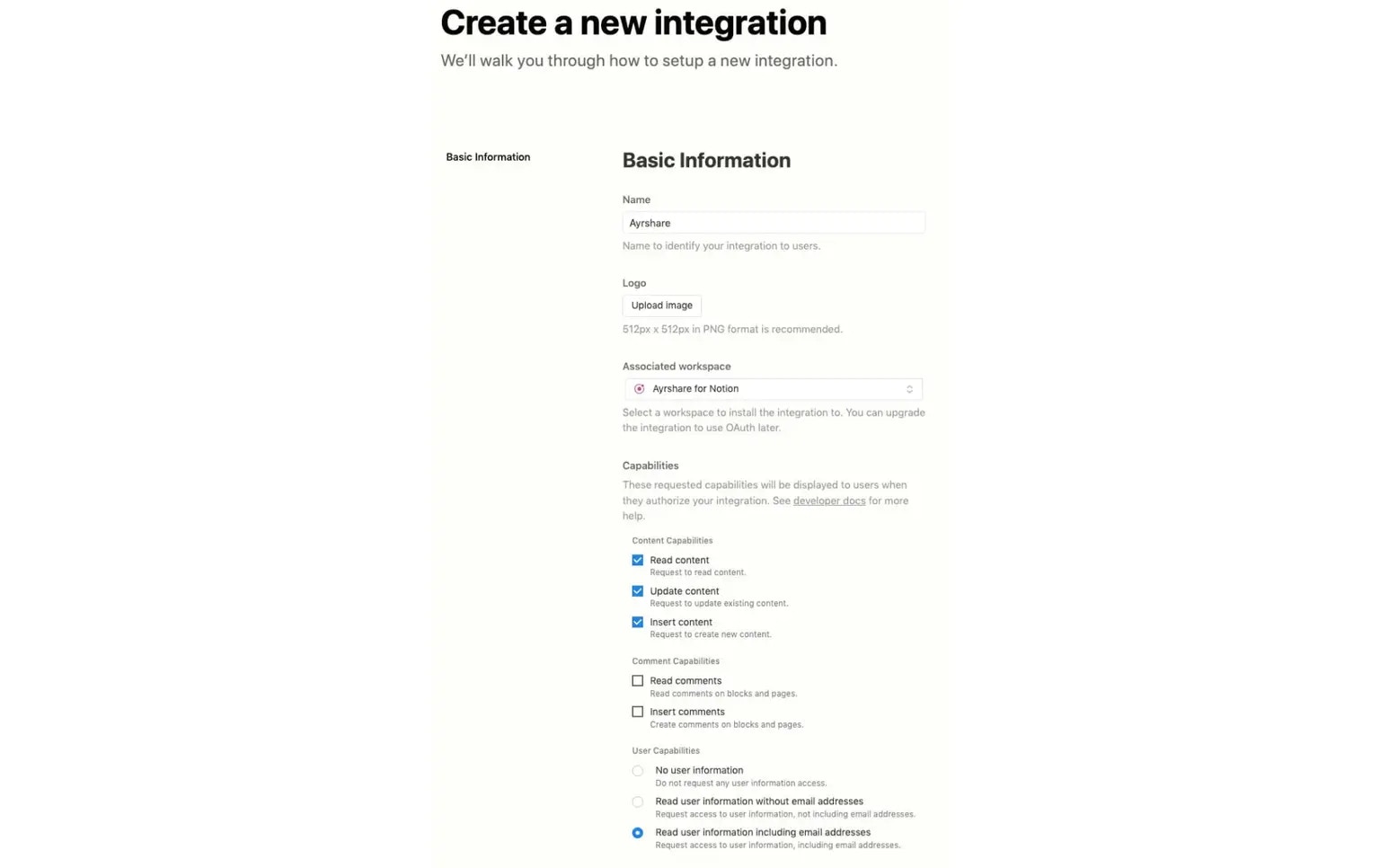
前往 Notion 的[My Integrations 页面](https://www.notion.so/my-integrations)，点击 New Integration。

[进一步了解 Notion 集成](https://developers.notion.com/docs/getting-started#utilizing-notions-public-api-for-integrations)。

你可以将该集成命名为 "Ayrshare" 便于识别，并选择包含发帖数据的合适工作区。

最后，系统为你默认选择的能力就足够了。提交以创建该集成。

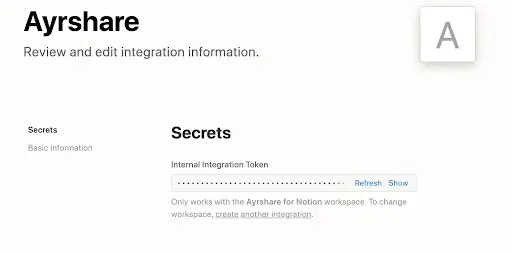
如果成功，你将获得一个内部集成 token。请记下它，本页后续步骤会用到。

<img src="https://mintcdn.com/ayrshare-docs/6mPR4kmwNEz1kMbX/images/packages-guides/create%20notion.webp?fit=max&auto=format&n=6mPR4kmwNEz1kMbX&q=85&s=48dce27786caad8a12c99f04f31a10d4" alt="Create a Notion Integration" width="1536" height="966" data-path="images/packages-guides/create notion.webp" />

然后获取你的 Notion 集成 token。

<img src="https://mintcdn.com/ayrshare-docs/6mPR4kmwNEz1kMbX/images/packages-guides/notion%20token.webp?fit=max&auto=format&n=6mPR4kmwNEz1kMbX&q=85&s=32b0f4d69eeabdc55409e801c6dbf9a7" alt="Get a Notion Secret" width="512" height="253" data-path="images/packages-guides/notion token.webp" />

### 将 Notion 数据库连接到内部集成

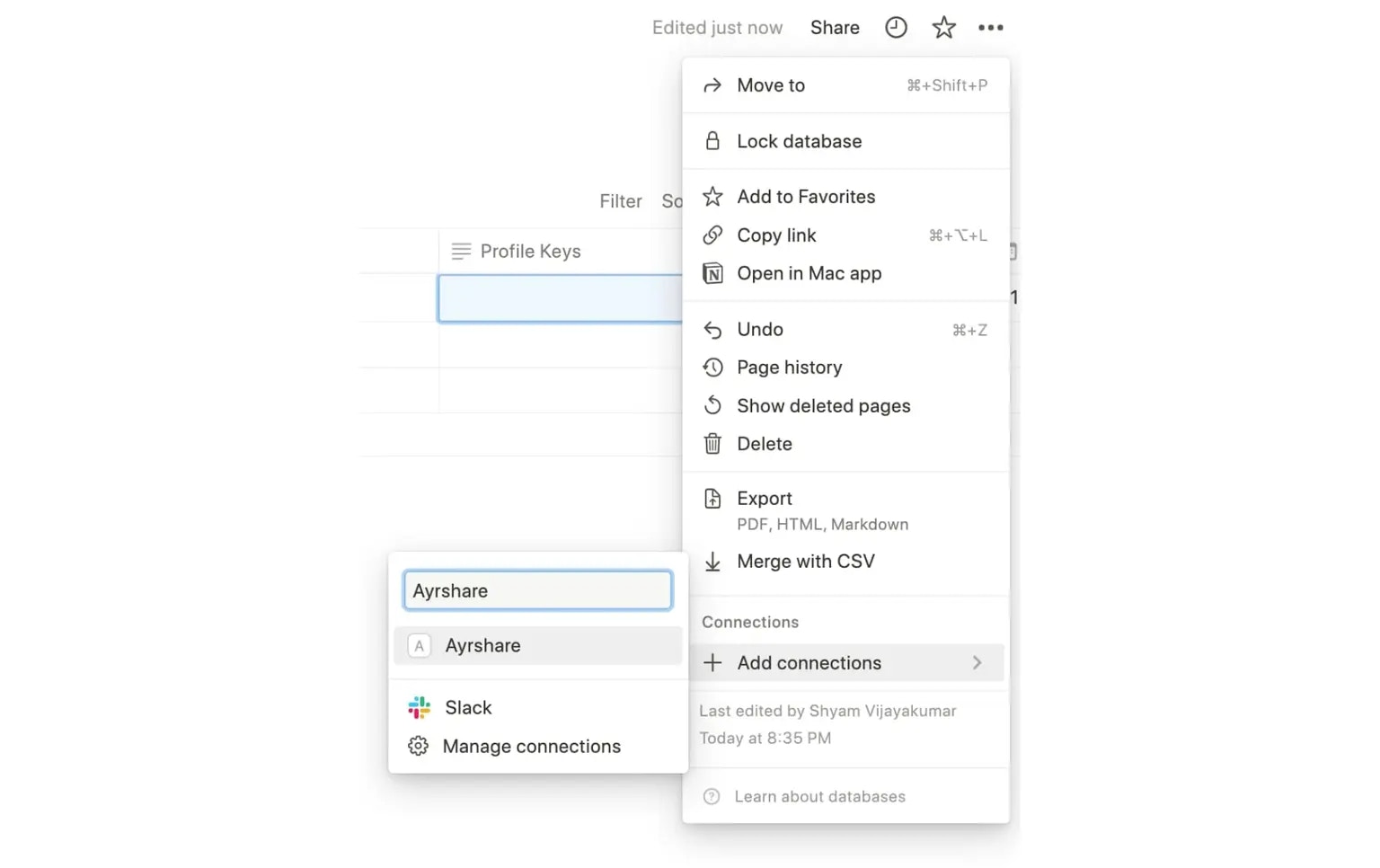
打开你之前创建的 Notion 数据库。点击页面右上角的省略号图标，选择 **Add Connection**。

在这里你可以按名称搜索上一步中创建的内部集成。

点击该内部集成后，你就把 Notion 数据库连接到该集成了。

<img src="https://mintcdn.com/ayrshare-docs/6mPR4kmwNEz1kMbX/images/packages-guides/connect%20to%20ayrshare.webp?fit=max&auto=format&n=6mPR4kmwNEz1kMbX&q=85&s=318c31733bb8920c5d5765648f6cca80" alt="Connect the Notion Database" width="1536" height="966" data-path="images/packages-guides/connect to ayrshare.webp" />

### 运行脚本从 Notion 发送帖子

现在你可以在本地环境中运行一个脚本，从 Notion 数据库中读取数据，并针对每一行状态为 "pending" 的记录通过 Ayrshare API 发帖。

请确保为脚本设置以下环境变量：

<ul class="custom-bullets">
  <li>
    `API_KEY`：这是你从 Ayrshare 获取的 `API Key`，也就是你的 Ayrshare 主配置的
    主 API Key。
  </li>

  <li>
    `NOTION_DATABASE_ID`：打开你在本页前面创建的数据库，从 URL 中获取
    数据库 ID。
  </li>
</ul>

<Info>数据库 ID 是数据库页面 URL 中 ?v= 之前的那部分值。</Info>

```html theme={"system"}
https://www.notion.so/company/<NOTION_DATABASE_ID>?v=aaee9f</NOTION_DATABASE_ID>
```

<ul class="custom-bullets">
  <li>`NOTION_KEY`：前面获取的内部集成 token。</li>
</ul>

在 Node.js 环境中运行以下 JavaScript：

<ul class="custom-bullets">
  <li>克隆仓库：</li>
</ul>

```bash theme={"system"}
git clone https://github.com/ayrshare/notion
```

<ul class="custom-bullets">
  <li>进入 **notion** 目录并运行 `npm install`。</li>

  <li>
    使用你的 Ayrshare `API_KEY`、Notion `NOTION_KEY` 和 `NOTION_DATABASE_ID`
    更新 `.env` 文件。
  </li>

  <li>运行 `node index.js`</li>
</ul>

在生产环境中，你可以将其部署到 [Heroku](https://www.heroku.com/)、[Digital Ocean](https://www.digitalocean.com/) 或 [Vercel](https://vercel.com/)。

如果成功，所有状态为 `pending` 的列将变为 `success`，帖子也将发布到相应的社交网络。

<Card title="Github：Ayrshare Notion Integration" icon="github" href="https://github.com/ayrshare/notion" horizontal>
  直接从 Notion 发布到你的社交媒体网络
</Card>