> ## Documentation Index
> Fetch the complete documentation index at: https://www.ayrshare.com/docs/llms.txt
> Use this file to discover all available pages before exploring further.
# 快速入门指南
> 在几分钟内关联你的社交账户并发送第一条帖子。
本指南面向单公司账户的搭建。对于面向多用户的 Business 和 Enterprise 套餐订阅,我们会为你提供专门定制的集成指南。
## 连接你的社交媒体账户
登录或注册一个 [Ayrshare 账户](https://app.ayrshare.com/)。
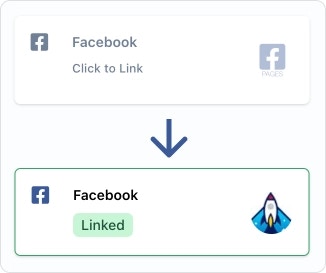
在 Social Account 页面上,点击你想要连接的社交网络。
请确保授予全部权限。
## 获取你的 API 密钥
访问 API 端点需要 API 密钥进行授权。
该密钥用于请求的请求头,并需要以 `Bearer` 关键字为前缀。
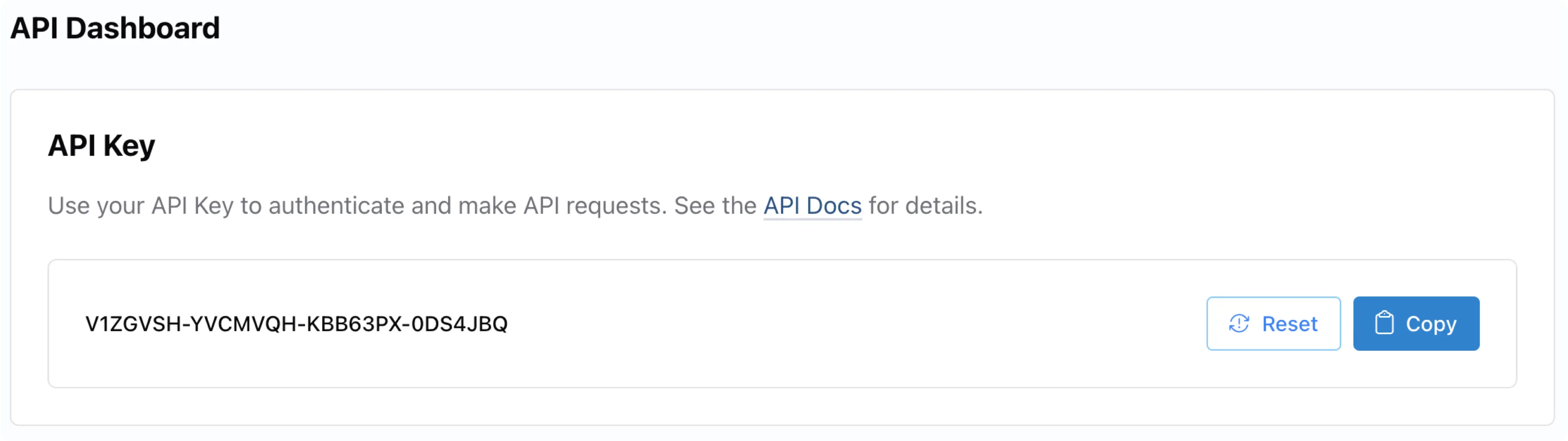
你的 API 密钥位于 [Ayrshare 控制台](https://app.ayrshare.com/) 的 **API Key** 页面。如有必要,请先在 **User Profiles** 页面切换到「Primary Profile」(主配置文件)。
然后你可以在左侧面板中找到 **API Key** 页面。
每次 API 调用都必须在请求头中通过 `Bearer` 令牌携带 API 密钥。同时还要包含 `Content-Type: application/json`。
```json Header theme={"system"}
"Authorization": "Bearer API_KEY",
"Content-Type": "application/json"
```
更多信息请参见 [Authorization](/apis/overview#authorization)。
## 发送你的第一次 API 发帖
### 发布帖子
以下是使用我们的 API 在不同编程语言中进行发帖的代码示例。
若想更轻松地集成,你还可以使用我们预先构建好的 [SDK 包](/packages-guides/overview)。
要发帖,你需要:
用于身份认证的 [API 密钥](/apis/overview#authorization)。
帖子的文本内容。
你希望发布到的社交媒体平台(仅包含你已关联的平台)。
可选:你希望附带的图片或视频 URL。
所有示例都使用 [/post](/apis/post/post) 端点。让我们看几段示例代码:
**要发布到 X/Twitter?** X 需要你自己的 API 凭据。请在请求中添加两个 BYO 请求头(`X-Twitter-OAuth1-Api-Key` 和 `X-Twitter-OAuth1-Api-Secret`)。这是 **每个 Ayrshare 账户的一次性设置**,同一对密钥适用于每一个子配置文件 / 终端用户。详细步骤请参见 [设置指南](/dashboard/connect-social-accounts/x-twitter-byo-keys)。
```bash cURL theme={"system"}
curl \
-H "Authorization: Bearer API_KEY" \
-H 'Content-Type: application/json' \
-d '{
"post": "Today is a great day!",
"platforms": ["facebook", "instagram", "linkedin"],
"mediaUrls": ["https://img.ayrshare.com/012/gb.jpg"]
}' \
-X POST https://api.ayrshare.com/api/post
```
```javascript JavaScript theme={"system"}
const API_KEY = "API_KEY";
fetch("https://api.ayrshare.com/api/post", {
method: "POST",
headers: {
"Content-Type": "application/json",
"Authorization": `Bearer ${API_KEY}`
},
body: JSON.stringify({
post: "Today is a great day!", // required
platforms: ["bluesky", "facebook", "instagram", "linkedin"], // required
mediaUrls: ["https://img.ayrshare.com/012/gb.jpg"] //optional
}),
})
.then((res) => res.json())
.then((json) => console.log(json))
.catch(console.error);
```
```python Python theme={"system"}
import requests
payload = {'post': 'Today is a great day!',
'platforms': ['bluesky', 'facebook', 'instagram', 'linkedin'],
'mediaUrls': ['https://img.ayrshare.com/012/gb.jpg']}
headers = {'Content-Type': 'application/json',
'Authorization': 'Bearer API_KEY'}
r = requests.post('https://api.ayrshare.com/api/post',
json=payload,
headers=headers)
print(r.json())
```
```php PHP theme={"system"}
"Today is a great day!",
"platforms" => ["bluesky", "facebook", "instagram", "linkedin", "pinterest"],
"mediaUrls" => ["https://img.ayrshare.com/012/gb.jpg"]
];
curl_setopt_array($curl, [
CURLOPT_URL => 'https://api.ayrshare.com/api/post',
CURLOPT_RETURNTRANSFER => true,
CURLOPT_POST => true,
CURLOPT_POSTFIELDS => json_encode($data),
CURLOPT_HTTPHEADER => [
'Authorization: Bearer API_KEY', // Replace 'API_KEY' with your actual API key
'Content-Type: application/json'
],
]);
$response = curl_exec($curl);
curl_close($curl);
echo $response;
```
```go Go theme={"system"}
package main
import (
"bytes"
"encoding/json"
"log"
"net/http"
)
func main() {
message := map[string]interface{}{
"post": "Today is a great day!",
"platforms": []string{"bluesky", "facebook", "instagram", "linkedin"},
"mediaUrls": []string{"https://img.ayrshare.com/012/gb.jpg"}
}
bytesRepresentation, err := json.Marshal(message)
if err != nil {
log.Fatalln(err)
}
req, _ := http.NewRequest("POST", "https://api.ayrshare.com/api/post",
bytes.NewBuffer(bytesRepresentation))
req.Header.Add("Content-Type", "application/json; charset=UTF-8")
req.Header.Add("Authorization", "Bearer API_KEY")
res, err := http.DefaultClient.Do(req)
if err != nil {
log.Fatal("Error:", err)
}
res.Body.Close()
}
```
```csharp C# theme={"system"}
using System;
using System.Net.Http;
using System.Text;
using System.Threading.Tasks;
namespace PostPOSTRequest_csharp
{
class Post
{
private static readonly HttpClient client = new HttpClient();
static async Task Main(string[] args)
{
string API_KEY = "API_KEY";
string url = "https://api.ayrshare.com/api/post";
// Set up request headers
client.DefaultRequestHeaders.Add("Authorization", "Bearer " + API_KEY);
// Prepare JSON content
string json = "{\"post\" : \"Today is a great day!\","
+ "\"platforms\" : [ \"bluesky\", \"facebook\", \"instagram\", \"linkedin\" ],"
+ "\"mediaUrls\" : [ \"https://img.ayrshare.com/012/gb.jpg\" ]}";
var content = new StringContent(json, Encoding.UTF8, "application/json");
try
{
// Send POST request
HttpResponseMessage response = await client.PostAsync(url, content);
response.EnsureSuccessStatusCode();
// Read response
string responseBody = await response.Content.ReadAsStringAsync();
Console.WriteLine(responseBody);
}
catch (HttpRequestException e)
{
Console.WriteLine($"Error: {e.Message}");
}
}
}
}
```
```ruby Ruby theme={"system"}
require 'httparty' # gem install httparty
res = HTTParty.post("https://api.ayrshare.com/api/post",
headers: {Authorization: "Bearer API_KEY"},
body: {
post: "Today is a great day!",
platforms: ['bluesky', 'facebook', 'instagram', 'linkedin'],
mediaUrls: ["https://img.ayrshare.com/012/gb.jpg"]
}).body
puts res
```
恭喜!你已成功发送第一条帖子。
### 发帖响应
当我们的 API 成功处理你的发帖时,你会收到一个 `status` 为 "success" 的响应。响应中包含:
 每次 API 调用都必须在请求头中通过 `Bearer` 令牌携带 API 密钥。同时还要包含 `Content-Type: application/json`。
```json Header theme={"system"}
"Authorization": "Bearer API_KEY",
"Content-Type": "application/json"
```
更多信息请参见 [Authorization](/apis/overview#authorization)。
## 发送你的第一次 API 发帖
### 发布帖子
以下是使用我们的 API 在不同编程语言中进行发帖的代码示例。
若想更轻松地集成,你还可以使用我们预先构建好的 [SDK 包](/packages-guides/overview)。
要发帖,你需要:
每次 API 调用都必须在请求头中通过 `Bearer` 令牌携带 API 密钥。同时还要包含 `Content-Type: application/json`。
```json Header theme={"system"}
"Authorization": "Bearer API_KEY",
"Content-Type": "application/json"
```
更多信息请参见 [Authorization](/apis/overview#authorization)。
## 发送你的第一次 API 发帖
### 发布帖子
以下是使用我们的 API 在不同编程语言中进行发帖的代码示例。
若想更轻松地集成,你还可以使用我们预先构建好的 [SDK 包](/packages-guides/overview)。
要发帖,你需要: