> ## Documentation Index
> Fetch the complete documentation index at: https://www.ayrshare.com/docs/llms.txt
> Use this file to discover all available pages before exploring further.
# Set Up Your Own X API Key
> Step-by-step guide to connect your own X (Twitter) API credentials with Ayrshare
On March 31, 2026, X changed how third-party platforms access its API. As a result, every Ayrshare account posting to X through Ayrshare must register its own X Developer App and use its API Key and API Secret on every request.
This is a platform-wide change mandated by X that affects all third-party tools.
**BYO keys are set once per platform (account-wide), not per customer or sub-profile.** You create **one X Developer App** under your own X account, and the same **API Key + API Secret** apply account-wide for X — they are used for **every** sub-profile / end-user that links X under your Ayrshare account. If you have a Business or Enterprise plan with hundreds of sub-profiles, you do **not** need to repeat this setup for each one. You set it up once for the X platform, then pass the same two headers on every request.
We've streamlined the setup process to make this as simple as possible, and it should take less than 10 minutes to complete. Follow our step-by-step guide below, and if you need any help along the way, our team is here to assist.
## Step 1: Create Your X Developer Account
Go to [console.x.com](https://console.x.com) and sign in with your X account. See [X's getting started guide](https://docs.x.com/x-api/getting-started/getting-access) if you need help.
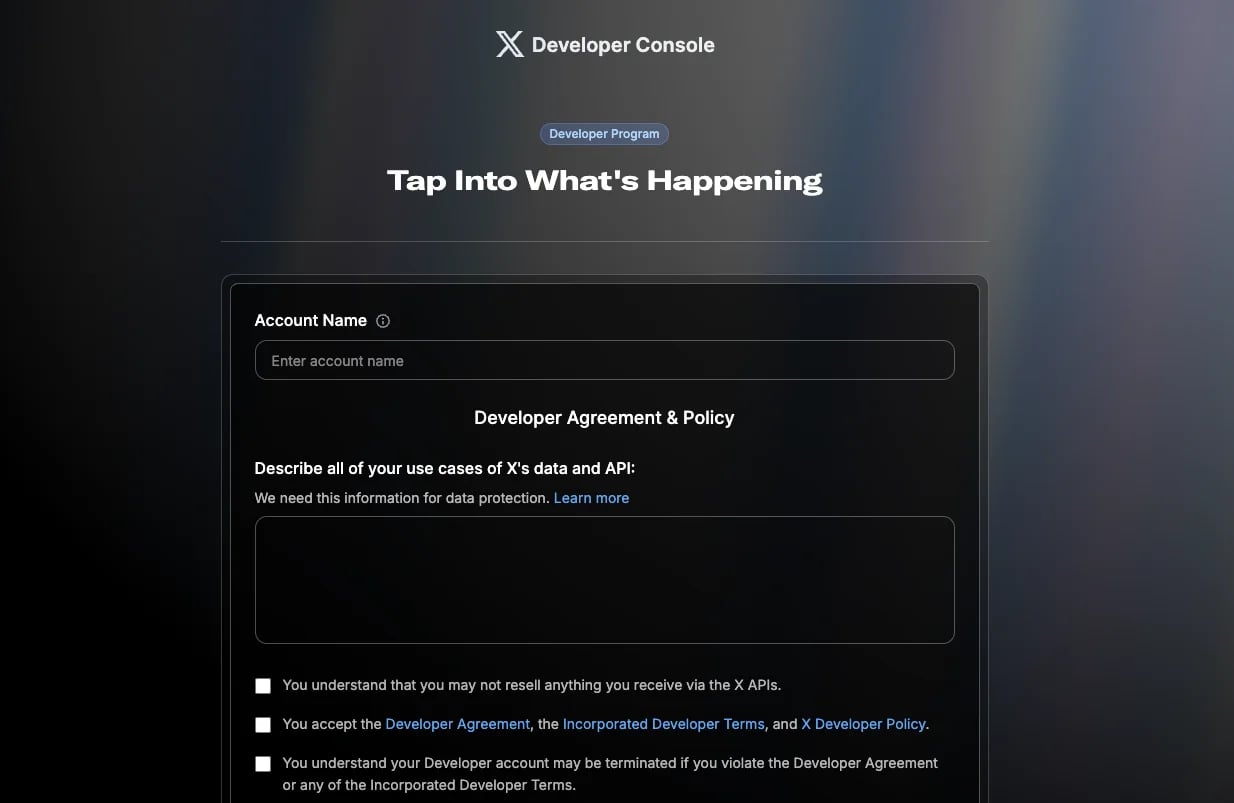 Complete the developer onboarding and accept the Developer Agreement and policies.
You're now in the X Developer Console.
## Step 2: Create an App
You only create **one X Developer App per Ayrshare account**. The same app and its API Key + API Secret are reused for every sub-profile / end-user you later link under your Ayrshare account. You do not create a new app per customer.
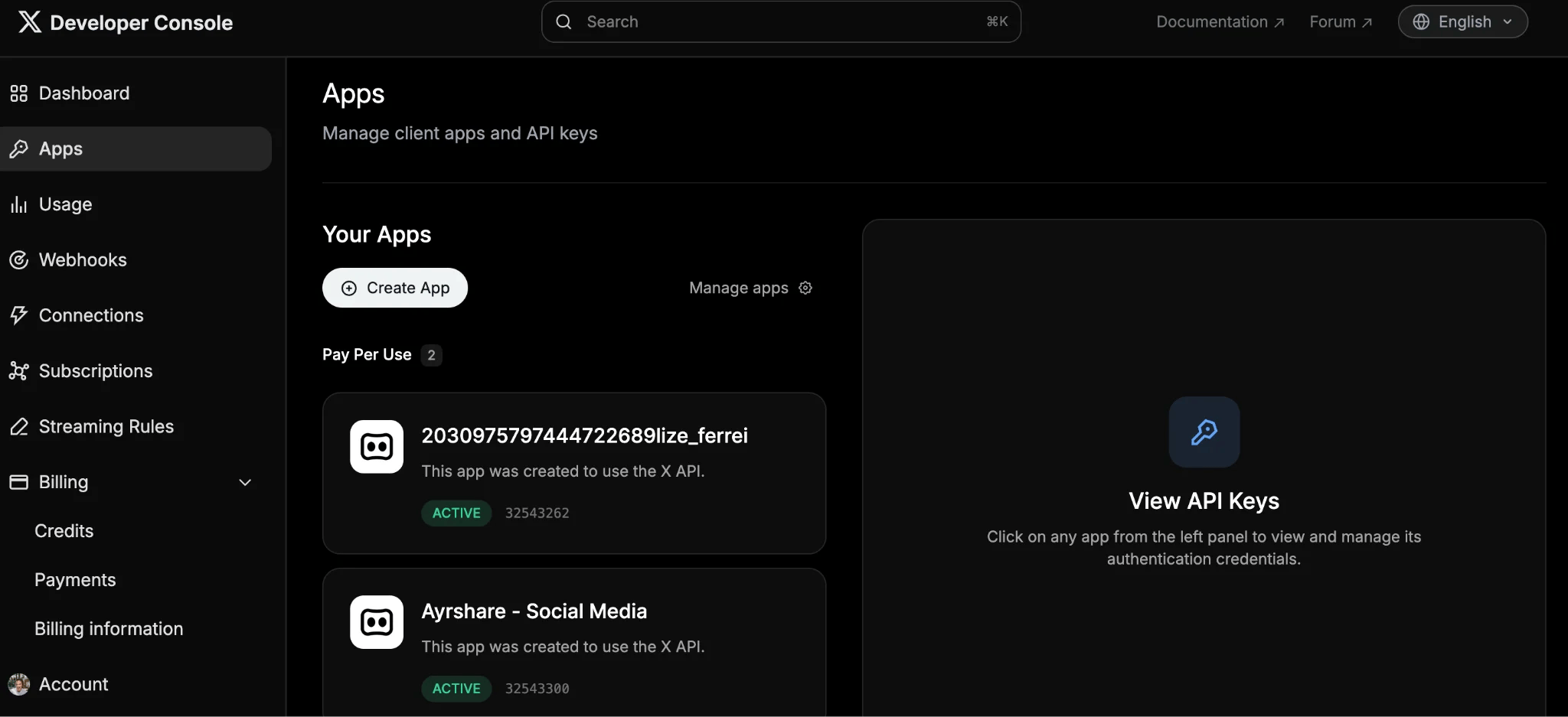
In the Developer Console, navigate to **Apps**.
Complete the developer onboarding and accept the Developer Agreement and policies.
You're now in the X Developer Console.
## Step 2: Create an App
You only create **one X Developer App per Ayrshare account**. The same app and its API Key + API Secret are reused for every sub-profile / end-user you later link under your Ayrshare account. You do not create a new app per customer.
In the Developer Console, navigate to **Apps**.
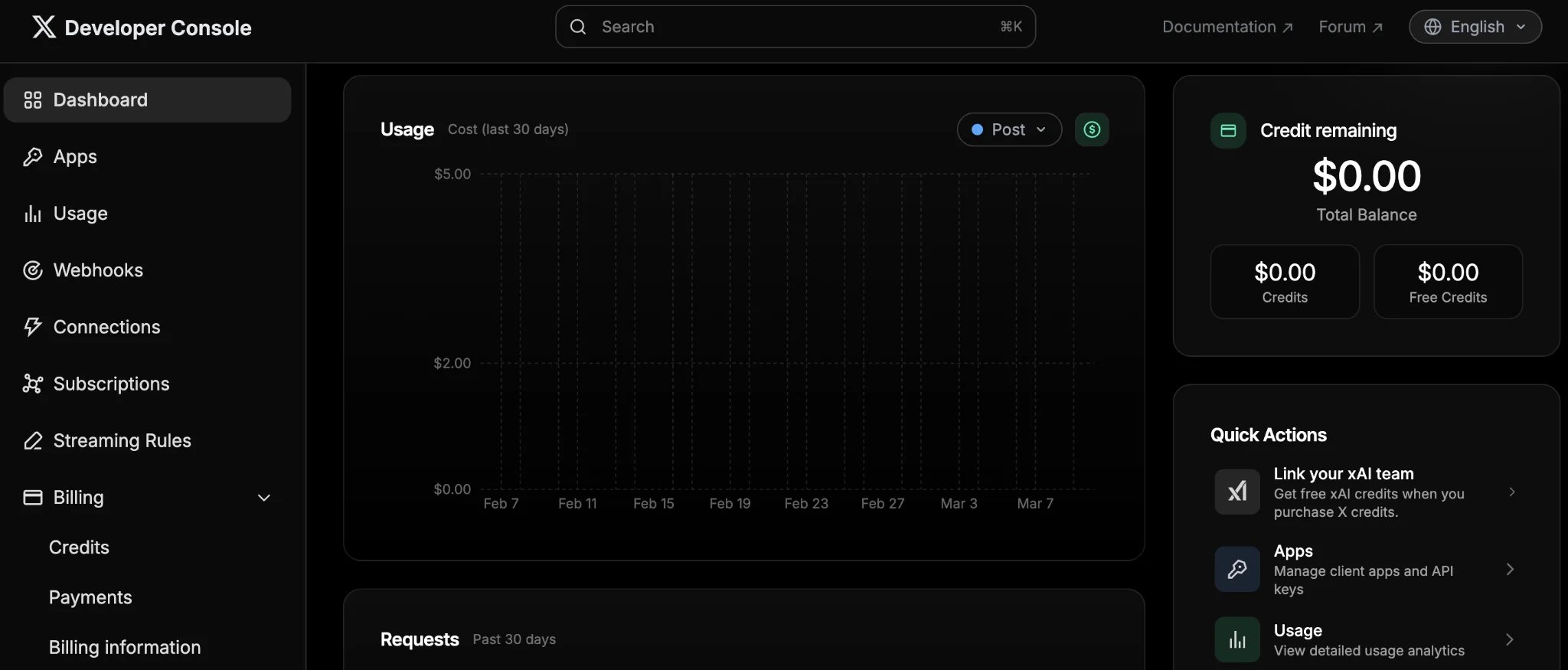 In the App dashboard, click **Create App** (see [X's App setup docs](https://docs.x.com/fundamentals/developer-apps) for details). Enter an app name (typically your brand name). This name will appear in the OAuth authorization screen when users connect their X account.
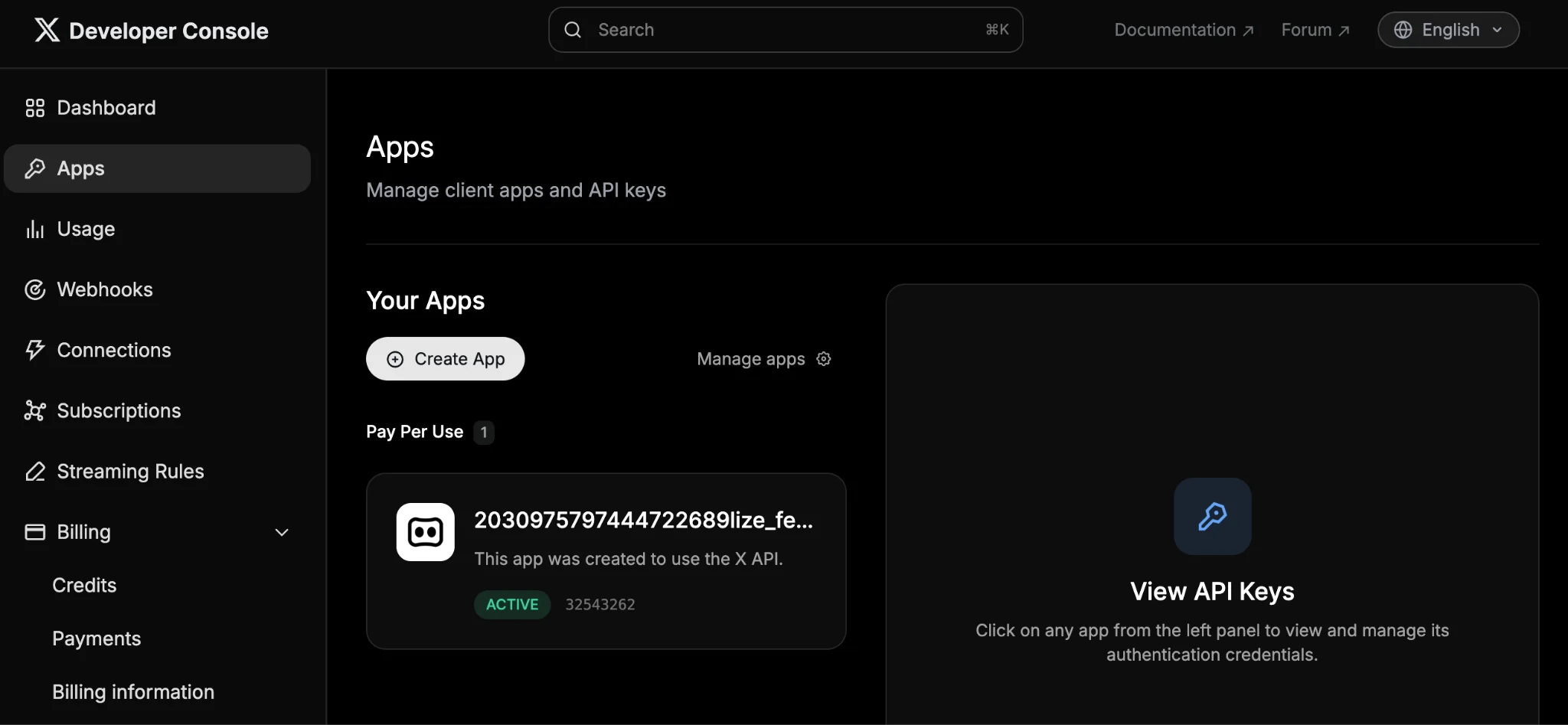 Select the **Production** environment in the dropdown.
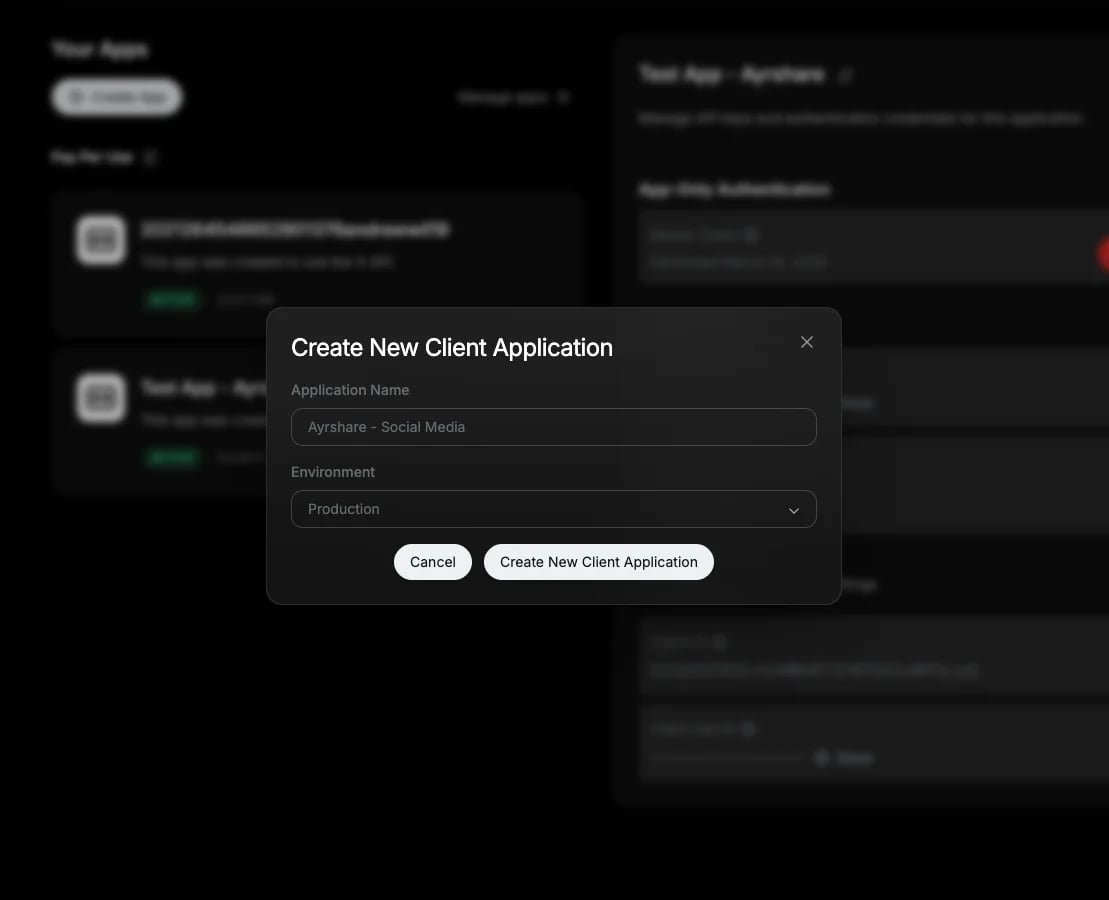 X will generate several credentials. **Ignore these credentials and close this window.**
## Step 3: Configure App Permissions
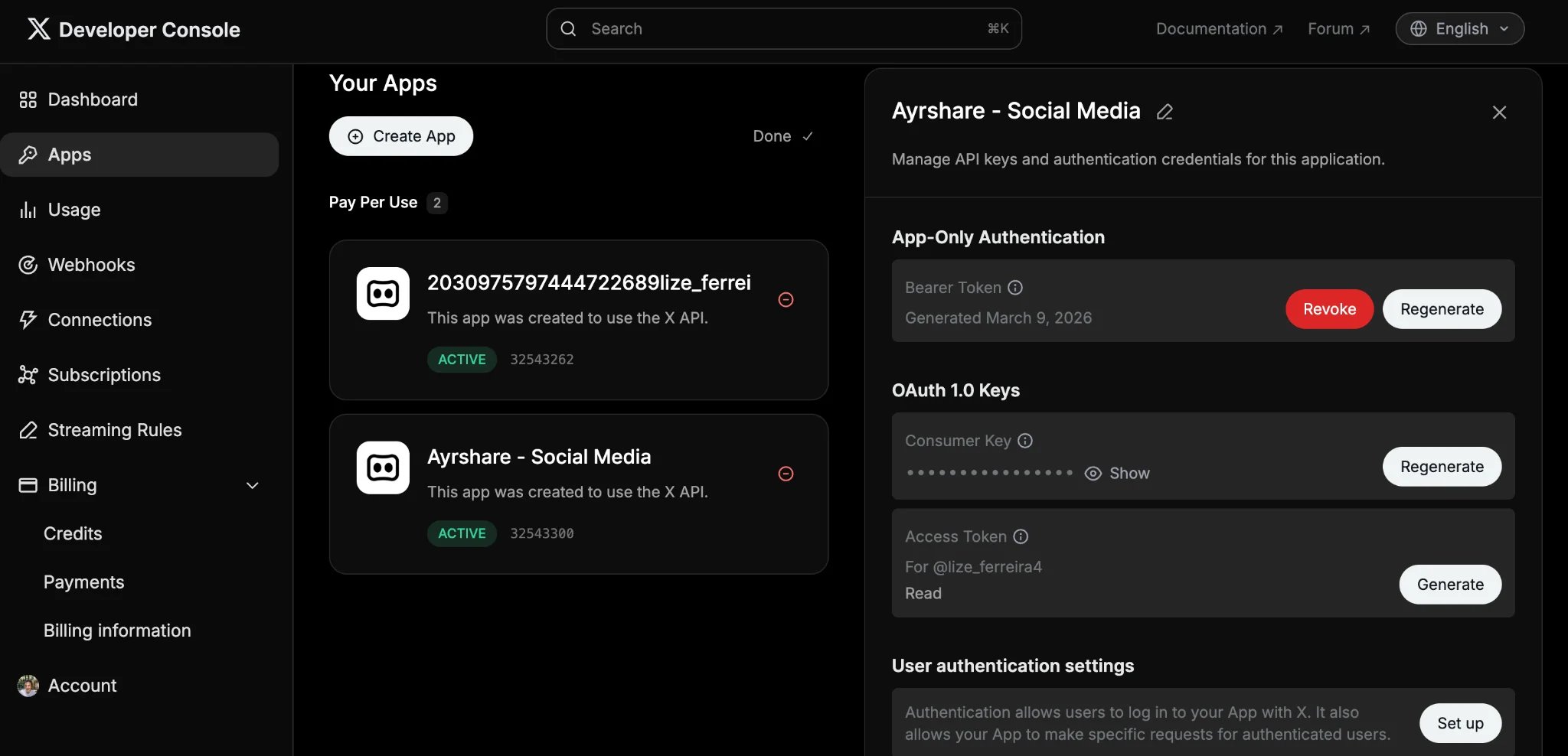
Under "Apps," locate the new app (refresh the page if it doesn't appear), then click it to view its details.
X will generate several credentials. **Ignore these credentials and close this window.**
## Step 3: Configure App Permissions
Under "Apps," locate the new app (refresh the page if it doesn't appear), then click it to view its details.
 Under **User authentication settings**, click **Set up**.
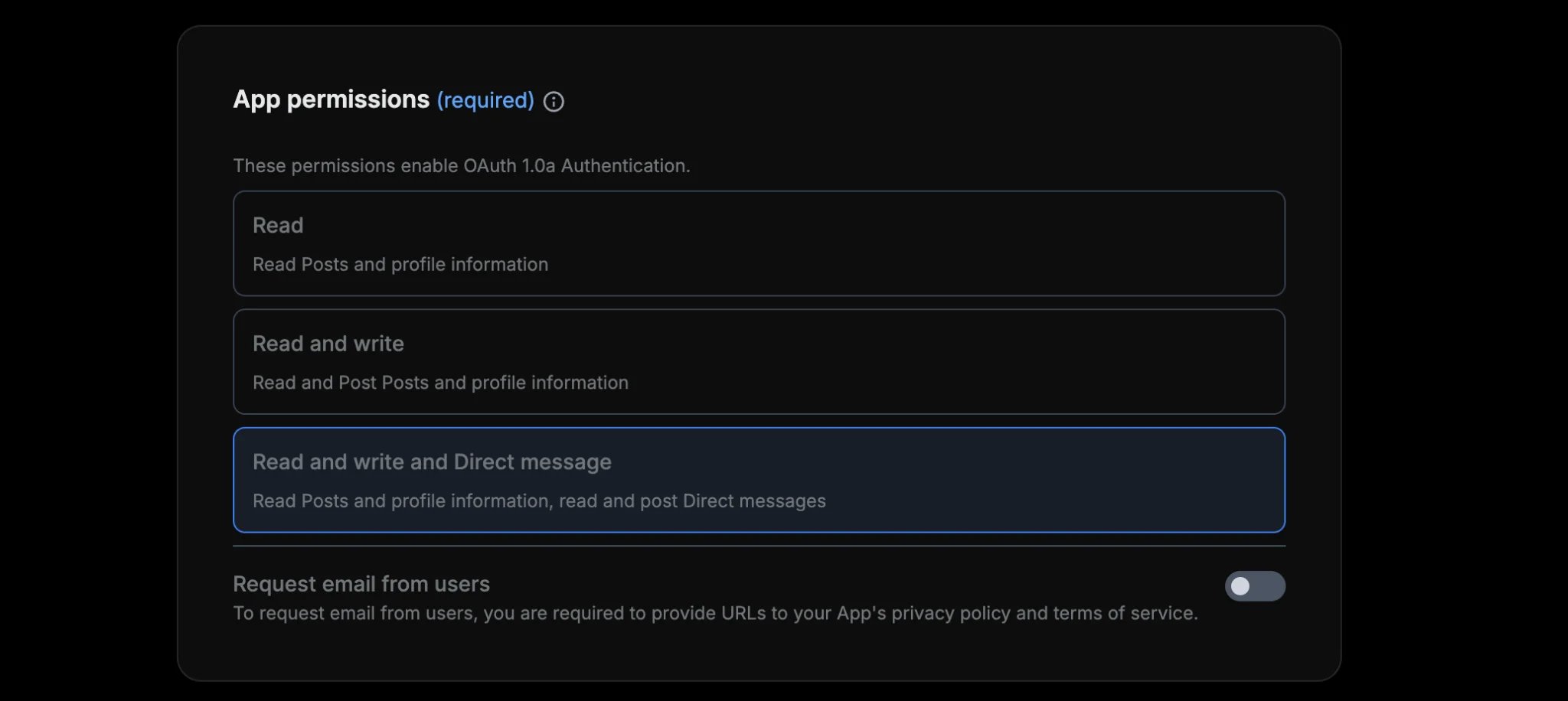
 Under **App permissions**, select **Read and write and Direct message**. This is required for full feature support, including posting and DMs.
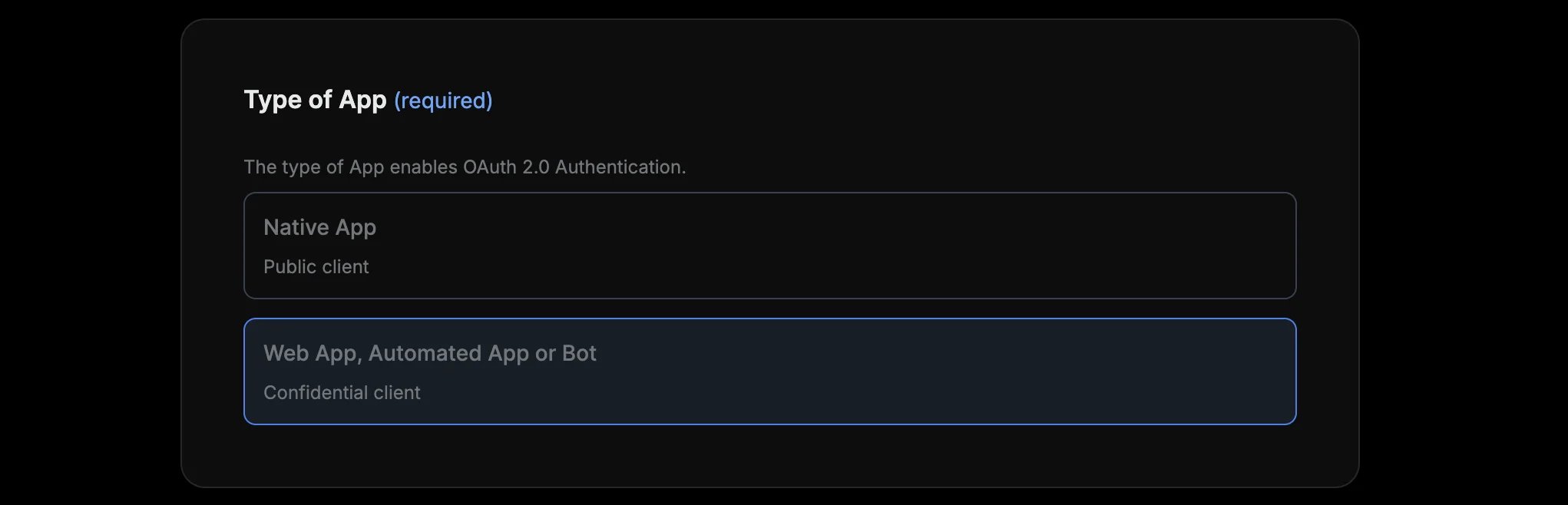
 Under **Type of App**, select **Web App, Automated App or Bot**. This is the right choice for server-side integrations like Ayrshare.
 Under **App info**:
* **Callback URL:** Add both of the following callback URLs:
* `https://profile.ayrshare.com/social-accounts`
* `https://app.ayrshare.com/social-accounts`
* **Website URL:** `https://app.ayrshare.com`
**Do not skip this step.** These callback URLs are required for the OAuth linking flow. When your end-users authorize the X connection, X redirects them back to one of these URLs to complete the linking process. If these are missing, the OAuth flow will fail with a `403 Callback URL not approved` error.
Under **App info**:
* **Callback URL:** Add both of the following callback URLs:
* `https://profile.ayrshare.com/social-accounts`
* `https://app.ayrshare.com/social-accounts`
* **Website URL:** `https://app.ayrshare.com`
**Do not skip this step.** These callback URLs are required for the OAuth linking flow. When your end-users authorize the X connection, X redirects them back to one of these URLs to complete the linking process. If these are missing, the OAuth flow will fail with a `403 Callback URL not approved` error.
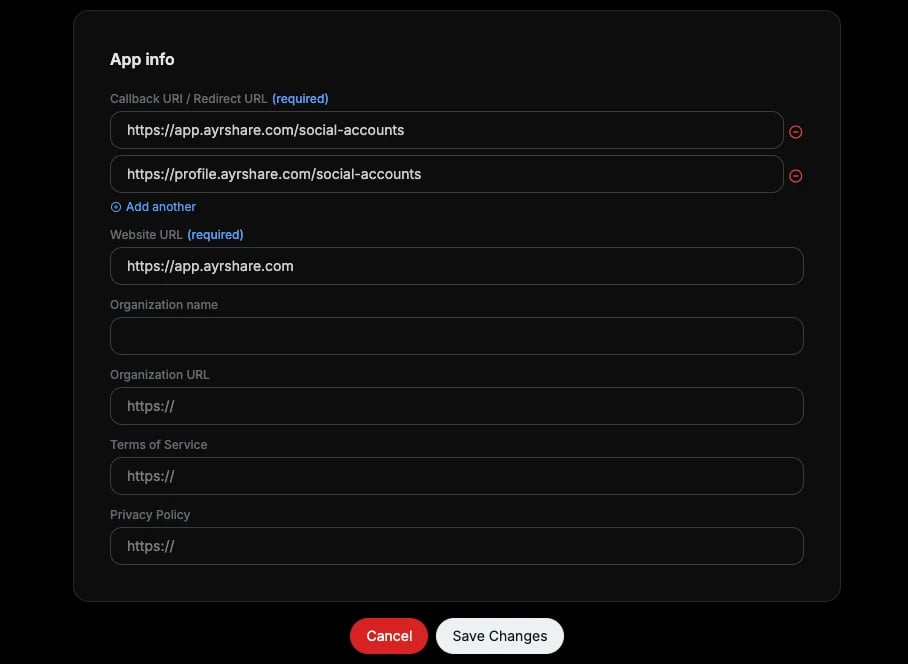 Click **Save**. You can ignore the OAuth 2.0 popup, since you will only be using 2 of the OAuth 1.0 keys (API Key and API Secret).
**Important: Set permissions before linking.** The permissions you choose here determine what your app can do. If you change permissions after linking your X account via OAuth, you'll need to re-link so the new Access Token inherits the updated permissions.
Click **Save**. You can ignore the OAuth 2.0 popup, since you will only be using 2 of the OAuth 1.0 keys (API Key and API Secret).
**Important: Set permissions before linking.** The permissions you choose here determine what your app can do. If you change permissions after linking your X account via OAuth, you'll need to re-link so the new Access Token inherits the updated permissions.
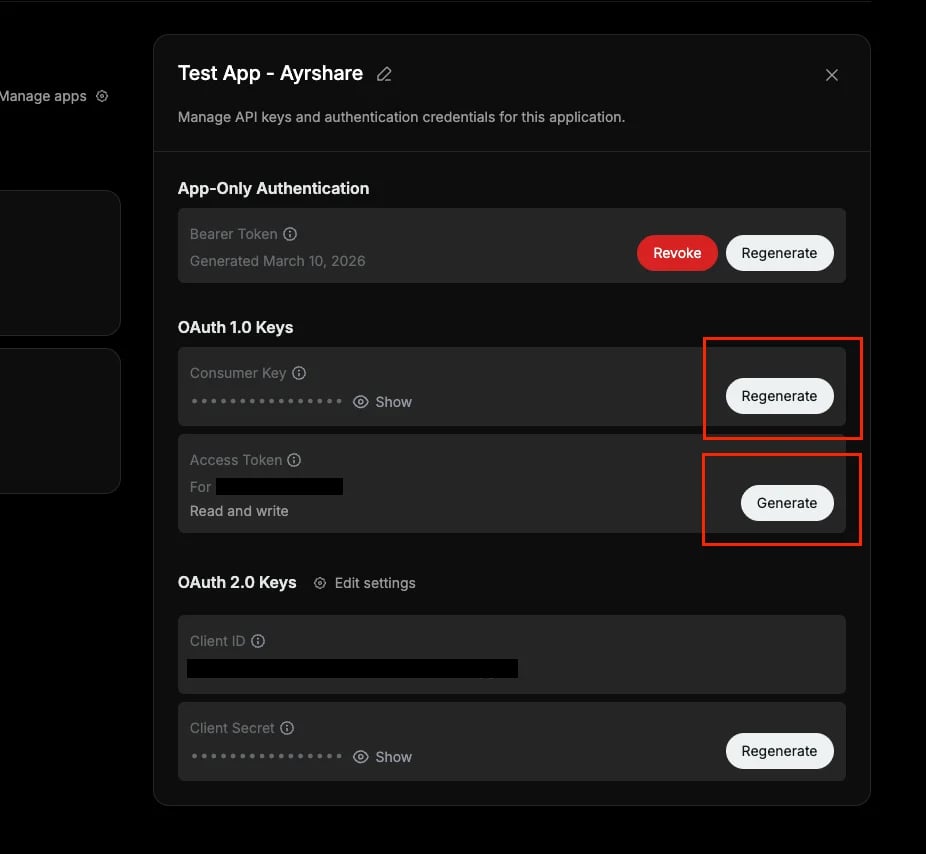 Please make sure you store these 2 keys:
1. **API Key** (aka Consumer Key, the X app identifier)
2. **API Secret** (aka Consumer Secret)
You do **NOT** need to manually generate Access Tokens. Ayrshare handles this automatically when you link your X account via OAuth.
## Step 4: Purchase X API Credits
X now uses credit-based API billing, purchased through the developer console.
In the Developer Console, click **Billing → Credits** in the left sidebar.
Please make sure you store these 2 keys:
1. **API Key** (aka Consumer Key, the X app identifier)
2. **API Secret** (aka Consumer Secret)
You do **NOT** need to manually generate Access Tokens. Ayrshare handles this automatically when you link your X account via OAuth.
## Step 4: Purchase X API Credits
X now uses credit-based API billing, purchased through the developer console.
In the Developer Console, click **Billing → Credits** in the left sidebar.
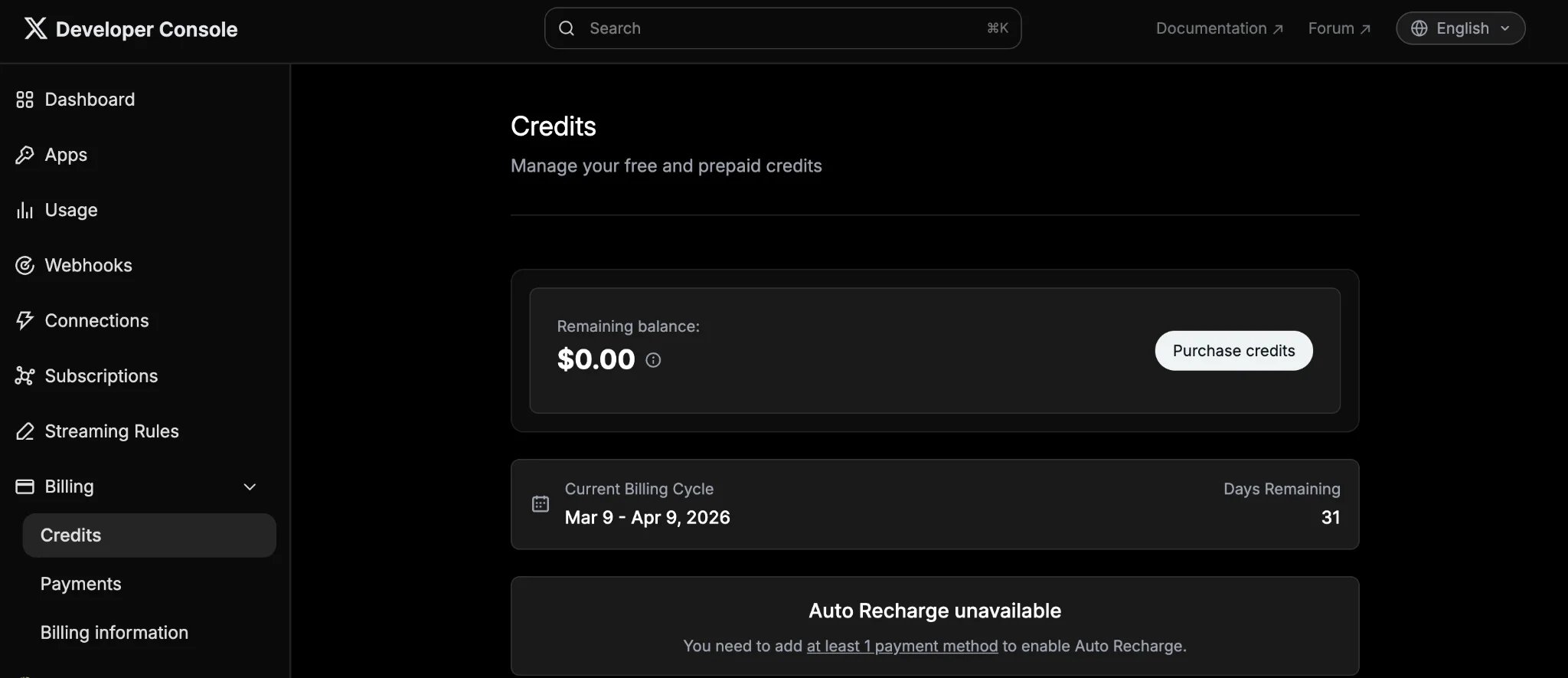 Purchase credits (the minimum is \$5, which is enough for hundreds of API calls). Each API call is a fraction of a penny, so the cost should be minimal for most users.
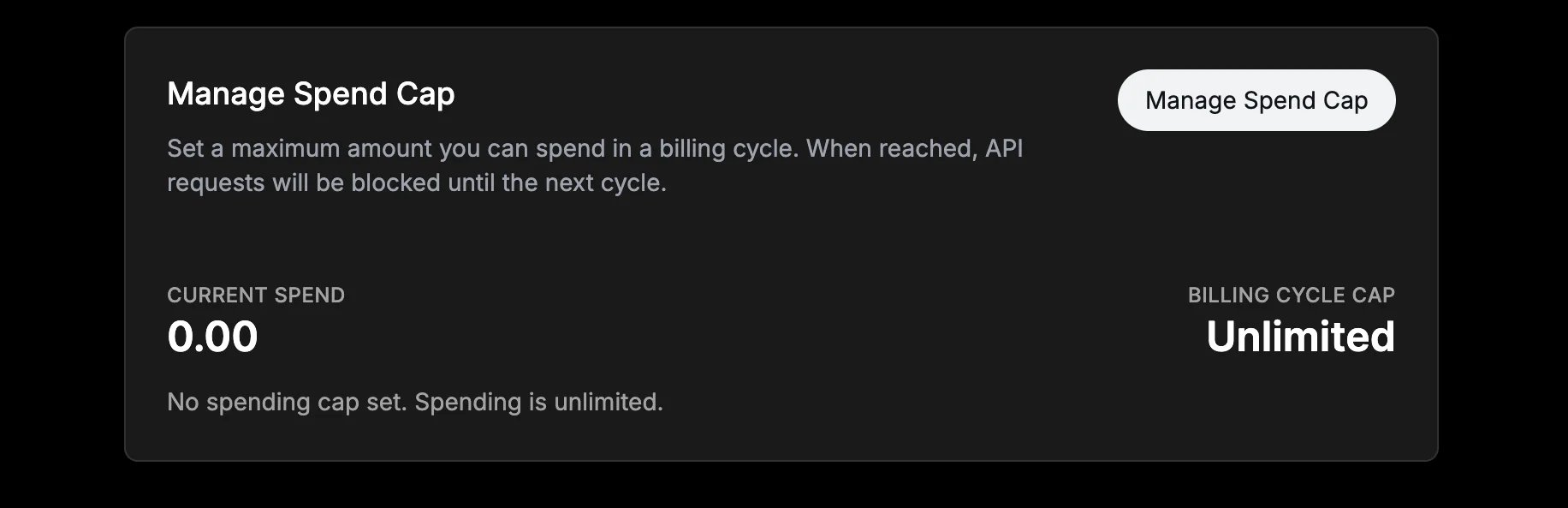
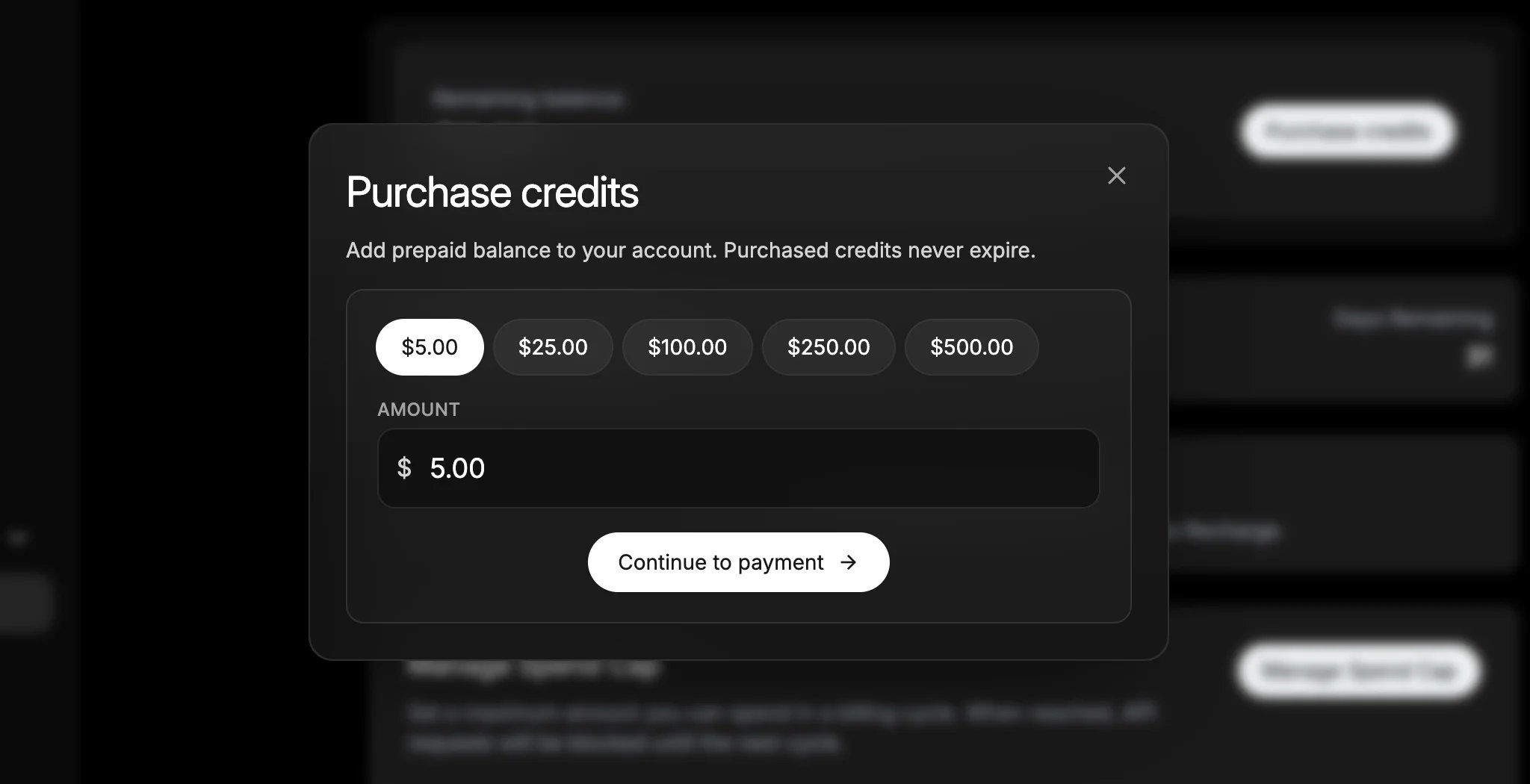 You can enable **auto-recharge** to avoid service interruptions, and manage your spend cap by setting a maximum amount you can spend in your billing cycle.
 **Your API calls will fail without credits.** X's API is pay-per-use. If your credit balance is zero, every API request will return a `402 CreditsDepleted` error with the message "Your enrolled account does not have any credits to fulfill this request." This includes posting, reading tweets, and user lookups. Load credits before testing your integration. See [How X API Pricing Works](#how-x-api-pricing-works) for a full update on X's pricing.
## Step 5: Update Your Ayrshare API Calls
In Step 3, you saved these 2 items securely in your own env, config, or secrets manager:
1. **API Key** (aka Consumer Key, the X app identifier)
2. **API Secret** (aka Consumer Secret)
Now, add your X credentials to the headers of your Ayrshare API calls.
**Your keys stay private.** Your API Key and API Secret are not stored by Ayrshare.
### Header Reference
| Header | Value |
| ----------------------------- | -------------------------------- |
| `X-Twitter-OAuth1-Api-Key` | API Key (Consumer Key) |
| `X-Twitter-OAuth1-Api-Secret` | API Key Secret (Consumer Secret) |
**How to tell if your permissions are wrong:**
* If your app permissions are misconfigured, your API request may return a `403 Forbidden` error with the message: "Your client app is not configured with the appropriate OAuth1 app permissions."
If you see this error, update your app permissions to **Read and write and Direct message** in the X Developer Console, then re-link your X account via OAuth so the new Access Token inherits the updated permissions.
### Code Examples
```bash cURL theme={"system"}
curl -X POST https://api.ayrshare.com/api/post \
-H "Authorization: Bearer YOUR_AYRSHARE_API_KEY" \
-H "X-Twitter-OAuth1-Api-Key: your_api_key" \
-H "X-Twitter-OAuth1-Api-Secret: your_api_secret" \
-H "Content-Type: application/json" \
-d '{"post": "Hello from my own X App!", "platforms": ["twitter"]}'
```
```javascript Node.js theme={"system"}
const response = await fetch("https://api.ayrshare.com/api/post", {
method: "POST",
headers: {
"Authorization": "Bearer YOUR_AYRSHARE_API_KEY",
"Content-Type": "application/json",
"X-Twitter-OAuth1-Api-Key": process.env.X_API_KEY,
"X-Twitter-OAuth1-Api-Secret": process.env.X_API_SECRET,
},
body: JSON.stringify({
post: "Hello from my own X App!",
platforms: ["twitter"],
}),
});
```
```python Python theme={"system"}
import os
import requests
headers = {
"Authorization": "Bearer YOUR_AYRSHARE_API_KEY",
"Content-Type": "application/json",
"X-Twitter-OAuth1-Api-Key": os.environ["X_API_KEY"],
"X-Twitter-OAuth1-Api-Secret": os.environ["X_API_SECRET"],
}
response = requests.post(
"https://api.ayrshare.com/api/post",
headers=headers,
json={"post": "Hello from my own X App!", "platforms": ["twitter"]},
)
```
Your existing automations and workflows will continue working as long as you include your API Key and API Secret headers in every request that targets X.
### Migrating Existing Profiles (Business & Enterprise)
If you have sub-profiles that are already linked to X through Ayrshare, those profiles need to re-link their X accounts after you switch to BYO keys. This is because the existing access tokens were issued under Ayrshare's X app and cannot be used with your consumer keys (OAuth 1.0a signatures are bound to the app that issued the token).
Add `twitterApiKey` and `twitterApiSecret` to your [generateJWT](/docs/apis/profiles/generate-jwt#body-parameters-13) call body. These are encrypted before being embedded in the JWT and are not exposed to your end users.
```json theme={"system"}
{
"domain": "your-domain",
"profileKey": "...",
"privateKey": "...",
"twitterApiKey": "YOUR_X_CONSUMER_KEY",
"twitterApiSecret": "YOUR_X_CONSUMER_SECRET"
}
```
This is the only request where your consumer keys go in the body. All other X requests use the headers described above.
After generating the JWT with the keys included, your users need to reconnect their X account through the profile linking page. The OAuth consent screen will now show your app name instead of Ayrshare's.
To streamline this, you can:
* Unlink accounts programmatically via the [Unlink API](/docs/apis/profiles/unlink-social-network#unlink-a-social-network), then have users re-authorize
* Use the [`logout` parameter](/docs/apis/profiles/generate-jwt#param-logout) in generateJWT to force a fresh login
* Use [`allowedSocial`](/docs/apis/profiles/generate-jwt#param-allowed-social) to show only X on the linking page during the migration flow
After re-linking, continue including `X-Twitter-OAuth1-Api-Key` and `X-Twitter-OAuth1-Api-Secret` headers on every API call (posting, analytics, comments, etc.).
Once a profile has re-linked under your X app, all subsequent posts for that profile will use your credentials. You can verify this by checking the Usage page in your [X Developer Console](https://console.x.com).
### Verify Your Setup
Make a test call through the Ayrshare API with your new headers to confirm everything is working. The [/analytics/social](/docs/apis/analytics/social) endpoint is a good lightweight test, since it won't create any posts.
## How X API Pricing Works
Previously, Ayrshare covered the cost of X's API usage on your behalf. Under X's current model, each Ayrshare customer maintains their own X Developer account and pays X directly for the API requests their application makes. (One X Developer account per Ayrshare account, not per end-user. All your sub-profiles share the same X Developer account and credit balance.)
X's pricing model is pay-per-use: you purchase credits in the X Developer Console, and they are deducted as API requests are made. No contracts or subscriptions are needed.
Typical operations are inexpensive. For example:
| Operation | Approximate cost |
| -------------------------------------- | ------------------------------------------------------------------------ |
| Creating a post (text only) | \~\$0.01 per post |
| Creating a post with media | \~\$0.02 per post (media upload and post creation are separate requests) |
| Reading a post | \~\$0.005 per read |
| User lookup | \~\$0.01 per lookup |
| Sending a DM | \~\$0.01 per message |
| Reading DM events | \~\$0.01 per event |
| User interactions (follow, like, etc.) | \~\$0.015 per request |
For context, if you're posting about 100 times per month, your direct X cost would likely be around \$1, and posts with media would be roughly \$2 per month.
X's pay-per-use pricing is currently in a pilot phase. Rates are subject to change, and additional costs may be introduced. Always check the Developer Console for the most current pricing. See [X's pricing information breakdown](https://docs.x.com/x-api/fundamentals/pricing).
We know this introduces a cost that didn't exist before, and we want to be transparent about that. At the same time, this model also unlocks several benefits that weren't possible under the previous shared-key setup.
## Benefits of Using Your Own X API Key
Using your own X API credentials provides more control and reliability than the previous shared-key model. This includes:
* **Branded OAuth experience:** Users see your app name and branding when authorizing X access.
* **Dedicated rate limits:** Your API usage is governed by your own X Developer account limits, separate from other Ayrshare users. You can monitor your usage in the [X Developer Console](https://console.x.com) and review the [X API rate limits documentation](https://developer.x.com/en/docs/x-api/rate-limits).
* **Credential control:** Your API Key and Secret stay in your own X Developer account. Ayrshare does not store your secret keys.
* **Portability:** Because users authenticate with your X App, your integration remains fully under your control.
* **Usage visibility:** Your X Developer dashboard shows API requests, rate limits, and credit usage.
X is the first platform requiring this model, but more platforms are moving toward "bring your own API key." We're expanding this capability across Ayrshare, so developers have the same control and independence across all social platforms.
## Security
* Your API Key and API Secret are not stored by Ayrshare.
* For general security best practices, see [X's authentication security guide](https://docs.x.com/resources/fundamentals/authentication).
## FAQ
**No.** You set up **one** X Developer App under your own X account, and the same **API Key + API Secret** are reused for every sub-profile / end-user you link under your Ayrshare account.
* You create the X Developer App **once**.
* You pass the same two headers (`X-Twitter-OAuth1-Api-Key` and `X-Twitter-OAuth1-Api-Secret`) on every Ayrshare API call, regardless of which sub-profile the call is for.
* Your end-users still each go through the OAuth linking flow to authorize their own X account, but they do **not** need their own X Developer App or API keys. They connect through your app.
* All sub-profiles share the same X Developer account, the same rate limits, and the same credit balance.
The only time you handle the keys per-profile is in the [generateJWT](/docs/apis/profiles/generate-jwt) body during migration, which is still your same two keys, just delivered to the linking page so end-users can re-authorize under your app.
Yes. As of March 31, 2026, all X operations through Ayrshare require your own X API credentials. If you haven't set up your X Developer account yet, follow the steps above.
Posting to X through Ayrshare requires your own X API credentials. Requests without valid BYO credentials are rejected. Posting to other platforms (Instagram, LinkedIn, Facebook, TikTok, etc.) is unaffected.
X charges per API call. Creating a post costs about \$0.01, and reading a post costs about \$0.005. For example, publishing 100 posts per month would cost roughly \$1. See [X's pricing page](https://docs.x.com/x-api/fundamentals/pricing) for the full details.
No. Your Ayrshare subscription price stays the same. The only additional cost is the X API usage fee billed directly by X through your developer account.
No. Your API Key and API Secret are not stored by Ayrshare. For general security best practices, see [X's authentication security guide](https://docs.x.com/resources/fundamentals/authentication).
Yes. You can use your existing X App as long as it has "Read and write" permissions enabled (and Direct Messages if you use DM features).
You'll need your API Key (Consumer Key) and API Secret (Consumer Secret) from the Keys and tokens section of the X Developer Console. Link your X account via OAuth, then include these 2 headers in your Ayrshare API requests.
If you've changed your app permissions since the initial setup, re-link your X account so the Access Token inherits the updated permissions.
You need your API Key (Consumer Key) and API Secret (Consumer Secret). See the [header reference table](#header-reference) above for exactly which Ayrshare header each one maps to. You can ignore the Client ID, Client Secret, Bearer Token, Access Token, and Access Token Secret.
They're completely different credentials for different authentication methods:
* **API Key** (also called "Consumer Key") is for OAuth 1.0a. API Key (Consumer Key) + API Secret is what Ayrshare uses. It works with all X features, tokens never expire, and no refresh logic is needed.
* **Client ID** is for OAuth 2.0. You do NOT need this for Ayrshare. OAuth 2.0 tokens expire after a short period and require refresh token management.
For Ayrshare, you only need your API Key and API Secret. You can ignore the Client ID, Client Secret, and Bearer Token.
OAuth 2.0 access tokens expire every 2 hours and X's refresh tokens are single-use (each refresh invalidates the old token). This makes it impossible to support a stateless BYO model, especially for scheduled posts. OAuth 1.0a tokens never expire, work with all X features, and require zero token management.
Yes. If your users linked X through Ayrshare before you set up BYO keys, they will need to reconnect. The existing access tokens were issued under Ayrshare's X app and won't work with your consumer keys. See [Migrating Existing Profiles](#migrating-existing-profiles-business--enterprise) above for the step-by-step process.
No. This change only affects posting to X. All other platform integrations in Ayrshare continue working as usual.
RSS auto-posting to X is no longer supported. RSS feeds run automatically on a schedule, but the bring-your-own API key model requires credentials to be provided with each API request. Because of this, RSS feeds cannot authenticate when the post is sent.
If you previously used RSS to post to X, we recommend switching to [scheduled posts](/docs/apis/post/overview#schedule-posts) or direct API calls that include your credentials. RSS auto-posting to all other platforms is unchanged.
This means your X Developer account has no API credits available. Go to [console.x.com](https://console.x.com) → **Billing → Credits** and purchase credits. Even \$5 is enough for hundreds of API calls. Once credits are loaded, retry your request.
Your Access Token doesn't have the right permissions. This usually means one of two things:
1. **Your app permissions are set to "Read" instead of "Read and write."** Go to your app's Settings in the Developer Console and change it to **Read and write and Direct message**.
2. **You changed permissions after linking your X account.** Access Tokens keep the permissions they were created with. Re-link your X account via OAuth so the new token inherits the updated permissions.
Our support team is happy to help. If you have any questions or run into issues during setup, please reach out via [support@ayrshare.com](mailto:support@ayrshare.com), and we'll walk you through the process.
## Troubleshooting
Make sure you're sending both required headers:
* `X-Twitter-OAuth1-Api-Key`
* `X-Twitter-OAuth1-Api-Secret`
If you see a pair-mismatch error (e.g., "You provided Api-Key but not Api-Secret"), it means one of the two is missing. Both are always required.
The error message will tell you which specific header is missing.
If you see this error when trying to link your X account, make sure you've added the required callback URLs to your X Developer App settings (under Authentication settings > Callback URI / Redirect URL):
* `https://profile.ayrshare.com/social-accounts`
* `https://app.ayrshare.com/social-accounts`
See the [Callback URL setup step](#step-3-configure-app-permissions) above.
Your X Developer account has no API credits loaded. Go to [console.x.com](https://console.x.com) → **Billing → Credits** and purchase credits. Even \$5 is enough for hundreds of API calls.
Your Access Token doesn't have the right permissions. This usually means:
1. **Your app permissions are set to "Read" instead of "Read and write."** Go to your app's Settings in the Developer Console and change it to **Read and write and Direct message**.
2. **You changed permissions after linking your X account.** Access Tokens keep the permissions they were created with. Re-link your X account via OAuth so the new token inherits the updated permissions.
## Need Help?
If you have any questions or run into issues while setting up your X API key, our engineering team is happy to help. You can reach us anytime at [support@ayrshare.com](mailto:support@ayrshare.com).
**Your API calls will fail without credits.** X's API is pay-per-use. If your credit balance is zero, every API request will return a `402 CreditsDepleted` error with the message "Your enrolled account does not have any credits to fulfill this request." This includes posting, reading tweets, and user lookups. Load credits before testing your integration. See [How X API Pricing Works](#how-x-api-pricing-works) for a full update on X's pricing.
## Step 5: Update Your Ayrshare API Calls
In Step 3, you saved these 2 items securely in your own env, config, or secrets manager:
1. **API Key** (aka Consumer Key, the X app identifier)
2. **API Secret** (aka Consumer Secret)
Now, add your X credentials to the headers of your Ayrshare API calls.
**Your keys stay private.** Your API Key and API Secret are not stored by Ayrshare.
### Header Reference
| Header | Value |
| ----------------------------- | -------------------------------- |
| `X-Twitter-OAuth1-Api-Key` | API Key (Consumer Key) |
| `X-Twitter-OAuth1-Api-Secret` | API Key Secret (Consumer Secret) |
**How to tell if your permissions are wrong:**
* If your app permissions are misconfigured, your API request may return a `403 Forbidden` error with the message: "Your client app is not configured with the appropriate OAuth1 app permissions."
If you see this error, update your app permissions to **Read and write and Direct message** in the X Developer Console, then re-link your X account via OAuth so the new Access Token inherits the updated permissions.
### Code Examples
```bash cURL theme={"system"}
curl -X POST https://api.ayrshare.com/api/post \
-H "Authorization: Bearer YOUR_AYRSHARE_API_KEY" \
-H "X-Twitter-OAuth1-Api-Key: your_api_key" \
-H "X-Twitter-OAuth1-Api-Secret: your_api_secret" \
-H "Content-Type: application/json" \
-d '{"post": "Hello from my own X App!", "platforms": ["twitter"]}'
```
```javascript Node.js theme={"system"}
const response = await fetch("https://api.ayrshare.com/api/post", {
method: "POST",
headers: {
"Authorization": "Bearer YOUR_AYRSHARE_API_KEY",
"Content-Type": "application/json",
"X-Twitter-OAuth1-Api-Key": process.env.X_API_KEY,
"X-Twitter-OAuth1-Api-Secret": process.env.X_API_SECRET,
},
body: JSON.stringify({
post: "Hello from my own X App!",
platforms: ["twitter"],
}),
});
```
```python Python theme={"system"}
import os
import requests
headers = {
"Authorization": "Bearer YOUR_AYRSHARE_API_KEY",
"Content-Type": "application/json",
"X-Twitter-OAuth1-Api-Key": os.environ["X_API_KEY"],
"X-Twitter-OAuth1-Api-Secret": os.environ["X_API_SECRET"],
}
response = requests.post(
"https://api.ayrshare.com/api/post",
headers=headers,
json={"post": "Hello from my own X App!", "platforms": ["twitter"]},
)
```
Your existing automations and workflows will continue working as long as you include your API Key and API Secret headers in every request that targets X.
### Migrating Existing Profiles (Business & Enterprise)
If you have sub-profiles that are already linked to X through Ayrshare, those profiles need to re-link their X accounts after you switch to BYO keys. This is because the existing access tokens were issued under Ayrshare's X app and cannot be used with your consumer keys (OAuth 1.0a signatures are bound to the app that issued the token).
Add `twitterApiKey` and `twitterApiSecret` to your [generateJWT](/docs/apis/profiles/generate-jwt#body-parameters-13) call body. These are encrypted before being embedded in the JWT and are not exposed to your end users.
```json theme={"system"}
{
"domain": "your-domain",
"profileKey": "...",
"privateKey": "...",
"twitterApiKey": "YOUR_X_CONSUMER_KEY",
"twitterApiSecret": "YOUR_X_CONSUMER_SECRET"
}
```
This is the only request where your consumer keys go in the body. All other X requests use the headers described above.
After generating the JWT with the keys included, your users need to reconnect their X account through the profile linking page. The OAuth consent screen will now show your app name instead of Ayrshare's.
To streamline this, you can:
* Unlink accounts programmatically via the [Unlink API](/docs/apis/profiles/unlink-social-network#unlink-a-social-network), then have users re-authorize
* Use the [`logout` parameter](/docs/apis/profiles/generate-jwt#param-logout) in generateJWT to force a fresh login
* Use [`allowedSocial`](/docs/apis/profiles/generate-jwt#param-allowed-social) to show only X on the linking page during the migration flow
After re-linking, continue including `X-Twitter-OAuth1-Api-Key` and `X-Twitter-OAuth1-Api-Secret` headers on every API call (posting, analytics, comments, etc.).
Once a profile has re-linked under your X app, all subsequent posts for that profile will use your credentials. You can verify this by checking the Usage page in your [X Developer Console](https://console.x.com).
### Verify Your Setup
Make a test call through the Ayrshare API with your new headers to confirm everything is working. The [/analytics/social](/docs/apis/analytics/social) endpoint is a good lightweight test, since it won't create any posts.
## How X API Pricing Works
Previously, Ayrshare covered the cost of X's API usage on your behalf. Under X's current model, each Ayrshare customer maintains their own X Developer account and pays X directly for the API requests their application makes. (One X Developer account per Ayrshare account, not per end-user. All your sub-profiles share the same X Developer account and credit balance.)
X's pricing model is pay-per-use: you purchase credits in the X Developer Console, and they are deducted as API requests are made. No contracts or subscriptions are needed.
Typical operations are inexpensive. For example:
| Operation | Approximate cost |
| -------------------------------------- | ------------------------------------------------------------------------ |
| Creating a post (text only) | \~\$0.01 per post |
| Creating a post with media | \~\$0.02 per post (media upload and post creation are separate requests) |
| Reading a post | \~\$0.005 per read |
| User lookup | \~\$0.01 per lookup |
| Sending a DM | \~\$0.01 per message |
| Reading DM events | \~\$0.01 per event |
| User interactions (follow, like, etc.) | \~\$0.015 per request |
For context, if you're posting about 100 times per month, your direct X cost would likely be around \$1, and posts with media would be roughly \$2 per month.
X's pay-per-use pricing is currently in a pilot phase. Rates are subject to change, and additional costs may be introduced. Always check the Developer Console for the most current pricing. See [X's pricing information breakdown](https://docs.x.com/x-api/fundamentals/pricing).
We know this introduces a cost that didn't exist before, and we want to be transparent about that. At the same time, this model also unlocks several benefits that weren't possible under the previous shared-key setup.
## Benefits of Using Your Own X API Key
Using your own X API credentials provides more control and reliability than the previous shared-key model. This includes:
* **Branded OAuth experience:** Users see your app name and branding when authorizing X access.
* **Dedicated rate limits:** Your API usage is governed by your own X Developer account limits, separate from other Ayrshare users. You can monitor your usage in the [X Developer Console](https://console.x.com) and review the [X API rate limits documentation](https://developer.x.com/en/docs/x-api/rate-limits).
* **Credential control:** Your API Key and Secret stay in your own X Developer account. Ayrshare does not store your secret keys.
* **Portability:** Because users authenticate with your X App, your integration remains fully under your control.
* **Usage visibility:** Your X Developer dashboard shows API requests, rate limits, and credit usage.
X is the first platform requiring this model, but more platforms are moving toward "bring your own API key." We're expanding this capability across Ayrshare, so developers have the same control and independence across all social platforms.
## Security
* Your API Key and API Secret are not stored by Ayrshare.
* For general security best practices, see [X's authentication security guide](https://docs.x.com/resources/fundamentals/authentication).
## FAQ
**No.** You set up **one** X Developer App under your own X account, and the same **API Key + API Secret** are reused for every sub-profile / end-user you link under your Ayrshare account.
* You create the X Developer App **once**.
* You pass the same two headers (`X-Twitter-OAuth1-Api-Key` and `X-Twitter-OAuth1-Api-Secret`) on every Ayrshare API call, regardless of which sub-profile the call is for.
* Your end-users still each go through the OAuth linking flow to authorize their own X account, but they do **not** need their own X Developer App or API keys. They connect through your app.
* All sub-profiles share the same X Developer account, the same rate limits, and the same credit balance.
The only time you handle the keys per-profile is in the [generateJWT](/docs/apis/profiles/generate-jwt) body during migration, which is still your same two keys, just delivered to the linking page so end-users can re-authorize under your app.
Yes. As of March 31, 2026, all X operations through Ayrshare require your own X API credentials. If you haven't set up your X Developer account yet, follow the steps above.
Posting to X through Ayrshare requires your own X API credentials. Requests without valid BYO credentials are rejected. Posting to other platforms (Instagram, LinkedIn, Facebook, TikTok, etc.) is unaffected.
X charges per API call. Creating a post costs about \$0.01, and reading a post costs about \$0.005. For example, publishing 100 posts per month would cost roughly \$1. See [X's pricing page](https://docs.x.com/x-api/fundamentals/pricing) for the full details.
No. Your Ayrshare subscription price stays the same. The only additional cost is the X API usage fee billed directly by X through your developer account.
No. Your API Key and API Secret are not stored by Ayrshare. For general security best practices, see [X's authentication security guide](https://docs.x.com/resources/fundamentals/authentication).
Yes. You can use your existing X App as long as it has "Read and write" permissions enabled (and Direct Messages if you use DM features).
You'll need your API Key (Consumer Key) and API Secret (Consumer Secret) from the Keys and tokens section of the X Developer Console. Link your X account via OAuth, then include these 2 headers in your Ayrshare API requests.
If you've changed your app permissions since the initial setup, re-link your X account so the Access Token inherits the updated permissions.
You need your API Key (Consumer Key) and API Secret (Consumer Secret). See the [header reference table](#header-reference) above for exactly which Ayrshare header each one maps to. You can ignore the Client ID, Client Secret, Bearer Token, Access Token, and Access Token Secret.
They're completely different credentials for different authentication methods:
* **API Key** (also called "Consumer Key") is for OAuth 1.0a. API Key (Consumer Key) + API Secret is what Ayrshare uses. It works with all X features, tokens never expire, and no refresh logic is needed.
* **Client ID** is for OAuth 2.0. You do NOT need this for Ayrshare. OAuth 2.0 tokens expire after a short period and require refresh token management.
For Ayrshare, you only need your API Key and API Secret. You can ignore the Client ID, Client Secret, and Bearer Token.
OAuth 2.0 access tokens expire every 2 hours and X's refresh tokens are single-use (each refresh invalidates the old token). This makes it impossible to support a stateless BYO model, especially for scheduled posts. OAuth 1.0a tokens never expire, work with all X features, and require zero token management.
Yes. If your users linked X through Ayrshare before you set up BYO keys, they will need to reconnect. The existing access tokens were issued under Ayrshare's X app and won't work with your consumer keys. See [Migrating Existing Profiles](#migrating-existing-profiles-business--enterprise) above for the step-by-step process.
No. This change only affects posting to X. All other platform integrations in Ayrshare continue working as usual.
RSS auto-posting to X is no longer supported. RSS feeds run automatically on a schedule, but the bring-your-own API key model requires credentials to be provided with each API request. Because of this, RSS feeds cannot authenticate when the post is sent.
If you previously used RSS to post to X, we recommend switching to [scheduled posts](/docs/apis/post/overview#schedule-posts) or direct API calls that include your credentials. RSS auto-posting to all other platforms is unchanged.
This means your X Developer account has no API credits available. Go to [console.x.com](https://console.x.com) → **Billing → Credits** and purchase credits. Even \$5 is enough for hundreds of API calls. Once credits are loaded, retry your request.
Your Access Token doesn't have the right permissions. This usually means one of two things:
1. **Your app permissions are set to "Read" instead of "Read and write."** Go to your app's Settings in the Developer Console and change it to **Read and write and Direct message**.
2. **You changed permissions after linking your X account.** Access Tokens keep the permissions they were created with. Re-link your X account via OAuth so the new token inherits the updated permissions.
Our support team is happy to help. If you have any questions or run into issues during setup, please reach out via [support@ayrshare.com](mailto:support@ayrshare.com), and we'll walk you through the process.
## Troubleshooting
Make sure you're sending both required headers:
* `X-Twitter-OAuth1-Api-Key`
* `X-Twitter-OAuth1-Api-Secret`
If you see a pair-mismatch error (e.g., "You provided Api-Key but not Api-Secret"), it means one of the two is missing. Both are always required.
The error message will tell you which specific header is missing.
If you see this error when trying to link your X account, make sure you've added the required callback URLs to your X Developer App settings (under Authentication settings > Callback URI / Redirect URL):
* `https://profile.ayrshare.com/social-accounts`
* `https://app.ayrshare.com/social-accounts`
See the [Callback URL setup step](#step-3-configure-app-permissions) above.
Your X Developer account has no API credits loaded. Go to [console.x.com](https://console.x.com) → **Billing → Credits** and purchase credits. Even \$5 is enough for hundreds of API calls.
Your Access Token doesn't have the right permissions. This usually means:
1. **Your app permissions are set to "Read" instead of "Read and write."** Go to your app's Settings in the Developer Console and change it to **Read and write and Direct message**.
2. **You changed permissions after linking your X account.** Access Tokens keep the permissions they were created with. Re-link your X account via OAuth so the new token inherits the updated permissions.
## Need Help?
If you have any questions or run into issues while setting up your X API key, our engineering team is happy to help. You can reach us anytime at [support@ayrshare.com](mailto:support@ayrshare.com).