> ## Documentation Index
> Fetch the complete documentation index at: https://www.ayrshare.com/docs/llms.txt
> Use this file to discover all available pages before exploring further.

# अपने Social Media Accounts कनेक्ट करें | Ayrshare Dashboard

> जानें कि Facebook, Instagram, X, LinkedIn, TikTok, और अधिक को Ayrshare Dashboard से कैसे लिंक करें ताकि आप मिनटों में पोस्ट शेड्यूल और प्रकाशित करना शुरू कर सकें।

## Web Dashboard के माध्यम से Linking और Posting

Ayrshare Dashboard के माध्यम से अपने सोशल मीडिया अकाउंट्स को कैसे लिंक और पोस्ट करें।

<div class="video-container">
  <iframe width="560" height="315" src="https://www.youtube.com/embed/Aav2Njv-AkY" title="Linking and Posting via the Ayrshare Dashboard" frameborder="0" allow="accelerometer; autoplay; clipboard-write; encrypted-media; gyroscope; picture-in-picture" />
</div>

### एक Social Media Network को कैसे Link करें

अपने सोशल मीडिया अकाउंट्स को कनेक्ट करना कुछ क्लिक्स के साथ आसान है।

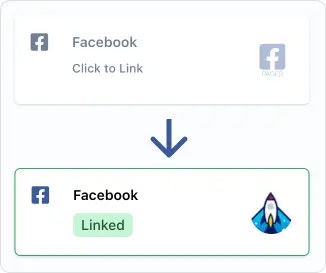
Social Account linkage पेज पर, या एकाधिक उपयोगकर्ताओं का प्रबंधन करने के लिए उपयोग किए जाने वाले user profile के [social account linking page](/multiple-users/user-integration#user-experience) पर, बस उस सोशल नेटवर्क पर क्लिक या टैप करें जिसे आप कनेक्ट करना चाहते हैं। फिर आपको एक pop-up या पेज redirect के माध्यम से Ayrshare तक पहुँच अधिकृत करने के लिए कहा जाएगा।

<img src="https://mintcdn.com/ayrshare-docs/BkNwRAXLA9nG0LQA/images/dashboard/link.webp?fit=max&auto=format&n=BkNwRAXLA9nG0LQA&q=85&s=dfb1f4a9936c8a7a174cc5749963ab08" alt="Click to link" width="245" class="center" data-path="images/dashboard/link.webp" />

<Info>
  कृपया authorization के दौरान Ayrshare द्वारा अनुरोधित सभी अनुमतियाँ प्रदान करें। अनुमतियाँ हटाने से
  सोशल नेटवर्क्स या Ayrshare के APIs पर अप्रत्याशित समस्याएँ हो सकती हैं। साथ ही अपने ब्राउज़र में
  pop-ups की अनुमति दें।
</Info>

एक बार सोशल नेटवर्क अधिकृत हो जाने के बाद, आपको अपना अकाउंट लोगो दिखाई देगा और हरा "Linked" pill दिखाई देगा, जो इंगित करता है कि आपका लिंक सक्रिय है।

### एक Social Network को कैसे Un-Link करें

बस हरे "Linked" pill पर टैप करें और आपको अकाउंट को unlink करने के लिए कहा जाएगा।

नेटवर्क पर पहले से भेजी गई पोस्ट अप्रभावित रहेंगी। हालांकि, भविष्य की scheduled पोस्ट और नई पोस्ट तब तक नहीं भेजी जाएंगी जब तक नेटवर्क का लिंक फिर से स्थापित नहीं हो जाता।

### अतिरिक्त सहायता

#### एक Page या Brand चुनें

<ul class="custom-bullets">
  <li>
    कुछ सोशल नेटवर्क्स आपसे एक अकाउंट या ब्रांड चुनने के लिए कहेंगे। उदाहरण के लिए, यदि आपके पास
    एकाधिक Facebook Pages हैं, तो आपको चुनने का विकल्प दिया जाएगा कि कौन सा Page लिंक करना है।
  </li>
</ul>

### अतिरिक्त Linking Guides

<CardGroup cols={2}>
  <Card title="Bluesky Linking" href="/dashboard/connect-social-accounts/bluesky" icon="bluesky" />

  <Card title="Facebook Linking" href="/dashboard/connect-social-accounts/facebook" icon="facebook" />

  <Card title="Instagram Linking" href="/dashboard/connect-social-accounts/instagram" icon="instagram" />

  <Card title="Google Business Linking" href="/dashboard/connect-social-accounts/google-business" icon="google" />

  <Card title="Linkedin Linking" href="/dashboard/connect-social-accounts/linkedin" icon="linkedin" />

  <Card title="Pinterest Linking" href="/dashboard/connect-social-accounts/pinterest" icon="pinterest" />

  <Card title="Reddit Linking" href="/dashboard/connect-social-accounts/reddit" icon="reddit" />

  <Card title="Telegram Linking" href="/dashboard/connect-social-accounts/telegram" icon="telegram" />

  <Card title="Threads Linking" href="/dashboard/connect-social-accounts/threads" icon="threads" />

  <Card title="Snapchat Linking" href="/dashboard/connect-social-accounts/snapchat" icon="snapchat" />

  <Card title="TikTok Linking" href="/dashboard/connect-social-accounts/tiktok" icon="tiktok" />

  <Card title="YouTube Linking" href="/dashboard/connect-social-accounts/youtube" icon="youtube" />

  <Card title="X/Twitter Linking (31 मार्च, 2026 को retiring)" href="/dashboard/connect-social-accounts/x-twitter" icon="x" />

  <Card title="अपनी स्वयं की X API Key सेट अप करें" href="/dashboard/connect-social-accounts/x-twitter-byo-keys" icon="x" />
</CardGroup>
