> ## Documentation Index
> Fetch the complete documentation index at: https://www.ayrshare.com/docs/llms.txt
> Use this file to discover all available pages before exploring further.
# क्विक स्टार्ट गाइड
> अपने सोशल अकाउंट्स लिंक करें और कुछ ही मिनटों में अपना पहला पोस्ट भेजें।
यह गाइड एक ही कंपनी को सेटअप करने के लिए है। कई उपयोगकर्ताओं वाले Business और Enterprise Plan सब्सक्रिप्शन के लिए, एक व्यक्तिगत इंटीग्रेशन गाइड प्रदान की जाती है।
## अपने सोशल मीडिया अकाउंट्स कनेक्ट करें
अपने [Ayrshare अकाउंट](https://app.ayrshare.com/) में लॉग इन करें या साइन अप करें।
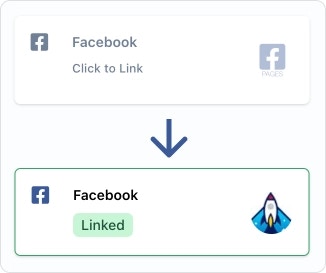
Social Account पृष्ठ पर, उन सोशल नेटवर्क्स पर क्लिक करें जिन्हें आप कनेक्ट करना चाहते हैं।
कृपया सुनिश्चित करें कि आप सभी अनुमतियाँ प्रदान कर रहे हैं।
## अपनी API Key प्राप्त करें
API endpoints तक पहुँच को अधिकृत करने के लिए एक API Key आवश्यक है।
यह key आपके requests के header में उपयोग की जाती है, और इसके पहले `Bearer` कीवर्ड होना चाहिए।
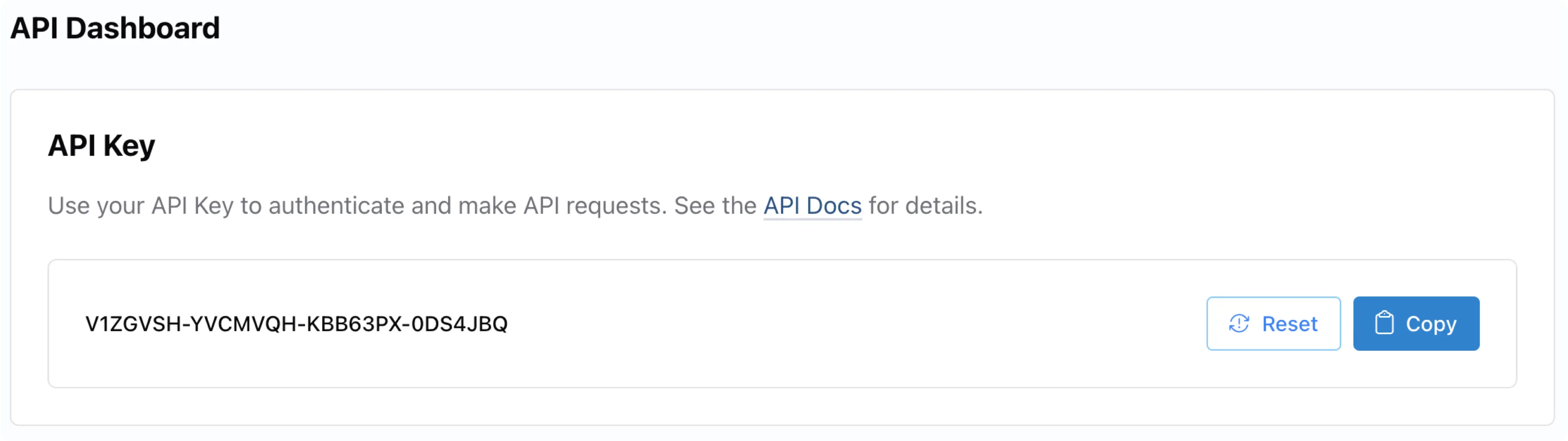
आपकी API Key [Ayrshare Dashboard](https://app.ayrshare.com/) के भीतर **API Key** पृष्ठ पर स्थित है। यदि आवश्यक हो, तो **User Profiles** पृष्ठ के माध्यम से अपने 'Primary Profile' पर स्विच करें।
वहाँ से, आप बाएँ हाथ के साइड पैनल में **API Key** पृष्ठ पा सकते हैं।
प्रत्येक API call में `Bearer` Token का उपयोग करके Header में API Key शामिल होनी चाहिए। साथ ही `application/json` का `Content-Type` भी शामिल करें।
```json Header theme={"system"}
"Authorization": "Bearer API_KEY",
"Content-Type": "application/json"
```
अधिक जानकारी के लिए [Authorization](/apis/overview#authorization) देखें।
## अपना पहला API पोस्ट भेजें
### पोस्ट प्रकाशित करना
नीचे कोड उदाहरण दिए गए हैं जो दिखाते हैं कि विभिन्न प्रोग्रामिंग भाषाओं में हमारे API का उपयोग करके पोस्ट कैसे किया जाए।
और भी आसान इंटीग्रेशन के लिए, आप हमारे पूर्व-निर्मित [SDK पैकेजों](/packages-guides/overview) में से किसी एक का उपयोग कर सकते हैं।
पोस्ट करने के लिए, आपको आवश्यकता होगी:
प्रमाणीकरण के लिए आपकी [API Key](/apis/overview#authorization)।
आपके पोस्ट की टेक्स्ट सामग्री।
वे सोशल मीडिया प्लेटफ़ॉर्म्स जिन पर आप पोस्ट करना चाहते हैं (केवल उन्हीं प्लेटफ़ॉर्म्स को शामिल करें जिन्हें आपने लिंक किया है)।
वैकल्पिक: कोई भी छवियों या वीडियो के URLs जिन्हें आप शामिल करना चाहते हैं।
सभी उदाहरण [/post](/apis/post/post) endpoint का उपयोग करते हैं। आइए कुछ सैंपल कोड देखें:
**X/Twitter पर पोस्ट कर रहे हैं?** X के लिए आपके स्वयं के API credentials आवश्यक हैं। अपने request में 2 BYO headers (`X-Twitter-OAuth1-Api-Key` और `X-Twitter-OAuth1-Api-Secret`) जोड़ें। यह **प्रति Ayrshare अकाउंट एक बार का सेटअप** है, और वही key pair प्रत्येक sub-profile / end-user के लिए काम करता है। विवरण के लिए [सेटअप गाइड](/dashboard/connect-social-accounts/x-twitter-byo-keys) देखें।
```bash cURL theme={"system"}
curl \
-H "Authorization: Bearer API_KEY" \
-H 'Content-Type: application/json' \
-d '{
"post": "Today is a great day!",
"platforms": ["facebook", "instagram", "linkedin"],
"mediaUrls": ["https://img.ayrshare.com/012/gb.jpg"]
}' \
-X POST https://api.ayrshare.com/api/post
```
```javascript JavaScript theme={"system"}
const API_KEY = "API_KEY";
fetch("https://api.ayrshare.com/api/post", {
method: "POST",
headers: {
"Content-Type": "application/json",
"Authorization": `Bearer ${API_KEY}`
},
body: JSON.stringify({
post: "Today is a great day!", // required
platforms: ["bluesky", "facebook", "instagram", "linkedin"], // required
mediaUrls: ["https://img.ayrshare.com/012/gb.jpg"] //optional
}),
})
.then((res) => res.json())
.then((json) => console.log(json))
.catch(console.error);
```
```python Python theme={"system"}
import requests
payload = {'post': 'Today is a great day!',
'platforms': ['bluesky', 'facebook', 'instagram', 'linkedin'],
'mediaUrls': ['https://img.ayrshare.com/012/gb.jpg']}
headers = {'Content-Type': 'application/json',
'Authorization': 'Bearer API_KEY'}
r = requests.post('https://api.ayrshare.com/api/post',
json=payload,
headers=headers)
print(r.json())
```
```php PHP theme={"system"}
"Today is a great day!",
"platforms" => ["bluesky", "facebook", "instagram", "linkedin", "pinterest"],
"mediaUrls" => ["https://img.ayrshare.com/012/gb.jpg"]
];
curl_setopt_array($curl, [
CURLOPT_URL => 'https://api.ayrshare.com/api/post',
CURLOPT_RETURNTRANSFER => true,
CURLOPT_POST => true,
CURLOPT_POSTFIELDS => json_encode($data),
CURLOPT_HTTPHEADER => [
'Authorization: Bearer API_KEY', // Replace 'API_KEY' with your actual API key
'Content-Type: application/json'
],
]);
$response = curl_exec($curl);
curl_close($curl);
echo $response;
```
```go Go theme={"system"}
package main
import (
"bytes"
"encoding/json"
"log"
"net/http"
)
func main() {
message := map[string]interface{}{
"post": "Today is a great day!",
"platforms": []string{"bluesky", "facebook", "instagram", "linkedin"},
"mediaUrls": []string{"https://img.ayrshare.com/012/gb.jpg"}
}
bytesRepresentation, err := json.Marshal(message)
if err != nil {
log.Fatalln(err)
}
req, _ := http.NewRequest("POST", "https://api.ayrshare.com/api/post",
bytes.NewBuffer(bytesRepresentation))
req.Header.Add("Content-Type", "application/json; charset=UTF-8")
req.Header.Add("Authorization", "Bearer API_KEY")
res, err := http.DefaultClient.Do(req)
if err != nil {
log.Fatal("Error:", err)
}
res.Body.Close()
}
```
```csharp C# theme={"system"}
using System;
using System.Net.Http;
using System.Text;
using System.Threading.Tasks;
namespace PostPOSTRequest_csharp
{
class Post
{
private static readonly HttpClient client = new HttpClient();
static async Task Main(string[] args)
{
string API_KEY = "API_KEY";
string url = "https://api.ayrshare.com/api/post";
// Set up request headers
client.DefaultRequestHeaders.Add("Authorization", "Bearer " + API_KEY);
// Prepare JSON content
string json = "{\"post\" : \"Today is a great day!\","
+ "\"platforms\" : [ \"bluesky\", \"facebook\", \"instagram\", \"linkedin\" ],"
+ "\"mediaUrls\" : [ \"https://img.ayrshare.com/012/gb.jpg\" ]}";
var content = new StringContent(json, Encoding.UTF8, "application/json");
try
{
// Send POST request
HttpResponseMessage response = await client.PostAsync(url, content);
response.EnsureSuccessStatusCode();
// Read response
string responseBody = await response.Content.ReadAsStringAsync();
Console.WriteLine(responseBody);
}
catch (HttpRequestException e)
{
Console.WriteLine($"Error: {e.Message}");
}
}
}
}
```
```ruby Ruby theme={"system"}
require 'httparty' # gem install httparty
res = HTTParty.post("https://api.ayrshare.com/api/post",
headers: {Authorization: "Bearer API_KEY"},
body: {
post: "Today is a great day!",
platforms: ['bluesky', 'facebook', 'instagram', 'linkedin'],
mediaUrls: ["https://img.ayrshare.com/012/gb.jpg"]
}).body
puts res
```
बधाई हो! आपने अभी-अभी अपना पहला पोस्ट भेजा है।
### पोस्ट रिस्पॉन्स
जब हमारा API आपकी पोस्ट को सफलतापूर्वक process करता है, तो आपको "success" के `status` के साथ एक response प्राप्त होगा। response में शामिल हैं:
`status`: API call की समग्र स्थिति ("success" या "error")
`errors`: आने वाली किसी भी errors की array (सफल होने पर खाली)
`postIds`: प्लेटफ़ॉर्म-विशिष्ट विवरण वाले objects की array:
प्लेटफ़ॉर्म का नाम
उस प्लेटफ़ॉर्म पर पोस्ट ID
पोस्ट देखने के लिए URL
अतिरिक्त प्लेटफ़ॉर्म-विशिष्ट जानकारी
`postIds` array में प्रत्येक प्लेटफ़ॉर्म का अपना status होगा, जिससे आप यह सत्यापित कर सकते हैं कि किन प्लेटफ़ॉर्म्स ने आपके पोस्ट को सफलतापूर्वक प्राप्त किया।
यह सुनिश्चित करने के लिए अपने सोशल मीडिया पृष्ठ जाँच करें कि पोस्ट सफलतापूर्वक process हुआ और लाइव है। ध्यान दें कि कुछ प्लेटफ़ॉर्म्स पर पोस्ट सार्वजनिक रूप से दिखने में थोड़ी देरी हो सकती है।
यहाँ एक सैंपल response है:
```json Post Response theme={"system"}
{
"status": "success",
"errors": [],
"postIds": [
{
"status": "success",
"id": "738681876342836_1530521371228093",
"postUrl": "https://www.facebook.com/738681876342836/posts/1530521371228093",
"platform": "facebook"
},
{
"status": "success",
"id": "18008340650526653",
"postUrl": "https://www.instagram.com/p/DGf4hgZObR0/",
"usedQuota": 1,
"platform": "instagram"
},
{
"status": "success",
"id": "urn:li:share:7300150903578275840",
"postUrl": "https://www.linkedin.com/feed/update/urn:li:share:7300150903578275840",
"owner": "urn:li:organization:66755239",
"platform": "linkedin"
}
],
"id": "K0DmYRgugS5P694it",
"refId": "d93ca2784c9bf7bf83e0bf081d16c91598",
"post": "Today is a great day!"
}
```
Node.js, Python, PHP, Golang, C#, और Ruby में सोशल मीडिया API कॉल करने के अधिक कोड उदाहरण, और साथ ही अन्य शानदार क्षमताएँ देखें:
### थोड़ी गहराई में जाना
आइए इस API call को करने पर जो हुआ, उसकी प्रक्रिया को समझते हैं।
हमने Header Authorization bearer token (API Key) और json का content type सेट किया।
इसके बाद, हमने एक body object बनाया:
टेक्स्ट "Today is a great day!" युक्त पोस्ट।
Facebook, Instagram, और LinkedIn के सोशल नेटवर्क प्लेटफ़ॉर्म्स।
आपको केवल उन्हीं प्लेटफ़ॉर्म्स को शामिल करना चाहिए जिन्हें आपने Social Linkage
Page में लिंक किया है।
mediaUrls में एक छवि जोड़ी।
सब कुछ HTTP POST के रूप में /post endpoint पर भेजा।
## जाने से पहले, कुछ बेहतरीन प्रथाएँ
### दस्तावेज़ पढ़ें
हम विस्तृत और अद्यतन दस्तावेज़ीकरण बनाए रखते हैं। चूँकि आप पहले से यहाँ हैं, बाएँ नेविगेशन में डॉक्स के अनुभागों को देखने में कुछ समय बिताएँ।
### Error Codes महत्वपूर्ण हैं
आपको उन्हें हैंडल करने की आवश्यकता है ताकि आपके उपयोगकर्ताओं का अनुभव शानदार हो।
### अपनी API Key सुरक्षित रखें
हम सुरक्षा को बहुत गंभीरता से लेते हैं, और आपको भी लेनी चाहिए। Ayrshare और आपके सोशल मीडिया अकाउंट्स के बीच कनेक्शन पर आपका पूरा नियंत्रण है। एक बार जब अकाउंट्स कनेक्ट हो जाते हैं, तो Ayrshare API key वह तरीका बन जाती है जिससे आप प्रमाणीकरण करते हैं। कृपया इस key को गुप्त और सुरक्षित रखें।
### टेस्ट पोस्ट प्रकाशित करें
आप [/post endpoint](/apis/post/post) में `randomPost`, `randomMediaUrl`, और `isLandscapeVideo` या `isPortraitVideo` parameters का उपयोग करके यादृच्छिक उद्धरण, छवि, या वीडियो के साथ टेस्ट पोस्ट प्रकाशित कर सकते हैं। यदि आप `randomPost` का उपयोग करते हैं, तो `post` parameter आवश्यक नहीं है।
ये पोस्ट आपके सोशल मीडिया पृष्ठों पर लाइव हैं, इसलिए यदि उचित हो, तो टेस्टिंग के बाद उन्हें हटा दें।
#### यादृच्छिक उद्धरण
पोस्ट प्रकाशित करने के परीक्षण के लिए `randomPost: true` जोड़कर एक यादृच्छिक उद्धरण भेजें।
[/post](/apis/post/post) endpoint के साथ उपयोग किया जाता है।
```json theme={"system"}
"randomPost": true
```
#### यादृच्छिक छवि
`randomMediaUrl: true` जोड़कर एक यादृच्छिक छवि भेजें।
[/post](/apis/post/post) endpoint के साथ उपयोग किया जाता है।
```json theme={"system"}
"randomMediaUrl": true
```
#### यादृच्छिक वीडियो
`isVideo: true` और `isLandscapeVideo: true` जोड़कर एक यादृच्छिक landscape वीडियो भेजें।
वीडियो मानक landscape आकार का होगा।
[/post](/apis/post/post) endpoint के साथ उपयोग किया जाता है।
```json theme={"system"}
"randomMediaUrl": true,
"isLandscapeVideo": true
```
TikTok या Facebook/Instagram Reels के लिए आवश्यक एक यादृच्छिक portrait वीडियो भेजें, `isVideo: true` और `isPortraitVideo: true` जोड़कर।
[/post](/apis/post/post) endpoint के साथ उपयोग किया जाता है।
```json theme={"system"}
"randomMediaUrl": true,
"isPortraitVideo": true
```
#### यादृच्छिक टिप्पणी
टिप्पणी प्रकाशित करने के परीक्षण के लिए `randomComment: true` जोड़कर एक यादृच्छिक टिप्पणी भेजें।
[/comment](/apis/comments/post-comment) endpoint के साथ उपयोग किया जाता है।
```json theme={"system"}
"randomComment": true
```
#### उदाहरण cURL Call
एक यादृच्छिक उद्धरण और portrait वीडियो भेजें।
```bash theme={"system"}
curl \
-H "Authorization: Bearer API_KEY" \
-H "Content-Type: application/json" \
-X POST \
-d '{
"randomPost": true,
"platforms": ["facebook", "instagram", "linkedin"],
"randomMediaUrl": true,
"isPortraitVideo": true
}' \
https://api.ayrshare.com/api/post
```
### **अपने API Calls का परीक्षण करने के लिए Postman का उपयोग करें**
[Postman](https://www.postman.com/) API calls का परीक्षण करने के लिए एक अद्भुत टूल है। आप एक दर्जन से अधिक भाषाओं में कोड भी उत्पन्न कर सकते हैं।
### डेमो कोड
यदि आप React और NodeJS में सैंपल डेमो प्रोजेक्ट की तलाश में हैं, तो कृपया इस GitHub रिपॉज़िटरी को देखें:
### **सामान्य समस्या निवारण**
कभी-कभी चीजें ठीक नहीं होतीं, इसलिए यहाँ हमारे सहायता केंद्र में थोड़ी मदद है।
### **मदद के लिए हमसे संपर्क करें**
हम मदद के लिए यहाँ हैं, इसलिए कृपया नीचे दाएँ कोने में चैट का उपयोग करें या [हमें ईमेल करें](mailto:support@ayrshare.com)।
 प्रत्येक API call में `Bearer` Token का उपयोग करके Header में API Key शामिल होनी चाहिए। साथ ही `application/json` का `Content-Type` भी शामिल करें।
```json Header theme={"system"}
"Authorization": "Bearer API_KEY",
"Content-Type": "application/json"
```
अधिक जानकारी के लिए [Authorization](/apis/overview#authorization) देखें।
## अपना पहला API पोस्ट भेजें
### पोस्ट प्रकाशित करना
नीचे कोड उदाहरण दिए गए हैं जो दिखाते हैं कि विभिन्न प्रोग्रामिंग भाषाओं में हमारे API का उपयोग करके पोस्ट कैसे किया जाए।
और भी आसान इंटीग्रेशन के लिए, आप हमारे पूर्व-निर्मित [SDK पैकेजों](/packages-guides/overview) में से किसी एक का उपयोग कर सकते हैं।
पोस्ट करने के लिए, आपको आवश्यकता होगी:
प्रत्येक API call में `Bearer` Token का उपयोग करके Header में API Key शामिल होनी चाहिए। साथ ही `application/json` का `Content-Type` भी शामिल करें।
```json Header theme={"system"}
"Authorization": "Bearer API_KEY",
"Content-Type": "application/json"
```
अधिक जानकारी के लिए [Authorization](/apis/overview#authorization) देखें।
## अपना पहला API पोस्ट भेजें
### पोस्ट प्रकाशित करना
नीचे कोड उदाहरण दिए गए हैं जो दिखाते हैं कि विभिन्न प्रोग्रामिंग भाषाओं में हमारे API का उपयोग करके पोस्ट कैसे किया जाए।
और भी आसान इंटीग्रेशन के लिए, आप हमारे पूर्व-निर्मित [SDK पैकेजों](/packages-guides/overview) में से किसी एक का उपयोग कर सकते हैं।
पोस्ट करने के लिए, आपको आवश्यकता होगी: