> ## Documentation Index
> Fetch the complete documentation index at: https://www.ayrshare.com/docs/llms.txt
> Use this file to discover all available pages before exploring further.

# ソーシャルメディアアカウントの接続 | Ayrshare ダッシュボード

> Ayrshare ダッシュボードに Facebook、Instagram、X、LinkedIn、TikTok などをリンクして、数分で投稿のスケジュール設定と公開を開始する方法を学びます。

## Web ダッシュボードでのリンクと投稿

Ayrshare ダッシュボードを使用してソーシャルメディアアカウントにリンクして投稿する方法。
<div class="video-container">
  <iframe width="560" height="315" src="https://www.youtube.com/embed/Aav2Njv-AkY" title="Linking and Posting via the Ayrshare Dashboard" frameborder="0" allow="accelerometer; autoplay; clipboard-write; encrypted-media; gyroscope; picture-in-picture" />
</div>

### ソーシャルメディアネットワークをリンクする方法

ソーシャルメディアアカウントの接続は、数回のクリックで簡単です。

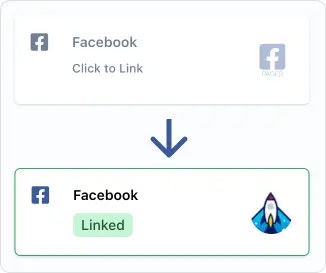
Social Account 連携ページ、または複数ユーザーを管理するために使用される User Profile の [ソーシャルアカウント連携ページ](/multiple-users/user-integration#user-experience) で、接続したいソーシャルネットワークをクリックまたはタップするだけです。ポップアップまたはページリダイレクトを介して Ayrshare へのアクセスを承認するよう求められます。

<img src="https://mintcdn.com/ayrshare-docs/BkNwRAXLA9nG0LQA/images/dashboard/link.webp?fit=max&auto=format&n=BkNwRAXLA9nG0LQA&q=85&s=dfb1f4a9936c8a7a174cc5749963ab08" alt="Click to link" width="245" class="center" data-path="images/dashboard/link.webp" />

<Info>
  認証中に Ayrshare が要求するすべての権限を付与してください。権限を削除すると、ソーシャルネットワークまたは Ayrshare の API で意図しない問題が発生する可能性があります。また、ブラウザでポップアップを許可してください。
</Info>

ソーシャルネットワークが承認されると、アカウントロゴと緑色の "Linked" ピルが表示され、リンクがアクティブであることを示します。

### ソーシャルネットワークのリンク解除方法

緑色の "Linked" ピルをタップするだけで、アカウントのリンク解除を求められます。

ネットワークにすでに送信された投稿は影響を受けません。ただし、ネットワークへのリンクが再確立されるまで、今後のスケジュール投稿と新しい投稿は送信されません。

### 追加のヘルプ

#### ページまたはブランドを選択

<ul class="custom-bullets">
  <li>
    一部のソーシャルネットワークでは、アカウントまたはブランドを選択するよう求められます。たとえば、複数の Facebook Page がある場合、リンクする Page の選択肢が表示されます。
  </li>
</ul>

### 追加の連携ガイド

<CardGroup cols={2}>
  <Card title="Bluesky Linking" href="/dashboard/connect-social-accounts/bluesky" icon="bluesky" />

  <Card title="Facebook Linking" href="/dashboard/connect-social-accounts/facebook" icon="facebook" />

  <Card title="Instagram Linking" href="/dashboard/connect-social-accounts/instagram" icon="instagram" />

  <Card title="Google Business Linking" href="/dashboard/connect-social-accounts/google-business" icon="google" />

  <Card title="Linkedin Linking" href="/dashboard/connect-social-accounts/linkedin" icon="linkedin" />

  <Card title="Pinterest Linking" href="/dashboard/connect-social-accounts/pinterest" icon="pinterest" />

  <Card title="Reddit Linking" href="/dashboard/connect-social-accounts/reddit" icon="reddit" />

  <Card title="Telegram Linking" href="/dashboard/connect-social-accounts/telegram" icon="telegram" />

  <Card title="Threads Linking" href="/dashboard/connect-social-accounts/threads" icon="threads" />

  <Card title="Snapchat Linking" href="/dashboard/connect-social-accounts/snapchat" icon="snapchat" />

  <Card title="TikTok Linking" href="/dashboard/connect-social-accounts/tiktok" icon="tiktok" />

  <Card title="YouTube Linking" href="/dashboard/connect-social-accounts/youtube" icon="youtube" />

  <Card title="X/Twitter Linking (2026 年 3 月 31 日に廃止)" href="/dashboard/connect-social-accounts/x-twitter" icon="x" />

  <Card title="Set Up Your Own X API Key" href="/dashboard/connect-social-accounts/x-twitter-byo-keys" icon="x" />
</CardGroup>
