> ## Documentation Index
> Fetch the complete documentation index at: https://www.ayrshare.com/docs/llms.txt
> Use this file to discover all available pages before exploring further.
# Quick Start Guide
> Link your social accounts and send your first post in a few minutes.
The guide is for setting up a single company. For Business and Enterprise Plan subscriptions with multiple users, a personalized integration guide is provided.
## Connect Your Social Media Accounts
Log in or sign up for an [Ayrshare account](https://app.ayrshare.com/).
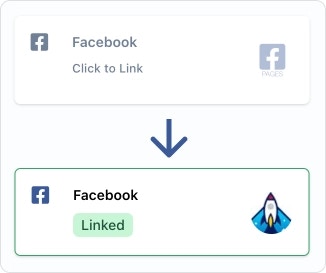
On the Social Account page, click the social networks you want to connect.
Please be sure to grant all permissions.
## Get Your API Key
An API Key is required to authorize access to the API endpoints.
This key is used in the header of your requests, and should be preceded by the `Bearer` keyword.
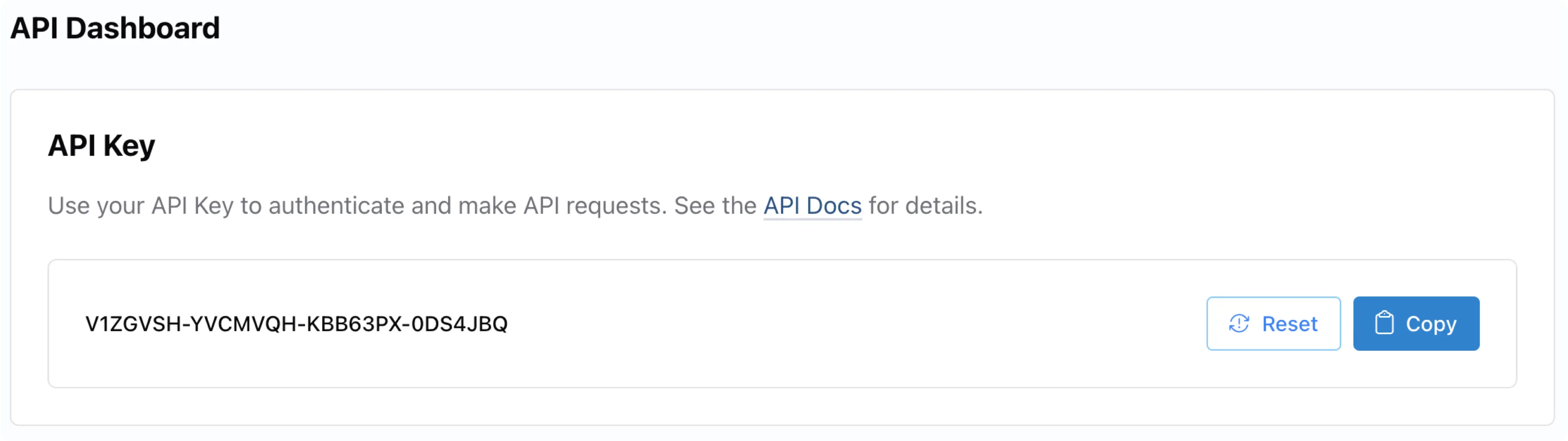
Your API Key is located within the [Ayrshare Dashboard](https://app.ayrshare.com/), on the **API Key** page. If necessary, switch to your 'Primary Profile' via the **User Profiles** page.
From there, you can find the **API Key** page in the left-hand side panel.
Every API call must include the API Key in the Header using a `Bearer` Token. Also include the `Content-Type` of `application/json`.
```json Header theme={"system"}
"Authorization": "Bearer API_KEY",
"Content-Type": "application/json"
```
See the [Authorization](/docs/apis/overview#authorization) for more information.
## Send Your First API Post
### Publishing the Post
Below are code examples showing how to make a post using our API in different programming languages.
For an even easier integration, you can use one of our pre-built [SDK packages](/docs/packages-guides/overview).
To make a post, you'll need:
Your [API Key](/docs/apis/overview#authorization) for authentication.
The text content of your post.
The social media platforms you want to post to (only include platforms you've linked).
Optional: URLs of any images or videos you want to include.
All examples use the [/post](/docs/apis/post/post) endpoint. Let's look at some sample code:
**Posting to X/Twitter?** X requires your own API credentials. Add 2 BYO headers (`X-Twitter-OAuth1-Api-Key` and `X-Twitter-OAuth1-Api-Secret`) to your request. This is a **one-time setup per Ayrshare account**, and the same key pair works for every sub-profile / end-user. See the [setup guide](/docs/dashboard/connect-social-accounts/x-twitter-byo-keys) for details.
```bash cURL theme={"system"}
curl \
-H "Authorization: Bearer API_KEY" \
-H 'Content-Type: application/json' \
-d '{
"post": "Today is a great day!",
"platforms": ["facebook", "instagram", "linkedin"],
"mediaUrls": ["https://img.ayrshare.com/012/gb.jpg"]
}' \
-X POST https://api.ayrshare.com/api/post
```
```javascript JavaScript theme={"system"}
const API_KEY = "API_KEY";
fetch("https://api.ayrshare.com/api/post", {
method: "POST",
headers: {
"Content-Type": "application/json",
"Authorization": `Bearer ${API_KEY}`
},
body: JSON.stringify({
post: "Today is a great day!", // required
platforms: ["bluesky", "facebook", "instagram", "linkedin"], // required
mediaUrls: ["https://img.ayrshare.com/012/gb.jpg"] //optional
}),
})
.then((res) => res.json())
.then((json) => console.log(json))
.catch(console.error);
```
```python Python theme={"system"}
import requests
payload = {'post': 'Today is a great day!',
'platforms': ['bluesky', 'facebook', 'instagram', 'linkedin'],
'mediaUrls': ['https://img.ayrshare.com/012/gb.jpg']}
headers = {'Content-Type': 'application/json',
'Authorization': 'Bearer API_KEY'}
r = requests.post('https://api.ayrshare.com/api/post',
json=payload,
headers=headers)
print(r.json())
```
```php PHP theme={"system"}
"Today is a great day!",
"platforms" => ["bluesky", "facebook", "instagram", "linkedin", "pinterest"],
"mediaUrls" => ["https://img.ayrshare.com/012/gb.jpg"]
];
curl_setopt_array($curl, [
CURLOPT_URL => 'https://api.ayrshare.com/api/post',
CURLOPT_RETURNTRANSFER => true,
CURLOPT_POST => true,
CURLOPT_POSTFIELDS => json_encode($data),
CURLOPT_HTTPHEADER => [
'Authorization: Bearer API_KEY', // Replace 'API_KEY' with your actual API key
'Content-Type: application/json'
],
]);
$response = curl_exec($curl);
curl_close($curl);
echo $response;
```
```go Go theme={"system"}
package main
import (
"bytes"
"encoding/json"
"log"
"net/http"
)
func main() {
message := map[string]interface{}{
"post": "Today is a great day!",
"platforms": []string{"bluesky", "facebook", "instagram", "linkedin"},
"mediaUrls": []string{"https://img.ayrshare.com/012/gb.jpg"}
}
bytesRepresentation, err := json.Marshal(message)
if err != nil {
log.Fatalln(err)
}
req, _ := http.NewRequest("POST", "https://api.ayrshare.com/api/post",
bytes.NewBuffer(bytesRepresentation))
req.Header.Add("Content-Type", "application/json; charset=UTF-8")
req.Header.Add("Authorization", "Bearer API_KEY")
res, err := http.DefaultClient.Do(req)
if err != nil {
log.Fatal("Error:", err)
}
res.Body.Close()
}
```
```csharp C# theme={"system"}
using System;
using System.Net.Http;
using System.Text;
using System.Threading.Tasks;
namespace PostPOSTRequest_csharp
{
class Post
{
private static readonly HttpClient client = new HttpClient();
static async Task Main(string[] args)
{
string API_KEY = "API_KEY";
string url = "https://api.ayrshare.com/api/post";
// Set up request headers
client.DefaultRequestHeaders.Add("Authorization", "Bearer " + API_KEY);
// Prepare JSON content
string json = "{\"post\" : \"Today is a great day!\","
+ "\"platforms\" : [ \"bluesky\", \"facebook\", \"instagram\", \"linkedin\" ],"
+ "\"mediaUrls\" : [ \"https://img.ayrshare.com/012/gb.jpg\" ]}";
var content = new StringContent(json, Encoding.UTF8, "application/json");
try
{
// Send POST request
HttpResponseMessage response = await client.PostAsync(url, content);
response.EnsureSuccessStatusCode();
// Read response
string responseBody = await response.Content.ReadAsStringAsync();
Console.WriteLine(responseBody);
}
catch (HttpRequestException e)
{
Console.WriteLine($"Error: {e.Message}");
}
}
}
}
```
```ruby Ruby theme={"system"}
require 'httparty' # gem install httparty
res = HTTParty.post("https://api.ayrshare.com/api/post",
headers: {Authorization: "Bearer API_KEY"},
body: {
post: "Today is a great day!",
platforms: ['bluesky', 'facebook', 'instagram', 'linkedin'],
mediaUrls: ["https://img.ayrshare.com/012/gb.jpg"]
}).body
puts res
```
Congratulations! You just sent your first post.
### Post Response
You will receive a response with a `status` of "success" when our API successfully processes your post. The response includes:
`status`: Overall status of the API call ("success" or "error")
`errors`: Array of any errors encountered (empty if successful)
`postIds`: Array of objects containing platform-specific details:
Platform name
Post ID on that platform
URL to view the post
Additional platform-specific information
Each platform in the `postIds` array will have its own status, allowing you to verify which platforms successfully received your post.
Check your social media pages to ensure that the post was successfully processed and is live. Note that some platforms may have a slight delay before posts appear publicly.
Here is a sample response:
```json Post Response theme={"system"}
{
"status": "success",
"errors": [],
"postIds": [
{
"status": "success",
"id": "738681876342836_1530521371228093",
"postUrl": "https://www.facebook.com/738681876342836/posts/1530521371228093",
"platform": "facebook"
},
{
"status": "success",
"id": "18008340650526653",
"postUrl": "https://www.instagram.com/p/DGf4hgZObR0/",
"usedQuota": 1,
"platform": "instagram"
},
{
"status": "success",
"id": "urn:li:share:7300150903578275840",
"postUrl": "https://www.linkedin.com/feed/update/urn:li:share:7300150903578275840",
"owner": "urn:li:organization:66755239",
"platform": "linkedin"
}
],
"id": "K0DmYRgugS5P694it",
"refId": "d93ca2784c9bf7bf83e0bf081d16c91598",
"post": "Today is a great day!"
}
```
See more code examples of calling the social media API in Node.js, Python, PHP, Golang, C#, and Ruby, plus other great capabilities:
### Diving a Little Deeper
Let's break down the process of what just happened when we made this API call.
We set the Header Authorization bearer token (API Key) and content type of
json.
Next, we created a body object:
Post containing the text "Today is a great day!".
Social network platforms of Facebook, Instagram, and LinkedIn.
You should only include the platforms you linked in the Social Linkage
Page.
Added an image in the mediaUrls.
Sent everything as an HTTP POST to the /post endpoint.
## Before You Go, Some Best Practices
### Read the Docs
We maintain extensive and up-to-date documentation. Since you are already here, take some time to check out the sections of the docs in the left navigation.
### Error Codes Are Important
You need to handle them so your users have a great experience.
### Keep Your API Key Secure
We take security very seriously, and so should you. You have full control over the connection between Ayrshare and your social media accounts. Once the accounts are connected, the Ayrshare API key becomes the way you authenticate. Please keep this key secret and secure.
### Publish Test Posts
You can publish test posts with a random quote, image, or video using the `randomPost`, `randomMediaUrl`, and `isLandscapeVideo` or `isPortraitVideo` parameters in the [/post endpoint](/docs/apis/post/post). If you use the `randomPost`, the `post` parameter is not required.
These posts are live on your social media pages, so if appropriate, delete them after testing.
#### Random Quote
Send a random quote for testing publishing a post by adding `randomPost: true`.
Used with the [/post](/docs/apis/post/post) endpoint.
```json theme={"system"}
"randomPost": true
```
#### Random Image
Send a random image by adding `randomMediaUrl: true`.
Used with the [/post](/docs/apis/post/post) endpoint.
```json theme={"system"}
"randomMediaUrl": true
```
#### Random Video
Send a random landscape video by adding `isVideo: true` and `isLandscapeVideo: true`.
The video will be standard landscape size.
Used with the [/post](/docs/apis/post/post) endpoint.
```json theme={"system"}
"randomMediaUrl": true,
"isLandscapeVideo": true
```
Send a random portrait video, required for TikTok or Facebook/Instagram Reels, by adding `isVideo: true` and `isPortraitVideo: true`.
Used with the [/post](/docs/apis/post/post) endpoint.
```json theme={"system"}
"randomMediaUrl": true,
"isPortraitVideo": true
```
#### Random Comment
Send a random comment for testing publishing a comment by adding `randomComment: true`.
Used with the [/comment](/docs/apis/comments/post-comment) endpoint.
```json theme={"system"}
"randomComment": true
```
#### Example cURL Call
Send a random quote and portrait video.
```bash theme={"system"}
curl \
-H "Authorization: Bearer API_KEY" \
-H "Content-Type: application/json" \
-X POST \
-d '{
"randomPost": true,
"platforms": ["facebook", "instagram", "linkedin"],
"randomMediaUrl": true,
"isPortraitVideo": true
}' \
https://api.ayrshare.com/api/post
```
### **Use Postman to Test Your API Calls**
[Postman](https://www.postman.com/) is an amazing tool for testing API calls. You can even generate code in over a dozen languages.
### Demo Code
If you are looking for sample demo project in React and NodeJS, please see this GitHub repository:
### **Common Troubleshooting**
Sometimes things don't go right, so here is a little help in our help center.
### **Reach Out To Us for Help**
We are here to help, so please use the chat in the bottom right corner or [email us](mailto:support@ayrshare.com).
 Every API call must include the API Key in the Header using a `Bearer` Token. Also include the `Content-Type` of `application/json`.
```json Header theme={"system"}
"Authorization": "Bearer API_KEY",
"Content-Type": "application/json"
```
See the [Authorization](/docs/apis/overview#authorization) for more information.
## Send Your First API Post
### Publishing the Post
Below are code examples showing how to make a post using our API in different programming languages.
For an even easier integration, you can use one of our pre-built [SDK packages](/docs/packages-guides/overview).
To make a post, you'll need:
Every API call must include the API Key in the Header using a `Bearer` Token. Also include the `Content-Type` of `application/json`.
```json Header theme={"system"}
"Authorization": "Bearer API_KEY",
"Content-Type": "application/json"
```
See the [Authorization](/docs/apis/overview#authorization) for more information.
## Send Your First API Post
### Publishing the Post
Below are code examples showing how to make a post using our API in different programming languages.
For an even easier integration, you can use one of our pre-built [SDK packages](/docs/packages-guides/overview).
To make a post, you'll need: