> ## Documentation Index
> Fetch the complete documentation index at: https://www.ayrshare.com/docs/llms.txt
> Use this file to discover all available pages before exploring further.
# Xác thực JSON
> Gửi JSON để xác thực xem có được định dạng đúng hay không
export const HeaderAPI = ({noProfileKey, profileKeyRequired}) => <>
API Key of the Primary Profile.
Format: Authorization: Bearer API_KEY
{!noProfileKey && (profileKeyRequired ?
Profile Key of a User Profile.
Format: Profile-Key: PROFILE_KEY
:
Profile Key of a User Profile.
Format: Profile-Key: PROFILE_KEY
)}
;
export const PlansAvailable = ({plans = [], maxPackRequired}) => {
let displayPlans = plans;
if (plans && plans.length === 1) {
const lowerCasePlan = plans[0].toLowerCase();
if (lowerCasePlan === "business") {
displayPlans = ["Launch", "Business", "Enterprise"];
} else if (lowerCasePlan === "premium") {
displayPlans = ["Premium", "Launch", "Business", "Enterprise"];
}
}
return
Available on {displayPlans.length === 1 ? "the " : ""}
{displayPlans.join(", ").replace(/\b\w/g, l => l.toUpperCase())}{" "}
{displayPlans.length > 1 ? "plans" : "plan"}.
{maxPackRequired && window.open('https://www.ayrshare.com/docs/additional/maxpack', '_self')} className="flex items-center mt-2 cursor-pointer">
Max Pack required
}
;
};
Gửi JSON để xác thực xem có được định dạng đúng hay không.
Bạn có thể xác thực JSON của mình bằng cách sử dụng linter trực tuyến, như [https://jsonlint.com/](https://jsonlint.com/) hoặc bằng cách sử dụng [Postman](/testing/postman).
Nếu bạn sử dụng công cụ không cần code như Bubble hoặc Make hoặc nhận được phản hồi 500 "Bad Request", endpoint này hữu ích để debug yêu cầu JSON.
## Tham số Header
- Gửi dữ liệu dưới dạng văn bản. Nếu sử dụng Postman, hãy chắc chắn chọn "Text" làm loại.
- Đặt `"Content-Type": "text/plain"`.
## Ví dụ yêu cầu
Gửi bất kỳ json nào đến endpoint này để xác thực nó.
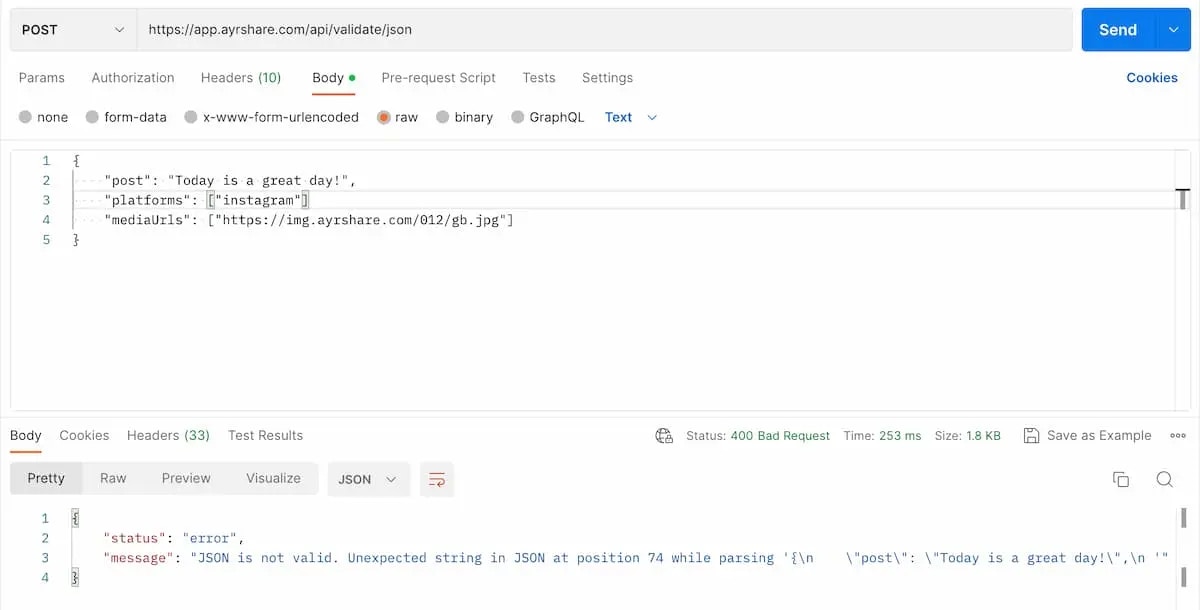
Dưới đây là một ví dụ về JSON không hợp lệ khi sử dụng Postman. Bạn có thể phát hiện ra không? Thiếu dấu phẩy ở cuối tham số thứ hai `platforms`.
Hãy chắc chắn đặt `Content-Type` trong header là `text/plain` và chọn "Text" khi gửi.
 ```json 200: OK Valid JSON theme={"system"}
{
"status": "success",
"message": "Valid JSON. Nice Job!"
}
```
```json 400: Bad Request Invalid JSON theme={"system"}
{
"status": "error",
"message": "JSON is not valid. Unexpected end of JSON input while parsing near '{\"test\": \"happy}'"
}
```
```json 200: OK Valid JSON theme={"system"}
{
"status": "success",
"message": "Valid JSON. Nice Job!"
}
```
```json 400: Bad Request Invalid JSON theme={"system"}
{
"status": "error",
"message": "JSON is not valid. Unexpected end of JSON input while parsing near '{\"test\": \"happy}'"
}
```