> ## Documentation Index
> Fetch the complete documentation index at: https://www.ayrshare.com/docs/llms.txt
> Use this file to discover all available pages before exploring further.

# Kết nối tài khoản mạng xã hội của bạn | Ayrshare Dashboard

> Tìm hiểu cách liên kết Facebook, Instagram, X, LinkedIn, TikTok và các mạng khác với Ayrshare Dashboard để bạn có thể bắt đầu lên lịch và đăng bài chỉ trong vài phút.

## Liên kết và đăng bài qua Web Dashboard

Cách liên kết và đăng bài lên các tài khoản mạng xã hội của bạn thông qua Ayrshare Dashboard.

<div class="video-container">
  <iframe width="560" height="315" src="https://www.youtube.com/embed/Aav2Njv-AkY" title="Linking and Posting via the Ayrshare Dashboard" frameborder="0" allow="accelerometer; autoplay; clipboard-write; encrypted-media; gyroscope; picture-in-picture" />
</div>

### Cách liên kết một mạng xã hội

Kết nối tài khoản mạng xã hội của bạn rất dễ dàng chỉ với vài cú nhấp chuột.

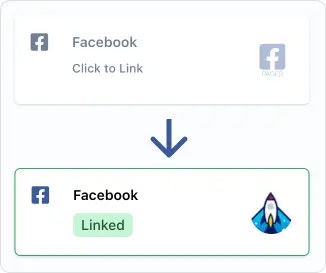
Trên trang liên kết Social Account, hoặc [trang liên kết tài khoản mạng xã hội](/multiple-users/user-integration#user-experience) của user profile dùng để quản lý nhiều người dùng, chỉ cần nhấp hoặc chạm vào mạng xã hội bạn muốn kết nối. Bạn sẽ được yêu cầu uỷ quyền truy cập cho Ayrshare thông qua cửa sổ pop-up hoặc chuyển hướng trang.

<img src="https://mintcdn.com/ayrshare-docs/BkNwRAXLA9nG0LQA/images/dashboard/link.webp?fit=max&auto=format&n=BkNwRAXLA9nG0LQA&q=85&s=dfb1f4a9936c8a7a174cc5749963ab08" alt="Click to link" width="245" class="center" data-path="images/dashboard/link.webp" />

<Info>
  Vui lòng cấp tất cả quyền mà Ayrshare yêu cầu trong quá trình uỷ quyền. Việc gỡ bỏ quyền có thể
  gây ra sự cố ngoài ý muốn tại các mạng xã hội hoặc API của Ayrshare. Cũng hãy cho phép pop-up trong
  trình duyệt của bạn.
</Info>

Sau khi mạng xã hội đã được uỷ quyền, bạn sẽ thấy logo tài khoản của mình và huy hiệu "Linked" màu xanh sẽ xuất hiện, cho biết liên kết của bạn đang hoạt động.

### Cách huỷ liên kết một mạng xã hội

Chỉ cần chạm vào huy hiệu "Linked" màu xanh và bạn sẽ được yêu cầu huỷ liên kết tài khoản.

Các bài đăng đã được gửi tới mạng xã hội sẽ không bị ảnh hưởng. Tuy nhiên, các bài đăng đã lên lịch trong tương lai và bài đăng mới sẽ không được gửi cho tới khi liên kết với mạng xã hội được thiết lập lại.

### Trợ giúp thêm

#### Chọn một Page hoặc Brand

<ul class="custom-bullets">
  <li>
    Một số mạng xã hội sẽ yêu cầu bạn chọn một tài khoản hoặc brand. Ví dụ, nếu bạn
    có nhiều Facebook Pages, bạn sẽ được cho một lựa chọn Page nào để liên kết.
  </li>
</ul>

### Hướng dẫn liên kết bổ sung

<CardGroup cols={2}>
  <Card title="Liên kết Bluesky" href="/dashboard/connect-social-accounts/bluesky" icon="bluesky" />

  <Card title="Liên kết Facebook" href="/dashboard/connect-social-accounts/facebook" icon="facebook" />

  <Card title="Liên kết Instagram" href="/dashboard/connect-social-accounts/instagram" icon="instagram" />

  <Card title="Liên kết Google Business" href="/dashboard/connect-social-accounts/google-business" icon="google" />

  <Card title="Liên kết LinkedIn" href="/dashboard/connect-social-accounts/linkedin" icon="linkedin" />

  <Card title="Liên kết Pinterest" href="/dashboard/connect-social-accounts/pinterest" icon="pinterest" />

  <Card title="Liên kết Reddit" href="/dashboard/connect-social-accounts/reddit" icon="reddit" />

  <Card title="Liên kết Telegram" href="/dashboard/connect-social-accounts/telegram" icon="telegram" />

  <Card title="Liên kết Threads" href="/dashboard/connect-social-accounts/threads" icon="threads" />

  <Card title="Liên kết Snapchat" href="/dashboard/connect-social-accounts/snapchat" icon="snapchat" />

  <Card title="Liên kết TikTok" href="/dashboard/connect-social-accounts/tiktok" icon="tiktok" />

  <Card title="Liên kết YouTube" href="/dashboard/connect-social-accounts/youtube" icon="youtube" />

  <Card title="Liên kết X/Twitter (ngừng ngày 31 tháng 3, 2026)" href="/dashboard/connect-social-accounts/x-twitter" icon="x" />

  <Card title="Thiết lập X API Key của riêng bạn" href="/dashboard/connect-social-accounts/x-twitter-byo-keys" icon="x" />
</CardGroup>
