> ## Documentation Index
> Fetch the complete documentation index at: https://www.ayrshare.com/docs/llms.txt
> Use this file to discover all available pages before exploring further.
# Khắc phục sự cố đăng bài Instagram | Tài liệu Ayrshare
> Khắc phục các sự cố đăng bài Instagram phổ biến trong Ayrshare, bao gồm đăng bài lỗi, lỗi định dạng phương tiện và quyền tài khoản, với các giải pháp từng bước.
Nếu bạn nhận được lỗi khi đăng bài về các vấn đề quyền Instagram hoặc tài khoản của bạn không được liên kết, mặc dù bạn đã liên kết tài khoản Facebook, thì có thể một số quyền truy cập chưa được cấp.
Ví dụ, nếu bạn nhận được các lỗi:
-
*Unsupported post request. Object with ID \[id number] does not exist,
cannot be loaded due to missing permissions, or does not support this
operation. Please read the Graph API documentation*
hoặc
- *There is an issue with your Instagram account type or permissions.*
Hãy thực hiện các bước sau:
### 1. Xác minh tài khoản Instagram Business của bạn vẫn được kết nối với một Facebook Page
Nếu bạn đã sử dụng kết nối Facebook Page, hãy đảm bảo Instagram của bạn là tài khoản Business và nó được kết nối với một Facebook Page.
1. Đăng nhập vào Facebook và điều hướng đến Facebook Page của bạn. Nhấp vào 'Settings' từ menu bên trái trên màn hình.
2. Chọn "Instagram" và xác minh tài khoản Instagram của bạn đã được liên kết hoặc nhấp "Connect Account".
3. Hủy liên kết và liên kết lại tài khoản Instagram của bạn trong Bảng điều khiển Ayrshare dưới "Social Accounts".
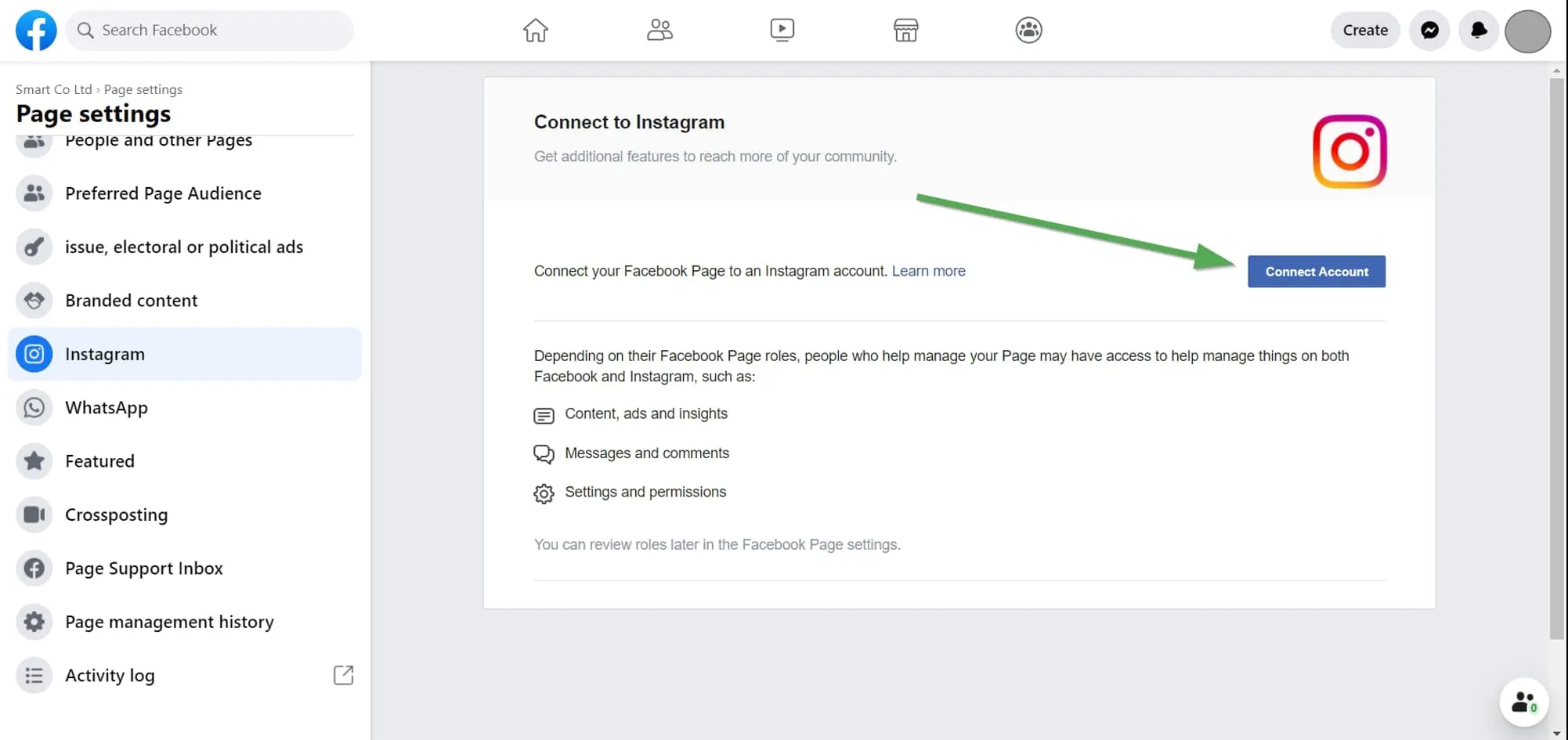 Xem tại đây để biết thêm chi tiết:
### 2. Kiểm tra quyền Instagram của bạn
Nếu sự cố vẫn tiếp diễn, hãy kiểm tra các quyền được cấp cho Ayrshare.
Đăng nhập vào Facebook và vào "Setting" -> "Settings & Privacy" -> "Security & Login" -> "Business Integration".
Nhấp vào đây để có liên kết trực tiếp
Trên [trang Business Integration](https://www.facebook.com/help/405094243235242/), nhấp vào ứng dụng Ayrshare.
Xem tại đây để biết thêm chi tiết:
### 2. Kiểm tra quyền Instagram của bạn
Nếu sự cố vẫn tiếp diễn, hãy kiểm tra các quyền được cấp cho Ayrshare.
Đăng nhập vào Facebook và vào "Setting" -> "Settings & Privacy" -> "Security & Login" -> "Business Integration".
Nhấp vào đây để có liên kết trực tiếp
Trên [trang Business Integration](https://www.facebook.com/help/405094243235242/), nhấp vào ứng dụng Ayrshare.
 Một cửa sổ bật lên sẽ hiển thị. Cuộn xuống "Upload media and create post for Instagram" và "Access profile and posts for Instagram". Chọn cả hai hộp "Instagram Accounts":
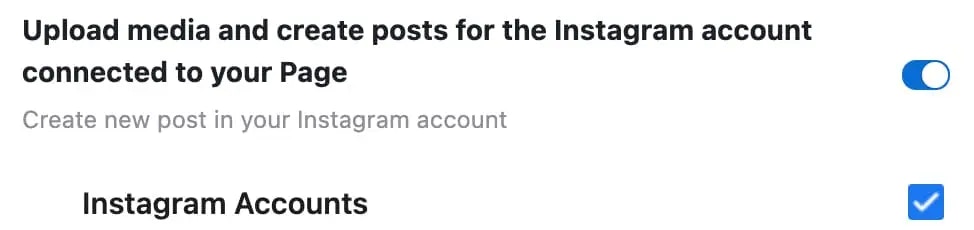
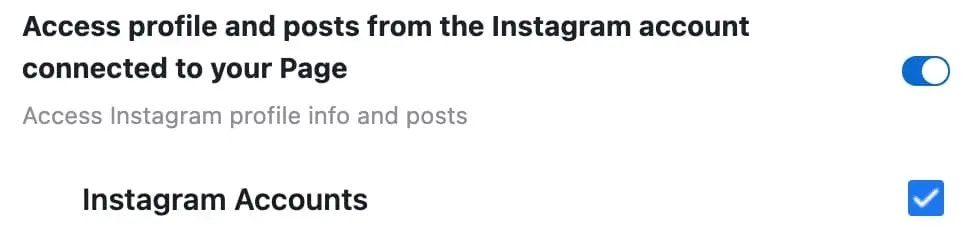 Nhấp "Save".
Quay lại Bảng điều khiển Ayrshare và hủy liên kết rồi liên kết lại Instagram. Bây giờ bạn sẽ có các quyền chính xác.
Nhấp "Save".
Quay lại Bảng điều khiển Ayrshare và hủy liên kết rồi liên kết lại Instagram. Bây giờ bạn sẽ có các quyền chính xác.