> ## Documentation Index
> Fetch the complete documentation index at: https://www.ayrshare.com/docs/llms.txt
> Use this file to discover all available pages before exploring further.

# 最新动态

> 了解 Ayrshare 的最新进展。查看我们的更新日志，掌握所有精彩新功能。

[在 X 上关注我们](https://twitter.com/intent/user?screen_name=ayrshare)，收听我们的 [Social Media API Podcast](https://ayrshare.podbean.com/)，或订阅我们的 [Newsletter](https://dashboard.mailerlite.com/forms/42719/54642298519029076/share)，以获取最新动态。

## 2026 年 7 月

<ul class="custom-bullets">
  <li>
    <strong>7 月 8 日 - 更快的 API 响应时间。</strong> 我们上线了一轮后端性能优化，显著降低了我们最热门的一些端点的延迟。平均响应时间和 95 百分位（p95）响应时间都大幅下降，尤其在高负载下增益最大。改进最明显的是 <a href="/apis/profiles/overview">profiles</a> 和 <a href="/apis/analytics/overview">analytics</a>。无需任何 API 变更；每个请求都会自动变得更快。

    | Endpoint         | 平均更快       | p95 更快     |
    | ---------------- | ---------- | ---------- |
    | `GET /profiles`  | **-71.6%** | **-88.7%** |
    | `GET /analytics` | **-59.5%** | **-75.0%** |
    | `GET /user`      | **-51.0%** | **-48.6%** |
    | `GET /post`      | **-47.6%** | **-63.1%** |
    | `GET /messages`  | **-40.5%** | **-59.4%** |
  </li>

  <li>
    <strong>7 月 7 日 - generateJWT 支持按会话设置 Instagram 关联方式。</strong> <a href="/apis/profiles/generate-jwt">generateJWT 接口</a>现在接受一个可选的请求体参数 <code>instagramLinkMethod</code>，用于在单次关联会话中覆盖你的账户级 <a href="/multiple-users/manage-user-profiles#instagram-login">Instagram Login</a> 设置。传入 <code>"instagram"</code> 时会启动直接 Instagram Login（无需 Facebook Page），传入 <code>"facebook"</code> 时，当用户在社交关联页面上点击 Instagram 按钮时，会通过已连接的 Facebook Page 进行关联。该覆盖只对由所返回 JWT URL 打开的关联页面生效——它会在授权跳转中保留，但绝不会更改你的账户级设置；省略该参数则保持现有行为。非法值会返回 <code>400</code> 并列出合法选项。详情请参见新的 <a href="/apis/profiles/generate-jwt-overview#instagram-link-method">Instagram Link Method</a> 章节，包括两种流程之间的 <a href="/multiple-users/manage-user-profiles#direct-instagram-login-vs-facebook-page-authentication">功能差异</a>。
  </li>
</ul>

## 2026 年 6 月

<ul class="custom-bullets">
  <li>
    <strong>6 月 24 日 - n8n 集成。</strong> 使用 n8n 内置的 MCP Client Tool 节点将 n8n 连接到 <a href="/additional/mcp-action-server">Ayrshare MCP Server</a>，无需自定义代码，也无需安装社区节点。有关概览请参见新的 <a href="/packages-guides/n8n">n8n 集成页面</a>，有关搭建、三个实际示例、多租户 profiles、X BYO 以及可下载的入门工作流（Chat Trigger 到 AI Agent 再到 Ayrshare MCP 节点），请参见 <a href="/additional/mcp-n8n">完整 n8n 指南</a>。另请参见 <a href="/additional/mcp-action-connect">Connect & Setup</a> 和 <a href="/additional/mcp-action-tools">Tool Catalog</a>。
  </li>

  <li>
    <strong>6 月 17 日 - Facebook 分析：Meta 停用 Reach 与 3 秒视频指标。</strong> Meta 于 2026 年 6 月 15 日在所有 Graph API 版本中移除了唯一展示（unique-impression）和 3 秒视频观看的 Insights 指标。Facebook <a href="/apis/analytics/post">帖子分析</a>不再返回 <code>impressionsUnique</code>、<code>impressionsFanUnique</code>、<code>impressionsOrganicUnique</code>、<code>impressionsPaidUnique</code> 或 <code>videoViewsUnique</code>；<a href="/apis/analytics/social">社交分析</a>不再返回 <code>pagePostsImpressions\*</code> 系列（包括 <code>pagePostsServedImpressionsOrganicUnique</code>）。仍支持的字段（<code>reactionsByType</code>、<code>videoViews</code>、<code>mediaView</code>、<code>pagePostEngagements</code>、<code>pageVideoViews</code>）不受影响。请使用 <code>mediaView</code> / <code>pageMediaView</code> 表示 reach；计划推出一个 Total Unique Media Views 的替代指标。参考：<a href="https://developers.facebook.com/blog/post/2026/02/18/introducing-graph-api-v25-and-marketing-api-v25/">Meta Graph API v25 changelog</a>。
  </li>

  <li>
    <strong>6 月 15 日 - Facebook 账户受限错误码 476。</strong> 因 Meta 对账户施加了限制（Meta 子代码 <code>2424009</code> 与 <code>1404078</code>，或在没有子代码时 Meta 给出的限制描述）而失败的 Facebook 发帖，现在会返回专用的、不可重试的 <code>code: 476</code>（HTTP 400），而不是通用的可重试 <code>code: 108</code>。账户仍保持关联——请通过 Meta 的 Account Status 页面（Facebook → 头像 → Help → Account Status）解决该限制，那里会给出具体原因和 API 无法返回的申诉流程。详情请参见 <a href="/errors/errors-ayrshare#facebook-account-restriction">Facebook Account Restriction</a>。
  </li>

  <li>
    <strong>6 月 10 日 - LinkedIn 个人主页分析。</strong> LinkedIn 个人（member）主页现在会返回一组更完善的分析数据。<a href="/apis/analytics/post">帖子分析</a>包含 <code>impressionCount</code>、<code>uniqueImpressionsCount</code>（触达的成员数）、<code>likeCount</code>、<code>commentCount</code>、<code>shareCount</code>、<code>engagement</code>、<code>reactions</code>，对于视频帖子还包括 <code>videoViews</code>、<code>videoViewers</code> 和 <code>videoWatchTimeMs</code>。<a href="/apis/analytics/social">社交分析</a>新增了终身 <code>followersCount</code>、每日 <code>followersDaily</code> 增长以及聚合的帖子指标。聚合的转发/反应/评论数为尽力而为，可能与 LinkedIn 界面略有出入。已有的关联账户必须在 Social Accounts 页面**重新关联其 LinkedIn 主页**以授予新的分析 scope——在此之前，分析会返回 <a href="/errors/errors-ayrshare#linkedin-analytics-errors"><code>code: 475</code></a>（"re-link your LinkedIn profile to enable analytics"）。发帖不受影响。
  </li>

  <li>
    <strong>6 月 10 日 - TikTok 首条评论改为事件驱动。</strong> TikTok 帖子的 <a href="/apis/post/overview#first-comment">首条评论</a>不再基于固定的定时等待发出。由于 TikTok 异步处理视频，<code>/post</code> 响应现在会以 <code>status: "pending"</code> 的形式返回 TikTok 首条评论，并在 TikTok 处理完成、<a href="/apis/webhooks/actions#scheduled-action"><code>tikTokPublished</code></a> webhook 解析出真实的视频 id 之后，自动发布该评论。视频 <code>visibility</code> 必须为 <code>public</code>，否则会返回明确的评论错误。此外，对仍在处理中的 TikTok 帖子调用 <a href="/apis/comments/get-comments">get-comments</a>，现在会返回 <a href="/errors/errors-ayrshare#tiktok-comment-errors"><code>code: 288</code></a>，而不是一个通用的失败。
  </li>

  <li>
    <strong>6 月 8 日 - YouTube 缩略图失败现在会显式返回。</strong> 当 YouTube 视频成功发布但其自定义缩略图应用失败时，YouTube 结果现在会保持 <code>status: "success"</code>（视频保持在线），并新增一个 <code>warnings</code> 数组（<code>feature: "thumbnail"</code>、<code>code: 307</code>）来描述失败原因——此前该失败被埋在 <code>thumbNail</code> 子对象中，该字段目前仍保留以向后兼容。原本容易误导的 <code>403</code> 指引已更正为首先要求进行频道 **手机验证**（[https://www.youtube.com/verify](https://www.youtube.com/verify)，未验证频道是主要原因），然后再考虑 OAuth 重新关联。新增的 **发布前校验**还会在上传前捕获非 PNG/JPG、超过 2MB 或无法访问的缩略图并跳过它们，因此视频仍会正常发布，同时在 `warnings` 中报告原因（缩略图问题永不会导致发帖失败）。请参见 [YouTube Post API](/apis/post/social-networks/youtube#youtube-thumbnails) 和新的 [YouTube Thumbnail Not Applied (Unverified Channel)](/help-center/technical-support/youtube_thumbnail_unverified_channel) 故障排查指南。
  </li>

  <li>
    <strong>6 月 8 日 - X BYOK 分析在余额耗尽时改为返回 code 416。</strong> 当 X/Twitter BYOK 账户所注册的 X Developer 账户 API 余额耗尽时，分析和用户查询路径现在会返回 <a href="/errors/errors-ayrshare#x/twitter-byo-key-errors"><code>code: 416</code></a>（HTTP <code>402</code>，X <code>CreditsDepleted</code>），并在 <code>detail</code> 中包含已注册的账户 id——此前它们被伪装成 <code>code: 294</code>（HTTP <code>400</code>，"Unable to get X User"）。解决办法是在 X Developer Portal 中充值余额。这也使分析/查询路径与发帖路径（已经返回 416）保持一致。如果你的集成通过分析中的 <code>294</code> 来判定无效句柄，请增加对 <code>416</code> 的处理。
  </li>

  <li>
    <strong>6 月 4 日 - MCP Server 与 Claude Code 插件。</strong> AI Agent 现在可以通过新的 <a href="/additional/mcp-action-server">MCP Server</a>（<code>[https://api.ayrshare.com/mcp](https://api.ayrshare.com/mcp)</code>）驱动 Ayrshare API，包括 <a href="/additional/mcp-claude-code-plugin">Claude Code 插件</a>。请参见 <a href="/additional/mcp-action-connect">Connect & Setup</a> 和 <a href="/additional/mcp-action-tools">Tool Catalog</a>。原有的文档搜索 MCP 现更名为 <a href="/additional/mcp-server">Documentation MCP</a>。
  </li>
</ul>

## 2026 年 5 月

<ul class="custom-bullets">
  <li>
    <strong>5 月 22 日 - Bulk Post Profile-Key 路由修复。</strong> <code>POST /post/bulk</code> 现在会遵循 <code>Profile-Key</code> 请求头，因此 CSV 行会发布到解析出的 <a href="/apis/profiles/overview">用户配置</a>，而不是主配置。此前带 <code>Profile-Key</code> 的批量上传会被静默地路由到主配置对应的社交账户。参见 <a href="/apis/post/bulk-post">Bulk Post</a>。
  </li>

  <li>
    <strong>5 月 21 日 - TikTok DELETE /comments 权限范围澄清。</strong> 更新了 [Delete Comments](/apis/comments/delete-comments) 和 [Comments Overview](/apis/comments/overview) 页面，说明在 TikTok 上 <code>DELETE /comments</code> 只对经过身份验证的 TikTok 账户本身撰写的评论（你自己的回复）成功。尝试删除第三方评论会返回 Ayrshare <code>code: 328</code>。需要审核其 TikTok 视频上第三方评论的客户请联系支持。API 行为无变化；仅文档更新。
  </li>

  <li>
    <strong>5 月 21 日 - 隐藏 TikTok 评论。</strong> <a href="/apis/comments/delete-comments">DELETE /comments</a> 现在支持通过 <code>hide=true</code> 结合 <code>videoId</code>，对公众观众隐藏 TikTok 评论。成功响应会返回 <code>action: "hide"</code> 并回显评论文本；仅发送 <code>hide=true</code> 而不带 <code>videoId</code> 会被拒绝并返回 400。隐藏的评论仍然可以在 TikTok Studio 中被视频所有者看到。
  </li>

  <li>
    <strong>5 月 20 日 - Node SDK v1.3.0 —— 支持 X/Twitter BYO。</strong> 官方 <a href="/packages-guides/nodejs">Node SDK</a> 现在提供 <code>setTwitterByo(apiKey, apiSecret)</code> 和 <code>clearTwitterByo()</code>，用于 X/Twitter 的 Bring-Your-Own-Keys。设置之后，每次 SDK 请求都会附加所需的 <code>X-Twitter-OAuth1-Api-Key</code> 和 <code>X-Twitter-OAuth1-Api-Secret</code> 请求头——自 2026 年 3 月 31 日起 Ayrshare 强制要求 BYO 后，这是 X/Twitter 操作所必需的。通过 <code>npm install social-media-api\@1.3.0</code> 安装；发布说明请见 <a href="https://www.npmjs.com/package/social-media-api/v/1.3.0">npm</a> 和 <a href="https://github.com/ayrshare/social-media-api/releases/tag/v1.3.0">GitHub</a>。
  </li>

  <li>
    <strong>5 月 20 日 - Messaging 按用量计费。</strong> Business Messaging 现在通过 Stripe 按用量计费，Launch 和 Business 方案下每个活跃会话 <code>$0.09</code>（Premium 仍为 <code>$49</code>/月的固定附加价格），每个计费周期最多 <strong>1,000 个活跃会话</strong>。参见 <a href="/apis/messages/overview#conversation-limit-amp-pricing">Messaging 定价</a>。
  </li>

  <li>
    <strong>5 月 20 日 - Instagram 分析权限错误不再自动解绑账户。</strong> 当 <a href="/apis/analytics/social">Instagram 分析</a>遇到缺少权限的错误（Meta <code>errCode 10</code>）时，账户不再被自动解绑。此前 scope/权限问题会被当作 token 撤销处理并静默断开账户，即便发帖仍然正常。Ayrshare 现在会保持账户关联，转而返回权限 scope 错误。
  </li>

  <li>
    <strong>5 月 19 日 - 按配置的 hideLogo。</strong> [Create Profile](/apis/profiles/create-profile) 和 [Update Profile](/apis/profiles/update-profile) 新增布尔字段 <code>hideLogo</code>，可在单个用户配置的社交关联页面上隐藏账户级 logo。非常适合为个别合作方主页做白标化。
  </li>

  <li>
    <strong>5 月 19 日 - Facebook Boost 广告组预算共享。</strong> [Boost 接口](/apis/ads/facebook/boost-post)现在接受一个新的可选布尔参数 <code>adSetBudgetSharingEnabled</code>（默认 <code>false</code>）。Meta 现在要求所有在没有 campaign-level budget 的情况下创建的 campaign 都必须包含该字段，Ayrshare 也会在每次请求中都发送——默认 <code>false</code> 与之前的行为一致，调用方无需改动。将其设为 <code>true</code> 可启用 Meta 的跨广告组优化，最多可将某个广告组预算的约 20% 转移到同一 campaign 内的其他广告组，以获得更好的整体表现。
  </li>

  <li>
    <strong>5 月 19 日 - Reddit Banned-Subreddit 错误。</strong> 向你被封禁的 subreddit 发帖现在会返回一个明确的、非重试安全的错误，而不是通用的可重试 <code>code 121</code>。这可防止调度器对一个永久被拒绝的帖子进行反复重试。参见 <a href="/errors/errors-ayrshare">Ayrshare 错误码</a>。
  </li>

  <li>
    <strong>5 月 19 日 - Bluesky 视频大小上限。</strong> Bluesky 视频上传的最大大小现在是 <strong>100 MB</strong>（此前文档标注为 1 GB），以匹配 Bluesky 平台限制。超过 100 MB 的文件现在会在最开始就被拒绝，而不是在上传后期失败。参见 <a href="/media-guidelines/bluesky#video">Bluesky 媒体指南</a>。
  </li>

  <li>
    <strong>5 月 19 日 - Dashboard 支持 BYO Key 的 X/Twitter 消息功能。</strong> Ayrshare 控制台的 <a href="https://app.ayrshare.com">Messaging</a> 页面现在支持 Bring-Your-Own-Keys（BYO）账户的 X/Twitter 私信。你的 X consumer key 和 secret 会在浏览器会话中被收集，并在发送、刷新、抓取图片等操作中一并使用——不会保存任何 key。自从 X/Twitter 在 Ayrshare 上强制 BYO 后，这是必需的能力。
  </li>

  <li>
    <strong>5 月 19 日 - Facebook Ads 城市定位修复。</strong> <a href="/apis/ads/facebook/get-ad-cities">Facebook Ads Cities</a> 接口（<code>GET /ads/facebook/cities</code>）现在能正确解析城市及其对应的区域数据。每条结果都包含 <code>region</code>、<code>regionId</code> 和 <code>supportsRegion</code>，以便在可用时定位到城市所属区域。使用 <code>search</code> 查询参数传入部分或完整的城市名。
  </li>

  <li>
    <strong>5 月 18 日 - YouTube 状态字段控制。</strong> <a href="/apis/post/social-networks/youtube">YouTube Post API</a> 的 <code>youTubeOptions</code> 新增三个可选参数：<code>license</code>（<code>"youtube"</code> 或 <code>"creativeCommon"</code>）、<code>embeddable</code>（布尔）和 <code>publicStatsViewable</code>（布尔——控制观看页上的扩展统计面板；基础观看和点赞数无论如何都保持公开）。<a href="/apis/history/history-platform">/history/youtube</a> 响应现在也会返回这些字段。两个新的校验错误码 —— <code>455</code>（非法 <code>license</code>）和 <code>456</code>（非法 <code>embeddable</code> 或 <code>publicStatsViewable</code>）—— 会在 Ayrshare 边缘拒绝格式错误的请求。变现开关（开启/关闭广告）不包含在内；那需要 YouTube CMS 凭据，且不通过标准 YouTube API 提供。
  </li>

  <li>
    <strong>5 月 18 日 - GMB 首条评论不再掩盖发帖成功。</strong> 修复了一个问题：在 Google Business Profile 发帖时包含 <code>firstComment</code> 会返回 <code>code: 163</code> 且没有 <code>postIds</code>，即便发帖已经成功。Google Business Profile 不支持帖子评论，因此 <code>firstComment</code> 在 GMB 上会被跳过，同时正常返回发帖成功结果。
  </li>

  <li>
    <strong>5 月 14 日 - 预防账户解绑。</strong> 各社交网络一直在悄悄推出更严格的反机器人控制，这导致异常多的用户账户被解绑。我们已上线多项后端改进以减少解绑并让错误信息更清晰，同时更新了 <a href="https://app.ayrshare.com/social-accounts">账户关联页面</a>，让 UI 对用户更清楚——包括针对 Meta 网络（Facebook、Instagram、FB Groups、Threads、Messenger）的新 “Action required” 状态，当账户陷入身份验证悬置时会显示 “Resolve with Meta” 链接和 “Check again” 探测按钮，让用户无需解绑再关联即可解决问题。
  </li>

  <li>
    <strong>5 月 12 日 - Instagram 互动自动化（Beta）。</strong> 全新的 <a href="/apis/automations/overview">Automations API</a> 让你的用户可以自动响应 Instagram 上的互动——当终端用户评论帖子、回复 story、发送私信或对私信作出反应时，触发 DM、webhook 或邮件。共支持 4 种触发类型（<code>comment\_keyword</code>、<code>story\_reply</code>、<code>dm\_reaction</code>、<code>dm\_keyword</code>）和 3 种动作类型（<code>send\_dm</code>、<code>fire\_webhook</code>、<code>send\_email</code>），每条规则每种最多 50 个。包括每个动作 7 天的去重（可通过 <code>dedupWindowMinutes</code> 按动作配置）、每日 DM 上限（Business 1,000 / Enterprise 5,000）以及基于游标分页的活动日志。Business 与 Enterprise 方案可用。新增错误码 <code>462</code>–<code>472</code>，涵盖校验、层级门槛、活跃自动化上限、缺少关联账户以及功能开关准入。<strong>Beta</strong> —— 我们正在积极收集反馈，请将 bug 报告和功能需求发送给支持团队。
  </li>

  <li>
    <strong>5 月 12 日 - 定时发帖吞吐量提升。</strong> 我们为定时发帖处理增加了更多硬件资源，吞吐量和性能显著提升。之后我们还会为 YouTube 和 TikTok 添加更多平台专用硬件。
  </li>

  <li>
    <strong>5 月 12 日 - Instagram 账户状态错误的重新关联提示。</strong> 某些 Instagram 账户状态失败（Meta <code>error\_subcode 2207085</code>，此前以通用的 <code>code: 258</code> 出现且没有指引）现在会返回 <code>relink: true</code> 和 <code>retryAvailable: true</code>，并附上引导用户解绑并重新关联 Instagram 账户（授予全部权限）的信息。参见[错误码](/errors/errors-ayrshare)。
  </li>

  <li>
    <strong>5 月 11 日 - YouTube 瞬时错误码。</strong>
    因上游瞬时问题导致的 YouTube 上传失败现在会返回新的
    错误码 <code>453</code>（HTTP 504，Google ingest 超时）和
    <code>454</code>（HTTP 503，服务不可用），并带有
    <code>retryAvailable: true</code> 标志，你的集成可据此
    自动重试。详情请参见[错误码](/errors/errors-ayrshare)。
  </li>

  <li>
    <strong>5 月 11 日 - X/Twitter 分析与查询对所有 BYO 用户开放。</strong> 老的 X 附加功能门槛已从 <a href="/apis/analytics/social">/analytics/social</a> 和 <code>/lookups/x</code> 中移除。任何 X/Twitter Bring-Your-Own-Keys 客户现在都可以查询任意句柄的分析并使用 X lookups 接口，而不会遇到 <code>code: 3</code>。调用会使用你自己的 X Developer App 凭据进行签名，并计入你自己的 X 速率限制。
  </li>

  <li>
    <strong>5 月 8 日 - Python SDK v1.3.0 —— 支持 X/Twitter BYO。</strong> 官方 <a href="/packages-guides/python">Python SDK</a> 现在提供 <code>set\_twitter\_byo(api\_key, api\_secret)</code> 和 <code>clear\_twitter\_byo()</code>，用于 X/Twitter 的 Bring-Your-Own-Keys。设置之后，每次 SDK 请求都会附加所需的 <code>X-Twitter-OAuth1-Api-Key</code> 和 <code>X-Twitter-OAuth1-Api-Secret</code> 请求头——自 2026 年 3 月 31 日起 Ayrshare 强制要求 BYO 后，这是 X/Twitter 操作所必需的。通过 <code>pip install --upgrade social-post-api</code> 安装；发布说明请见 <a href="https://github.com/ayrshare/social-post-api-python/releases/tag/v1.3.0">GitHub</a> 和 <a href="https://pypi.org/project/social-post-api/1.3.0/">PyPI</a>。
  </li>

  <li>
    <strong>5 月 4 日 - 自动图片格式转换。</strong> WebP、HEIC 和 AVIF 图片现在会在发布到不接受这些格式的平台前，自动转换为 JPEG。WebP 转换适用于 Instagram、LinkedIn、TikTok、Google My Business、Threads 和 Snapchat。HEIC 和 AVIF 则在所有支持的平台上进行转换。无需 API 变更；转换在发送时透明进行。当转换无法完成时，新增错误码 <code>450</code>（转换失败）、<code>451</code>（源下载失败）和 <code>452</code>（转换后图片上传失败）会显式提示。
  </li>

  <li>
    <strong>5 月 4 日 - Instagram 错误现在包含 Meta 原始信息。</strong> Instagram 媒体状态失败现在会在 <code>details</code> 字段中显示 Meta 底层的错误文本，同时保留 Ayrshare 错误码，因此调用方能够区分原因（例如 robots.txt/爬虫问题 vs. token 问题），无需再根据通用错误码猜测。参见 [Instagram Post API](/apis/post/social-networks/instagram) 和[错误码](/errors/errors-ayrshare)。
  </li>
</ul>

## 2026 年 4 月

<ul class="custom-bullets">
  <li>
    <strong>4 月 30 日 - API Explorer 支持 X/Twitter BYOK。</strong> <a href="https://apiexplorer.ayrshare.com">Ayrshare API Explorer</a> 现在包含一个可折叠的 <strong>X/Twitter BYOK (Bring Your Own Keys)</strong> 面板，你只需粘贴一次 X API Key 和 API Secret，就会在每次外发请求中作为 <code>X-Twitter-OAuth1-Api-Key</code> 和 <code>X-Twitter-OAuth1-Api-Secret</code> 请求头附带——不再需要退到 <code>curl</code> 或 Postman 才能在 Explorer 中测试 BYOK。这些值通过 <code>sessionStorage</code> 限定在当前浏览器标签中，默认打码显示并可切换查看，一键即可清空。请参见 <a href="/dashboard/connect-social-accounts/x-twitter-byo-keys">X BYO Key 搭建指南</a> 了解如何获取你的凭据。
  </li>

  <li>
    <strong>4 月 28 日 - 社交分析增强（逐步上线中）。</strong> <a href="/apis/analytics/social">社交分析</a>接口新增 Instagram <code>shareCount</code>（在滚动 90 天窗口内的总分享数）和 YouTube <code>lifetimeLikes</code>（通过 <code>youtube: \{ lifetime: true }</code> 显式开启）；上线覆盖到你的账户后，这些新字段会出现在响应中。本次更新的文档更正：Instagram <code>viewsCount</code> 是 90 天滚动窗口（不是 180 天），<code>mediaCount</code> 始终是终身值，YouTube <code>likes</code> 受 <code>quarters</code> 范围约束，TikTok 主页级指标最多 60 天；当使用 <code>quarters</code> 时，每帖终身语义仍然适用。
  </li>

  <li>
    <strong>4 月 28 日 - Instagram Trial Reels。</strong> <a href="/apis/post/post">/post</a> 接口现在支持发布 Instagram <a href="/apis/post/social-networks/instagram#trial-reels">Trial Reels</a>——首次发布时仅对非粉丝可见的 Reels。将 <code>instagramOptions.trialParams.graduationStrategy</code> 设为 <code>"MANUAL"</code>（在 Instagram 应用内手动 “晋升”）或 <code>"SS\_PERFORMANCE"</code>（Meta 根据早期表现自动 “晋升”）。三个新的校验错误码——<a href="/errors/errors-ayrshare#instagram-specific-error-codes"><code>447</code>、<code>448</code>、<code>449</code></a>——会在 Ayrshare 边缘拒绝非法的 trial-reel 请求。
  </li>

  <li>
    <strong>4 月 24 日 - Instagram 发帖稳定性。</strong> 在高峰时段扩展了 Instagram 的自动重试处理，并全面改进了错误信息。现在你会收到具体的<a href="/errors/errors-ayrshare#instagram-specific-error-codes">错误码</a>：速率限制（<code>code: 435</code>）和媒体处理超时（<code>code: 436</code>）——让你在集成中更容易诊断问题并构建更聪明的重试逻辑。
  </li>

  <li>
    <strong>4 月 23 日 - Facebook 分析速率限制错误码 444。</strong> Facebook Page 按 Page 分析的限流（Meta 错误 <code>80001</code>）现在会在 <a href="/apis/analytics/post">post</a> 和 <a href="/apis/analytics/social">social</a> 分析响应上返回 <code>code: 444</code>（HTTP 429）。此前这些限流被错误归类为 <code>code: 161</code>（"relink your account"）。如果你的集成依赖 <code>161</code> 触发重新关联流程，请更新识别 <code>444</code>，并改为退避重试。详情请参见 <a href="/errors/errors-ayrshare#facebook-analytics-rate-limit">Facebook Analytics Rate Limit</a>。
  </li>

  <li>
    <strong>4 月 23 日 - Meta 媒体爬虫故障排查。</strong> 新增帮助中心文章，介绍如何修复错误 <code>code: 440</code>（"social network could not download media from this URL"）以及相关的 Instagram <code>code: 138</code> / Threads <code>code: 379</code>，这些都是由 <code>robots.txt</code> 或 bot 规则阻挡 Meta 发布爬虫引起的。参见 <a href="/help-center/technical-support/meta_media_crawler_blocked">Meta Media Crawler Blocked</a>。
  </li>

  <li>
    <strong>4 月 21 日 - 审核输入错误现在返回 400。</strong> <a href="/apis/validate/moderation">POST /validate/moderation</a> 现在会针对调用方的输入问题（例如作为 <code>imageUrl</code> 的不支持文件，或不可达/格式错误的 URL）返回新的错误 <code>code 438</code>（HTTP <code>400</code>），而不是带有重试指引的、有误导性的 <code>500</code>。真正的处理失败仍返回 <code>code 331</code>（HTTP 500）。参见[错误码](/errors/errors-ayrshare)。
  </li>

  <li>
    <strong>4 月 20 日 - Caption 增强错误码 441。</strong> <a href="/apis/post/post">Post</a> 接口现在会在 <code>shortenLinks</code> 等 caption 增强失败时返回错误 <code>code: 441</code>（HTTP 502）。如果失败仅影响部分平台，则成功平台仍会发帖并出现在 <code>postIds</code> 中，同时顶层为 <code>status: "error"</code>，各平台的失败项出现在 <code>errors\[]</code> 中。详情请参见 <a href="/errors/errors-ayrshare#caption-enhancement-errors">Caption Enhancement Errors</a>。
  </li>

  <li>
    <strong>4 月 15 日 - Instagram 死 token 检测。</strong> 因 OAuth token 无效/过期——或 Page 角色/权限错误（Meta 子代码 492）——而失败的 Instagram 发帖，现在会返回 Ayrshare <code>code 161</code>（授权错误），并自动解绑受影响账户，以便通知用户重新关联，而不是此前那种掩盖了这些情况、令人误解的通用 <code>code 138</code> "please try again" 响应。参见[错误码](/errors/errors-ayrshare)和 [Instagram Post API](/apis/post/social-networks/instagram)。
  </li>

  <li>
    <strong>4 月 9 日 - Instagram 与 TikTok 分析支持全时段数据与日期筛选。</strong> 当未指定 <code>daily</code> 也未指定 <code>quarters</code> 时，<a href="/apis/analytics/social">社交分析</a>接口现在会返回 Instagram 和 TikTok 的全时段数据。使用 <code>quarters</code>（1–4，其中 1 = 90 天）或 <code>daily=true</code> 按日期范围筛选——现在 TikTok 也支持。启用时，TikTok 的评论、分享和观看的时间段标签及合计值会反映筛选后的日期范围。
  </li>

  <li>
    <strong>4 月 9 日 - 分析可靠性与恢复。</strong> <a href="/apis/analytics/social">社交分析</a>和<a href="/apis/analytics/post">帖子分析</a>接口现在会在社交网络临时返回 0 时，自动从已保存数据中回填累积指标（粉丝、点赞、观看数）。响应新增两个可选字段 <code>backfilledFrom</code> 和 <code>recoveredFrom</code>，指示何时使用了存档数据。此外，当没有平台返回数据时，请求分析现在会返回 <code>400</code> 错误（<code>code: 187</code>），而不是空的成功响应。
  </li>

  <li>
    <strong>4 月 1 日 - generateJWT 支持通过请求头传递 X 凭据。</strong> <a href="/apis/profiles/generate-jwt">Generate JWT</a> 接口现在接受 <code>X-Twitter-OAuth1-Api-Key</code> 和 <code>X-Twitter-OAuth1-Api-Secret</code> 请求头，用于传递你的 X consumer keys——与其他所有 X/Twitter 接口保持一致。为了向后兼容，请求体参数仍然被支持。
  </li>
</ul>

## 2026 年 3 月

<ul class="custom-bullets">
  <li>
    <strong>3 月 30 日 - X 余额耗尽错误显式返回。</strong> 当 BYOK X/Twitter Developer 账户的 API 余额用尽时，此前会以 <code>processing</code> 状态卡住且没有错误的发帖现在会正确失败，并返回 <code>code: 416</code>（X Credits Depleted，HTTP <code>402</code>）。<code>code: 416</code> 的检测也扩展为覆盖 X 中提到余额的 HTTP <code>429</code> 响应。详情请参见<a href="/errors/errors-ayrshare">错误码</a>。
  </li>

  <li>
    <strong>3 月 28 日 - Instagram 发帖返回 null 修复。</strong> 修复了一个边角问题：Instagram 帖子在平台上成功了，但 <a href="/apis/post/post">/post</a> 响应返回的是 <code>null</code>，而不是带有 <code>postIds</code> 和 <code>id</code> 的正常成功响应。现在成功的 Instagram 发帖始终会返回一个可被你集成解析的有效响应。
  </li>

  <li>
    <strong>3 月 26 日 - Instagram 每日 reach 修复。</strong> 修复了一个问题：当 <code>daily=true</code> 时，Instagram <a href="/apis/analytics/social">社交分析</a>会遗漏每日 reach 数据。在 daily 模式下，响应现在返回一个嵌套的 <code>reach</code> 对象（包含 <code>period</code> 和一个 <code>values</code> 时间序列）；非 daily 模式下仍返回标量 <code>reachCount</code>，并在每日数据暂时不可用时作为回退。
  </li>

  <li>
    <strong>3 月 26 日 - X/Twitter BYOK 强制执行的错误码。</strong> 随着 [Bring Your Own Keys](/dashboard/connect-social-accounts/x-twitter-byo-keys) 要求正式生效，X/Twitter 请求会返回你可据以分支处理的具体错误码：<code>419</code>（HTTP 400，缺少 <code>X-Twitter-OAuth1-Api-Key</code>/<code>Secret</code> 请求头）、<code>416</code>（HTTP 402，X Developer 账户余额耗尽）和 <code>417</code>（HTTP 403，OAuth 1.0a 应用权限未设为 Read/Write/DM）。参见<a href="/errors/errors-ayrshare">错误码</a>了解具体信息和处理方式。
  </li>

  <li>
    <strong>3 月 23 日 - X 关键词搜索。</strong> 面向 BYOK 客户的新 <a href="/apis/listen/keyword/search-tweets">关键词搜索</a>接口。可以在 X/Twitter 上搜索匹配关键词、话题标签和高级搜索操作符的推文。支持分页、按语言与位置过滤，返回标准化的推文数据。
  </li>

  <li>
    <strong>3 月 23 日 - Listening 板块。</strong> 新增了 <a href="/apis/listen/overview">Listening</a> 板块，在 Brand 接口的基础上扩展了新特性，例如关键词搜索。
  </li>

  <li>
    <strong>3 月 19 日 - 评论中的 @ 提及。</strong> 为 [Post a Comment](/apis/comments/post-comment) 和 [Reply to a Comment](/apis/comments/reply-to-comment) 接口的 <code>comment</code> 文本字符串新增了 @ 提及支持的文档，包括 LinkedIn 服务器端解析细节以及各平台 @ 提及语法的链接。
  </li>

  <li>
    <strong>X/Twitter 消息分页。</strong> [Get Messages](/apis/messages/get-messages) 接口现在支持 X/Twitter 的 <code>limit</code> 查询参数，允许你只获取最新的 N 条消息（1–100），无需完整同步历史。结合基于游标的 <code>next</code> 参数分页，可以实现高效的轮询——先取一小批，检查是否已有，再按需继续翻页。
  </li>

  <li>
    <strong>提高视频大小上限。</strong> 由于社交发布现在大量围绕视频内容，我们在多个平台提高了视频上传上限：LinkedIn（200 MB → 500 MB）、TikTok（1 GB → 10 GB）、X Premium 长视频（1 GB → 16 GB），并为 Facebook（Reels 2 GB、Stories 4 GB、Feed 10 GB）和 Pinterest（2 GB）新增了按内容类型的更大上限。完整详情请参见[媒体指南](/media-guidelines/overview)。
  </li>

  <li>
    <strong>X/Twitter 消息支持 BYO Key。</strong> [Get Messages](/apis/messages/get-messages) 和 [Send Message](/apis/messages/send-message) 接口现在支持 BYO（Bring Your Own）X/Twitter API 凭据。BYO 用户无法通过 webhook 获取实时 DM 通知；请改用 GET Messages 接口进行轮询。
  </li>

  <li>
    <strong>Bring Your Own Keys（X）。</strong> X/Twitter 账户连接方式的重大变更。全新的 [Bring Your Own Keys](/apis/post/social-networks/x-twitter) 让你对账户有更强的控制、更好的数据可移植性，以及带品牌的 OAuth 流程。所有用户必须在 2026 年 3 月 31 日前完成迁移。
  </li>

  <li>
    <strong>可编辑的短链接。</strong> 你现在可以在发布后[更新短链接](/apis/links/update-short-link)。
  </li>

  <li>
    <strong>定时发帖处理稳定性。</strong> 修复了定时发帖处理任务可能内存不足并返回 503 的问题。增加了资源分配、加入了分页查询处理，并引入了分布式应用锁以防止重复执行——确保每次定时发帖处理都是唯一且可靠的运行。
  </li>

  <li>
    <strong>Facebook 与 Instagram 历史改进。</strong> 改进了 [/history/facebook](/apis/history/history-platform) 和 [/history/instagram](/apis/history/history-platform) 接口：对于 Facebook，过期/归档的 Stories 现在默认会被过滤掉，因此只有活跃 Stories 会与普通帖子一起显示，同时新增 <code>since</code> 和 <code>until</code> 查询参数，可以用 ISO UTC 日期字符串按时间筛选。对于 Facebook 和 Instagram，新增的 <code>dataType</code> 参数允许你只请求 <code>posts</code>、只请求 <code>stories</code>，或两者都要（默认）。
  </li>

  <li>
    <strong>移除 X 速率限制。</strong> 作为 [X/Twitter BYO Keys 迁移](/dashboard/connect-social-accounts/x-twitter-byo-keys)的一部分，Ayrshare 不再对 X 分析强制任何月度或日度速率限制。你的用量现在受你自己的 X Developer 账户限额约束。
  </li>
</ul>

## 2026 年 2 月

<ul class="custom-bullets">
  <li>
    <strong>2 月 25 日 - X/Twitter 视频标题与描述。</strong> 发布到 X/Twitter 的视频现在支持在 <a href="/apis/post/social-networks/x-twitter">X Post API</a> 的 <code>twitterOptions</code> 对象上设置 <code>videoTitle</code> 和 <code>videoDescription</code>，用于上传到 X Media Studio 的媒体。它们与现有的 <code>thumbNail</code> 支持一同为视频提供更丰富的元数据。
  </li>

  <li>
    <strong>批量分析。</strong> 新增了对社交帖子 ID 批量分析的支持，通过新的 <code>postIds</code> 参数，一次分析调用最多可包含 100 条帖子。详细信息请见 [Analytics on a Post by Social ID](/apis/analytics/social-by-id) 接口。
  </li>

  <li>
    <strong>历史分页。</strong> 为 Threads 和 X/Twitter 的[按平台获取帖子历史](/apis/history/history-platform) API 添加了分页支持。不再受 500 条帖子的限制——现在可以通过分页拉取更长的历史，并将调用拆成更小的分块，以获得更快、更高效的响应。
  </li>

  <li>
    <strong>免费试用增强。</strong> 免费试用用户现在可以测试 [Messaging API](/apis/messages/overview) 和 [Max Pack](/additional/maxpack)——在免费试用期结束前不会产生费用。
  </li>

  <li>
    <strong>更好的错误信息。</strong> 为 [X/Twitter](/apis/post/social-networks/x-twitter) 和 [LinkedIn](/apis/post/social-networks/linkedin) 的错误信息补充了更多细节，让你更容易诊断 API 调用中的问题。
  </li>

  <li>
    <strong>Instagram 评论修复。</strong> 修复了一个问题：带嵌套回复的 Instagram 顶层评论未从 [Get Comments](/apis/comments/get-comments) 接口正确返回。
  </li>

  <li>
    <strong>Python SDK。</strong> 更新了我们的 [Python SDK](https://pypi.org/project/social-post-api/)，加入了最新特性与改进。
  </li>

  <li>
    <strong>X/Twitter Webhook URL。</strong> [Direct Message Event webhook](/apis/webhooks/actions#direct-message-event) 的负载中现在包含新的 <code>ayrshareUrl</code> 字段，提供一个便捷的未鉴权 URL。
  </li>

  <li>
    <strong>Status Page Slack 集成。</strong> 你可以将我们 [Status Page](https://status.ayrshare.com) 的更新自动接入 Slack。只需点击右上角的 "Get Updates" 并选择 Slack 选项即可。
  </li>
</ul>

## 2026 年 1 月

<ul class="custom-bullets">
  <li>
    <strong>1 月 21 日 - 链接分析自定义域名修复。</strong> [Link Analytics](/apis/links/link-analytics) 接口（<code>GET /links/:id</code>）现在使用你配置的自定义域名返回短链接，而不是默认的 Ayrshare 域名。如果你使用自定义短链接域名（Business/Enterprise），分析中的 URL 现在会与你的实际链接一致。
  </li>

  <li>
    <strong>1 月 15 日 - Instagram 出站消息删除同步。</strong> 当在原生 Instagram 应用中删除已发送的 Instagram 出站消息时，现在会在 Ayrshare 的 [Messages](/apis/messages/get-messages) 数据中被正确标记为已删除——与入站消息现有行为一致。对话历史现在在两个方向都能保持准确。
  </li>

  <li>
    <strong>MCP Server。</strong> 应大家的呼声——我们重新上线了 [MCP Server](/additional/mcp-server)！将你的 AI 工具直接连接到 Ayrshare API。
  </li>

  <li>
    <strong>自助注册。</strong> 为 Business Plan 和 Launch Plan 新增了[自助注册](https://www.ayrshare.com/pricing/)。新客户现在可以通过 Launch Plan 的 14 天免费试用体验 Ayrshare 平台。
  </li>

  <li>
    <strong>X/Twitter 视频缩略图。</strong> [X/Twitter 视频帖子](/apis/post/social-networks/x-twitter#video-thumbnail)现在支持包含缩略图预览图片（作为 URL）。它会作为上传视频时的元数据发送。
  </li>

  <li>
    <strong>Instagram 话题标签数量。</strong> 根据 Instagram 发布的新规范，[Instagram 帖子](/apis/post/social-networks/instagram) 的话题标签数量限制调整为 5 个。
  </li>

  <li>
    <strong>Bluesky 视频时长。</strong> 为与 Bluesky API 要求保持一致，Bluesky 视频媒体的时长上限调整为[三分钟](/media-guidelines/bluesky#video)。
  </li>
</ul>

## 2025 年 12 月

今年我们以专注于透明度和可靠性收官，同时也在 2026 年 Q1 规划了大量新特性。

<ul class="custom-bullets">
  <li>
    <strong>12 月 23 日 - 响应中包含 X/Twitter URL 实体。</strong> X/Twitter 的发帖和 [history](/apis/history/history-platform) 响应现在会为推文正文中的链接包含 URL 实体数据：顶层的 <code>urls</code> 数组携带 X 的原始字段（<code>display\_url</code>、<code>expanded\_url</code>），另有一个 camelCase 的 <code>entities</code> 对象，其中同样的链接以 <code>entities.urls\[].displayUrl</code> / <code>expandedUrl</code> 的形式出现——让你的集成更容易渲染链接预览并检测外链。
  </li>

  <li>
    <strong>X/Twitter 实体。</strong> X/Twitter 的 [帖子分析](/apis/analytics/post) 和 [平台历史](/apis/history/history-platform) 接口现在会返回从推文文本中解析出的实体，包括 URL、@ 提及、话题标签和 cashtag，以及它们的位置信息和展示 URL。
  </li>

  <li>
    <strong>Facebook 帖子分析。</strong> [Facebook 帖子分析](/apis/analytics/post) 新增了 <code>mediaView</code>、<code>mediaViewIsFromAds</code> 和 <code>mediaViewIsFromFollowers</code> 等指标，用于替代[已弃用的展示量指标](/whatsnew/upcoming-api-changes#november-14%2C-2025)。
  </li>

  <li>
    <strong>Bluesky 评论。</strong> 改进了 [Bluesky 评论获取](/apis/comments/get-comments) 的支持，正确处理 AT Protocol 风格的帖子和评论 ID。
  </li>

  <li>
    <strong>Threads 关联。</strong> 增强了 [Threads 账户关联](/dashboard/connect-social-accounts/threads)，可以在账户上没有 name 或 username 字段时依然正常处理。
  </li>

  <li>
    <strong>24/7 监控。</strong> 引入了专门的 DevOps 团队全天候监控平台，提升可靠性。
  </li>

  <li>
    <strong>每月账单。</strong> 系统现在会自动向主账户持有人发送每月账单邮件，让定价和付款更加透明。
  </li>
</ul>

## 2025 年 11 月

<ul class="custom-bullets">
  <li>
    <strong>Instagram Token 刷新。</strong> 为使用直接 IG 登录（无 Facebook Page）关联 Instagram 的用户增加了长效 Instagram token 的自动刷新。
  </li>

  <li>
    <strong>Facebook 分析更新。</strong> [Facebook 帖子分析](/apis/analytics/post) 现在返回增强的展示量指标，包括 <code>post\_impressions\_paid\_unique</code>、<code>post\_impressions\_fan\_unique</code>、<code>post\_impressions\_organic\_unique</code> 和 <code>post\_impressions\_unique</code>。
  </li>

  <li>
    <strong>Facebook Page Insights。</strong> 新增了 [Facebook 社交分析](/apis/analytics/social) 字段：<code>pageFollows</code>、<code>pageMediaView</code>、<code>pageMediaViewIsFromAds</code> 和 <code>pageMediaViewIsFromFollowers</code>，同时支持聚合与按天分解。
  </li>

  <li>
    <strong>Instagram 分析。</strong> [Instagram 社交分析](/apis/analytics/social) 的 <code>viewsCount</code> 和 <code>reachCount</code> 指标现在同时支持直接 Instagram Login 和 Facebook 关联账户。
  </li>

  <li>
    <strong>LinkedIn 提及。</strong> 修复了 [LinkedIn 提及](/apis/post/social-networks/linkedin#linkedin-mentions) 的处理逻辑，能够正确区分对组织的提及和对个人的提及。
  </li>

  <li>
    <strong>Dashboard 改进。</strong> 重构了 [Ayrshare Web Dashboard](https://app.ayrshare.com) 的 API 页面，性能更好，Messaging 用量卡片布局也更清晰。
  </li>

  <li>
    <strong>团队扩张。</strong> 我们正在扩展开发团队，以加快支持响应和特性研发。
  </li>
</ul>

## 2025 年 10 月

<ul class="custom-bullets">
  <li>
    <strong>Ayrshare 被 Saas.group 收购。</strong> Ayrshare 已被 <a href="https://saas.group/" target="_blank">Saas.group</a> 收购。团队正在扩张，以加快特性开发并提升客户支持。
  </li>

  <li>
    <strong>Webhook 历史。</strong> 新增按动作获取过去 6 个月[webhook 历史](/apis/webhooks/history)的接口。
  </li>

  <li>
    <strong>Facebook 广告定位。</strong> 除国家定位外，你现在可以在 boost Facebook 帖子时[指定地区或城市](/apis/ads/facebook/boost-post#param-locations)。
  </li>

  <li>
    <strong>LinkedIn 视频缩略图。</strong> [LinkedIn 历史接口](/apis/history/history-platform) 现在为视频帖子返回 <code>thumbnailUrl</code>，让你的应用更容易展示视频预览。
  </li>

  <li>
    <strong>Reddit 帖子分析。</strong> 增强了 [Reddit 帖子分析](/apis/analytics/post) 的可靠性，改进了认证处理以避免速率限制。
  </li>

  <li>
    <strong>Instagram 历史。</strong> 改进了 [Instagram 帖子历史](/apis/history/history-platform) 中对大量结果集的处理，适用于帖子较多的账户。
  </li>

  <li>
    <strong>Facebook 广告。</strong> [Facebook 广告历史接口](/apis/ads/facebook/get-ad-history) 现在明确说明基于 campaign 结构会返回哪些广告。
  </li>

  <li>
    <strong>Instagram 协作。</strong> 补充文档说明：由于 Instagram API 限制，某些[已接受的协作帖](/apis/history/history-platform)可能不会从平台历史接口返回。
  </li>
</ul>

## 2025 年 9 月

<Frame>
  <iframe title="Recapping the Ayrshare September 2025 Release" height="150" width="100%" src="https://www.podbean.com/player-v2/?i=28mm4-19896f5-pb&from=pb6admin&share=1&download=0&rtl=0&fonts=Arial&skin=654771&font-color=auto&logo_link=episode_page&btn-skin=fb0584" />
</Frame>

<ul class="custom-bullets">
  <li>
    <strong>TikTok 草稿。</strong> [向 TikTok 发送草稿帖](/apis/post/social-networks/tiktok#param-draft) 现在同时支持图片和视频。
  </li>

  <li>
    <strong>Facebook 广告。</strong> 根据欧盟《数字服务法》（DSA）的
    要求，Facebook 要求所有面向欧盟部分地区投放的广告都必须
    提供定义广告受益方与付款方的值。你现在可以[查询 DSA
    推荐](/apis/ads/facebook/get-dsa-recommendations)并将其加入
    广告中。
  </li>

  <li>
    <strong>媒体管理。</strong> [GET media
    接口](/apis/media/get-media-in-gallery) 已增强以包含已上传的
    大媒体文件，并会显示 <code>expireAt</code> 字段。
  </li>

  <li>
    <strong>Threads 发帖。</strong> 轻松在 Threads 上创建
    [thread](/apis/post/social-networks/threads#thread)（也称为
    threadstorm），即在 Meta Threads 上一系列相连的帖子。
  </li>

  <li>
    <strong>私信。</strong> Facebook 和 Instagram Messaging 现在
    支持[发送音频文件](/apis/messages/send-message#param-media-urls)
    （AAC 或 WAV）。
  </li>
</ul>

## 2025 年 8 月

<Frame>
  <iframe title="Recapping the Ayrshare August 2025 Release" height="150" width="100%" src="https://www.podbean.com/player-v2/?i=zkhfq-195bc8d-pb&from=pb6admin&share=1&download=0&rtl=0&fonts=Arial&skin=654771&font-color=auto&logo_link=episode_page&btn-skin=fb0584" />
</Frame>

<ul class="custom-bullets">
  <li>
    <strong>Reddit 分析。</strong> 新增用户的 [Reddit 社交分析数据](/apis/analytics/social)，包括好友数、粉丝接受度、账户被暂停时的到期日期等。
  </li>

  <li>
    <strong>Threads 分析。</strong> 新增用户的 [Threads 社交分析
    数据](/apis/analytics/social)，包括简介、地域限制
    资格、用户名等。
  </li>

  <li>
    <strong>Threads 地域限制。</strong> 在 Threads 上，你可以[设置地理
    限制](/apis/post/social-networks/threads#geo-restrictions)，只允许
    帖子在特定国家显示。
  </li>

  <li>
    <strong>LinkedIn 分发。</strong> [禁止其他用户
    转发你的 LinkedIn
    帖子](/apis/post/social-networks/linkedin#disable-share)。
  </li>

  <li>
    <strong>Ayrshare 状态。</strong> 除了邮件提醒外，你现在还可以
    通过[接口获取社交网络和 Ayrshare 系统状态](/additional/status)。
  </li>

  <li>
    <strong>YouTube 水印。</strong> 为你的 YouTube 频道设置[水印图片](/apis/utils/set-youtube-watermark)，该水印会出现在你的所有视频上。可以配置水印在视频播放的特定时段出现。
  </li>
</ul>

## 2025 年 7 月

<Frame>
  <iframe title="Recapping the Ayrshare July 2025 Release" height="150" width="100%" src="https://www.podbean.com/player-v2/?i=pjk92-1926415-pb&from=pb6admin&share=1&download=0&rtl=0&fonts=Arial&skin=654771&font-color=auto&logo_link=episode_page&btn-skin=fb0584" />
</Frame>

<ul class="custom-bullets">
  <li>
    <strong>Instagram Login。</strong> [Instagram Login](/multiple-users/manage-user-profiles#instagram-login) 特性已于 2025 年 7 月 6 日正式发布（GA）。
    所有新的 Instagram 连接都会使用新的 Instagram Login 特性。已有连接不受影响。
    如果你不想使用新的 Instagram Login 特性，可以在账户设置中禁用它。
  </li>

  <li>
    <strong>LinkedIn 提及。</strong> 你现在可以按 vanity name 或实际名称[提及
    另一个 LinkedIn
    主页](/apis/post/social-networks/linkedin#member-profiles)。
  </li>

  <li>
    <strong>LinkedIn 搜索。</strong> [基于搜索查询搜索
    LinkedIn 公司或个人](/apis/listen/search/linkedin-search)。该接口
    常用于社交媒体帖子中 @ 提及的联想补全。
  </li>

  <li>
    <strong>LinkedIn 视频。</strong> [LinkedIn 现在接受最大 500
    MB 的视频文件](/media-guidelines/linkedin#video)，此前上限为 200 MB。
  </li>

  <li>
    <strong>X 账户活动。</strong> 通过 webhook 获取 X 上的完整账户
    活动，包括发帖、点赞、@ 提及、私信等。要接收这些
    webhook，需要为已关联的 X 账户启用 X Account
    Activity 特性。请联系你的客户经理开通此特性。
  </li>

  <li>
    <strong>X 地理限制。</strong> 为你的 X 媒体
    [设置允许和禁止的
    国家](/apis/post/social-networks/x-twitter#geo-restrictions)。
  </li>

  <li>
    <strong>X 帖子限订阅者可见。</strong> 你可以将 [X 帖子设置为仅
    订阅者可见](/apis/post/social-networks/x-twitter#subscribers-only)。
  </li>

  <li>
    <strong>X 回复设置。</strong> 在 X 上，你可以只允许[特定类型的
    用户回复你的
    帖子](/apis/post/social-networks/x-twitter#reply-settings)。可以选择
    粉丝、被 @ 的人、订阅者或已验证用户。
  </li>

  <li>
    <strong>TikTok 缩略图。</strong> 为 TikTok 视频设置[自定义
    缩略图](/apis/post/social-networks/tiktok#thumbnail-url)。
  </li>

  <li>
    <strong>Instagram 分析。</strong> 帖子的 Instagram 分析现在
    [包含到媒体的直接链接](/apis/analytics/post)。
  </li>

  <li>
    <strong>Developer Dashboard。</strong> 你现在可以[直接在 Ayrshare
    控制台中注册 Webhook](/apis/webhooks/overview#register-a-webhook)。
  </li>

  <li>
    <strong>跳过预校验。</strong> 现在可选择[跳过定时
    发帖的预校验](/apis/post/post#param-validate-scheduled)。
  </li>

  <li>
    <strong>Premium 方案历史。</strong> Premium 方案现在也可以访问
    [按平台历史](/apis/history/history-platform)，获取所有帖子，包括
    未通过 Ayrshare 发送的帖子。
  </li>

  <li>
    <strong>自动转发。</strong> 你现在可以[按 auto repost ID 获取发帖历史](/apis/history/get-history)。创建[自动转发](/apis/post/overview#auto-repost)时会分配一个 ID 用于追踪该系列帖子。你可以按此 ID 检索该自动转发，也可以获取全部记录。
  </li>
</ul>

## 2025 年 6 月

<ul class="custom-bullets">
  <Frame>
    <iframe title="Recapping the Ayrshare June 2025 Release" height="150" width="100%" src="https://www.podbean.com/player-v2/?i=4d3fx-18fc1e0-pb&from=pb6admin&share=1&download=0&rtl=0&fonts=Arial&skin=654771&font-color=auto&logo_link=episode_page&btn-skin=fb0584" />
  </Frame>

  <li>
    <strong>Instagram Login（即将推出）。</strong> 在社交
    关联页面上[启用或禁用 Instagram
    Login](/multiple-users/manage-user-profiles#instagram-login)。Instagram Login 将在未来几周内默认启用。
    如果你需要包括话题标签搜索、协作、位置标注或品牌数据在内的高级功能，
    必须手动禁用此选项，改用 Facebook Page 认证。
    我们建议大多数客户使用新的直接 Instagram Login，
    因为它工作流程更简单，且不需要 Facebook Page。
  </li>

  <li>
    <strong>推出 Snapchat。</strong> Ayrshare 现在支持
    [Snapchat](/dashboard/connect-social-accounts/snapchat)。Snapchat API
    支持将内容直接发布到 Stories 和 Spotlight，并
    获取分析和历史。Stories 是 24 小时后消失的
    临时帖子，而 Spotlight 帖子是永久的，可以帮助创作者和
    企业触达更广泛的受众。
  </li>

  <li>
    <strong>MCP Server。</strong> 将 [Ayrshare API Docs MCP
    服务](/additional/mcp-server) 连接到你的 AI Agent。通过将 Ayrshare API 文档 MCP 服务连接到 Cursor 或
    Claude Desktop 等 AI 开发工具，你可以让 AI Agent 直接访问 Ayrshare 的
    文档。
  </li>

  <li>
    <strong>复制帖子。</strong> 将现有[帖子复制](/apis/post/copy-post)到
    另一个平台。这个新接口允许你在不同平台或不同配置下
    复用成功的帖子。
  </li>

  <li>
    <strong>Developer Dashboard。</strong> [开发者控制台](https://app.ayrshare.com)的
    发帖流程有两项新改进。除了上传媒体文件之外，
    你现在也可以使用 URL 发布媒体。同时你现在还可以
    查看用于发布帖子的 JSON，帮助你验证 JSON 的正确性。
  </li>

  <li>
    <strong>用户管理。</strong> [User
    接口](/multiple-users/manage-user-profiles#get-user-profile) 现在会
    实时返回已连接社交网络的状态，用户连接或断开
    社交媒体账户时会自动更新。
  </li>

  <li>
    <strong>YouTube。</strong> 在 YouTube 上发布视频时，现在可以通过设置
    `containsSyntheticMedia` 参数披露 realistic Altered or Synthetic (A/S) 内容。[查看
    文档](/apis/post/social-networks/youtube)。
  </li>

  <li>
    <strong>Facebook。</strong> [获取
    Facebook 评论](/apis/comments/get-comments) 现在会返回
    指向具体评论的直接 URL。
  </li>
</ul>

## 2025 年 5 月

<Frame>
  <iframe title="Recapping the Ayrshare May 2025 Release" height="150" width="100%" src="https://www.podbean.com/player-v2/?i=qergk-18c8770-pb&from=pb6admin&share=1&download=0&rtl=0&fonts=Arial&skin=654771&font-color=auto&logo_link=episode_page&btn-skin=fb0584" />
</Frame>

<ul class="custom-bullets">
  <li>
    <strong>推出 Threads。</strong> Ayrshare 现在支持[向
    Threads 发帖和排期](https://www.ayrshare.com/docs/dashboard/connect-social-accounts/threads)、
    获取分析、管理评论和检索历史。
  </li>

  <li>
    <strong>Messaging。</strong> [Messaging 现已成为 Business Plan 中的
    标准特性](https://www.ayrshare.com/docs/apis/messages/overview)。核心功能包括：管理你的用户与
    联系人的会话；发送文本、图片、视频和 emoji 消息；配置自动化消息回复；以及 webhook。
  </li>

  <li>
    <strong>X 分析。</strong> X 的[评论
    分析](https://www.ayrshare.com/docs/apis/comments/get-comments) 和[帖子
    分析](https://www.ayrshare.com/docs/apis/analytics/post) 现在包含
    展示、引用和收藏计数。
  </li>

  <li>
    <strong>关联页面语言。</strong> 你现在可以[设置社交关联
    页面的
    语言](https://www.ayrshare.com/docs/multiple-users/manage-user-profiles#set-language-for-social-linking)。
    目前支持的语言包括英语、简体中文、法语、
    德语和西班牙语。
  </li>

  <li>
    <strong>LinkedIn 发帖。</strong> 将 [LinkedIn 帖子
    可见性](https://www.ayrshare.com/docs/apis/post/social-networks/linkedin#post-visibility)
    设置为公开、一度人脉或已登录用户。
  </li>

  <li>
    <strong>LinkedIn 发帖。</strong> 你现在可以[在 LinkedIn 首条
    评论中包含媒体](https://www.ayrshare.com/docs/apis/post/overview#first-comment)。
  </li>

  <li>
    <strong>Instagram 话题标签搜索。</strong> [按话题标签搜索最热门或最新的
    Instagram 帖子](/apis/hashtags/search-hashtags)，
    为你的内容策略提供信息并识别热门话题。
  </li>
</ul>

## 2025 年 4 月

<Frame>
  <iframe title="Recapping the Ayrshare April 2025 Release" height="150" width="100%" src="https://www.podbean.com/player-v2/?i=vm4wq-189fb37-pb&from=pb6admin&share=1&download=0&rtl=0&fonts=Arial&skin=654771&font-color=auto&logo_link=episode_page&btn-skin=fb0584" />
</Frame>

<ul class="custom-bullets">
  <li>
    <strong>Facebook 广告。</strong> [将 Facebook 帖子作为广告
    推广。](/apis/ads/overview) Ayrshare Ads API 包括推广帖子、
    管理广告、跟踪表现和分析广告花费。
  </li>

  <li>
    <strong>用户配置管理。</strong> 获取用户配置的[创建与删除
    历史日志](/apis/profiles/get-profiles#param-action-log)。
  </li>

  <li>
    <strong>用户配置管理。</strong> 在 Web 控制台的用户配置区域，
    如果某个用户配置被暂停，你现在可以点击 "Suspended" 徽章
    查看原因。
  </li>

  <li>
    <strong>帖子历史。</strong> [history
    接口](/apis/history/get-history) 现在支持按起止
    日期筛选。
  </li>

  <li>
    <strong>社交关联。</strong> 我们推出了升级版的 X 认证
    关联体验，对你和你的用户都更友好。
  </li>

  <li>
    <strong>社交关联。</strong> [直接在
    创建 Business Plan 关联页面时指定允许的
    社交网络](/apis/profiles/generate-jwt#param-allowed-social)，使用 <code>allowedSocial</code>
    参数。
  </li>

  <li>
    <strong>Instagram 发帖。</strong> [Instagram
    图片](/apis/post/social-networks/instagram#alternative-text) 现在支持
    alt 文本。
  </li>

  <li>
    <strong>Bluesky 发帖。</strong> [Bluesky 图片和视频
    发帖](/apis/post/social-networks/bluesky#alternative-text) 现在支持
    alt 文本。
  </li>

  <li>
    <strong>Pinterest。</strong> 为 [Pinterest
    Pin](/apis/post/social-networks/pinterest#posting-an-image-pin-to-pinterest) 添加私密备注。
  </li>

  <li>
    <strong>YouTube Shorts。</strong> [YouTube
    Shorts](/apis/post/social-networks/youtube#youtube-shorts) 现在可以长达 3
    分钟，此前上限为 60 秒。
  </li>
</ul>

## 2025 年 3 月

<Frame>
  <iframe title="Recapping the Ayrshare March 2025 Release" height="150" width="100%" src="https://www.podbean.com/player-v2/?from=embed&i=mg8mk-1873b34-pb&share=1&download=0&fonts=Arial&skin=654771&font-color=auto&rtl=0&logo_link=episode_page&btn-skin=fb0584&size=150" />
</Frame>

<ul class="custom-bullets">
  <li>
    <strong>X 分析。</strong> 新增 [X 社交分析
    数据](/apis/analytics/social)，包括点赞数、加入列表数、主页
    横幅图片等。
  </li>

  <li>
    <strong>X 速率限制。</strong> [X 的
    月度调用限额](/errors/errors-http#x%2Ftwitter-analytics-rate-limits) 已提升
    至 Business Plan 100,000，Premium Plan 5,000。
  </li>

  <li>
    <strong>LinkedIn 分析。</strong> [LinkedIn 个人
    主页](/apis/analytics/social) 现在会返回一组基础数据，包括
    网站 URL 和头像。
  </li>

  <li>
    <strong>Facebook Reels。</strong> 你现在可以为 Reel 视频添加[封面
    图片](/apis/post/social-networks/facebook#facebook-reels)。
  </li>

  <li>
    <strong>关联页面。</strong> 你可以[设置社交关联页面上自定义
    logo 的高度](/multiple-users/manage-user-profiles#update-logo-on-social-linking-page)。
    在 Web 控制台的账户设置中以像素为单位指定高度即可。
  </li>

  <li>
    <strong>关联页面。</strong> 关联 Facebook 和 Instagram Page 时，
    当列表较长时会出现搜索框，可按 Page 名称或位置过滤。
  </li>

  <li>
    <strong>团队成员管理。</strong> 现在可以[限制单个团队成员访问
    其他用户配置](/multiple-users/manage-user-profiles#restrict-team-member-access)。
  </li>

  <li>
    <strong>媒体。</strong> [上传媒体接口](/apis/media/upload-media)
    现在支持最大 30 MB 的图片和视频上传。
  </li>

  <li>
    <strong>媒体。</strong> [Google Drive 和 Dropbox 分享链接现在可以
    直接](/apis/post/overview#valid-url) 在 `mediaUrls` 发帖
    参数中使用，无需再创建单独的下载 URL。
  </li>
</ul>

## 2025 年 2 月

<Frame>
  <iframe title="Recapping the Ayrshare February 2025 Release" height="150" width="100%" src="https://www.podbean.com/player-v2/?i=vvfx8-182c76d-pb&from=pb6admin&share=1&download=0&rtl=0&fonts=Arial&skin=654771&font-color=auto&logo_link=episode_page&btn-skin=fb0584" />
</Frame>

<ul class="custom-bullets">
  <li>
    **TikTok 发帖**。在 TikTok 应用中[创建草稿视频
    帖子](/apis/post/social-networks/tiktok#tiktok-video-draft-post)。草稿视频会出现在应用的
    通知 Inbox 中，用户可以在发布前编辑该视频。
  </li>

  <li>
    **TikTok 分析**。[新增了 TikTok 分析
    数据字段](/apis/analytics/social)，包括受众城市、性别等人口统计信息。其他新的
    主页字段包括主页浏览量以及邮箱、地址、简介链接点击等。
  </li>

  <li>
    **Instagram 协作**。除了图片和 Reels，用户现在还可以
    [为轮播添加协作者](/apis/post/social-networks/instagram#collaboration)。
  </li>

  <li>
    **Instagram 分析**。[Instagram 帖子分析](/apis/analytics/post)
    现在包含 view count，即你的帖子被查看的总次数。
  </li>

  <li>
    **Instagram 详情**。为用户配置获取[更多 Instagram
    详情](/apis/user/profile-details)，例如已用配额，以及账户类型是 Creator 还是 Business。
  </li>

  <li>
    **压缩**。所有接口的[压缩现在支持 Brotli](/apis/overview#compression)，速度更快、压缩率更好。
  </li>

  <li>
    **LinkedIn 评论**。[LinkedIn 评论及评论回复](/apis/comments/post-comment)
    现在支持图片。
  </li>

  <li>
    **Reddit 提及**。Reddit 帖子现在[支持 @ 提及其他用户或
    subreddit](/apis/post/social-networks/reddit#reddit-mentions)。
  </li>

  <li>
    **Bluesky 发帖**。[Bluesky 帖子现在支持链接
    预览](/apis/post/social-networks/bluesky#bluesky-supported-features)。
    帖子中包含链接时会自动生成预览。
  </li>

  <li>
    **Max Pack**。图片调整大小和转换现在支持[转换为
    WebP](/apis/media/resize#convert-to-a-jpg-or-webp)。
  </li>

  <li>
    **Max Pack**。图片调整大小和
    [水印](/apis/media/resize#watermark-position) 现在支持定位
    水印位置，例如东北角。
  </li>

  <li>
    **Dashboard**。[Ayrshare Web 控制台](https://app.ayrshare.com) 焕新推出，
    采用新的配色、增强的提醒和改进的工作流，
    以带来更流畅的用户体验。
  </li>
</ul>

## 2025 年 1 月

<Frame>
  <iframe title="Recapping the Ayrshare January 2025 Release" height="150" width="100%" src="https://www.podbean.com/player-v2/?i=yytkf-17e9b8c-pb&from=pb6admin&share=1&download=0&rtl=0&fonts=Arial&skin=654771&font-color=auto&logo_link=episode_page&btn-skin=fb0584" />
</Frame>

<ul class="custom-bullets">
  <li>
    **Bluesky API**。[Bluesky 社交媒体管理](/apis/post/social-networks/bluesky) 现已作为 Ayrshare 支持的第 11 个社交网络推出。
  </li>

  <li>
    **LinkedIn 定位**。LinkedIn 允许你将有机帖子[定向到
    特定的用户
    群体](/apis/post/social-networks/linkedin#linkedin-audience-targeting)。
    可按国家、行业、职位等定向。
  </li>

  <li>
    **YouTube 定位**。为 YouTube 视频[屏蔽或允许国家和
    地区](/apis/post/social-networks/youtube#location-targeting)。
  </li>

  <li>
    **Auto Schedule**。重置自动排期以从当前时间开始
    排期。通过[删除最后一个已排期的
    日期](/apis/auto-schedule/delete-schedule)实现。
  </li>

  <li>
    **TikTok 分析**。用户配置层面的 TikTok 社交网络分析现在
    提供历史[每日时间
    序列](/apis/analytics/social#param-daily)。
  </li>

  <li>
    **TikTok 发帖**。如果帖子完全或主要由 AI 创建，你
    可以将该帖子标注为 [“Creator labeled as
    AI-generated”](/apis/post/social-networks/tiktok#available-tiktok-options)。
  </li>

  <li>
    **X 发帖**。X 现在支持[在单条推文中最多包含 4 个视频](/media-guidelines/x_twitter)。
  </li>
</ul>

## 2024 年 12 月

<Frame>
  <iframe title="Recapping the Ayrshare December 2024 Release" height="150" width="100%" src="https://www.podbean.com/player-v2/?from=embed&i=4fvdu-17a0072-pb&share=1&download=0&fonts=Arial&skin=654771&font-color=auto&rtl=0&logo_link=&btn-skin=fb0584&size=150" />
</Frame>

<ul class="custom-bullets">
  <li>
    **Dashboard**。Web 控制台中的 User Profiles 页面性能
    已优化。无论账户中有多少个用户配置，你现在都能获得流畅的
    滚动与加载体验。
  </li>

  <li>
    **Dashboard**。Web 控制台的 Posts 页面现在允许你在历史时间轴中
    包含已删除的帖子。这样你就可以像访问成功帖子一样
    访问、筛选和搜索已删除的帖子。
  </li>

  <li>
    **已删除帖子**。如果你或你的用户在社交网络上手动删除了帖子，你可以在 Ayrshare 中[将其标记为手动
    删除](/apis/post/delete-post#body-parameters)。这样可以防止 Ayrshare 未来尝试
    删除该帖子，并让你获得更准确的帖子历史。
  </li>

  <li>
    **Webhook**。你现在可以[通过一次调用获取所有用户配置的
    已注册 webhook](/apis/webhooks/list)。
  </li>

  <li>
    **分析**。[Instagram 帖子分析](/apis/analytics/post) 现在包含
    分享数、新增粉丝数、主页访问数以及主页活动计数。
  </li>

  <li>
    **评论**。[TikTok 评论](/apis/comments/get-comments) 现在会返回
    发表评论的用户姓名。
  </li>

  <li>
    **评论**。[X 评论](/apis/comments/get-comments) 现在会返回
    该评论回复的推文 ID。
  </li>
</ul>

## 2024 年 11 月

<Frame>
  <iframe title="Recapping the Ayrshare November 2024 Release" height="150" width="100%" src="https://www.podbean.com/player-v2/?i=r4d3b-175d43f-pb&from=pb6admin&share=1&download=0&rtl=0&fonts=Arial&skin=654771&font-color=auto&logo_link=episode_page&btn-skin=fb0584" />
</Frame>

<ul class="custom-bullets">
  <li>
    **全新文档**。请查看[全新的 Ayrshare 文档](/introduction)。相较于此前版本，我们迁移到一个更先进的
    文档平台，带来了大量用户体验改进。
  </li>

  <li>**Instagram 分析**。[Instagram 帖子分析](/apis/analytics/post) 现在包含指标：Reel 在首次播放之后被回放的次数，以及 Reel 在首次展示之后被播放的总次数。</li>
  <li>**话题标签**。[话题标签接口](/apis/hashtags/auto-hashtags) 现在允许你指定语言提示，让生成的话题标签与帖子保持同一语言。</li>
  <li>**X 分析**。[X/Twitter 社交分析](/apis/analytics/social) 现在会返回最近一条推文以及置顶推文（若已设置）。</li>
  <li>**Dashboard**。在开发者控制台中，Auto-Scheduled 帖子现在会被打上 “Auto-Schedule” 标签。</li>
  <li>**Auto-Schedule**。通过 API 获取所有[待发布的 Auto-Scheduled 帖子](/apis/auto-schedule/pending-auto-schedule)。返回的是已排期但尚未发布的帖子列表。</li>
  <li>**TikTok**。通过 Social Analytics 接口可以[检查已关联的 TikTok 账户是否为企业账户](/apis/analytics/social)。</li>
  <li>**Instagram 评论**。[评论接口](/apis/comments/get-comments) 现在会返回 Instagram 顶层帖子 ID，用于识别原始帖子。</li>
  <li>**历史**。[history 接口](/apis/history/get-history) 现在会返回 “paused” 状态的定时帖子。同时，返回的历史帖子数上限提升至 1000。</li>
  <li>**关联页面**。[在用户配置社交关联页面添加页脚与版权信息](/multiple-users/manage-user-profiles#footer-text)。需 Max Pack。</li>
  <li>**图片转换**。图片调整大小接口现在可以在转换过程中[将 PNG 或其他类型图片转换为 JPG](/apis/media/resize#convert-to-jpg)。需 Max Pack。</li>
</ul>

## 2024 年 10 月

<Frame>
  <iframe title="Recapping the Ayrshare October 2024 Release" height="150" width="100%" src="https://www.podbean.com/player-v2/?i=rbdjm-172b93a-pb&from=pb6admin&share=1&download=0&rtl=0&fonts=Arial&skin=654771&font-color=auto&logo_link=episode_page&btn-skin=fb0584" />
</Frame>

<ul className="custom-bullets">
  <li>
    **首条评论**。[为你已发布的社交媒体帖子自动添加首条评论](/apis/post/overview#first-comment)。首条评论是一个很棒的
    特性，可以让你补充更多细节和背景、提升互动，并为对话定下基调。
  </li>

  <li>
    **评论错误**。[评论错误现在也会以 errors 数组
    字段返回](/apis/comments/post-comment)，与帖子错误的
    返回方式保持一致。
  </li>

  <li>
    **X/Twitter 评论**。你现在可以[为 X/Twitter 评论
    和评论回复添加媒体](/apis/comments/post-comment)，包括
    图片和视频。
  </li>

  <li>
    **Pinterest 分析**。[Pinterest 指标已
    增强](/apis/analytics/post)，现在包含整整一年的分析
    数据，以及针对图片和视频的终身评论数和 reactions。
  </li>

  <li>
    **RSS 订阅**。[添加 RSS 订阅](/apis/feeds/add-feed) 时，你现在可以
    选择将文章发布到哪些社交网络。在控制台和 API 中都可用。
  </li>

  <li>
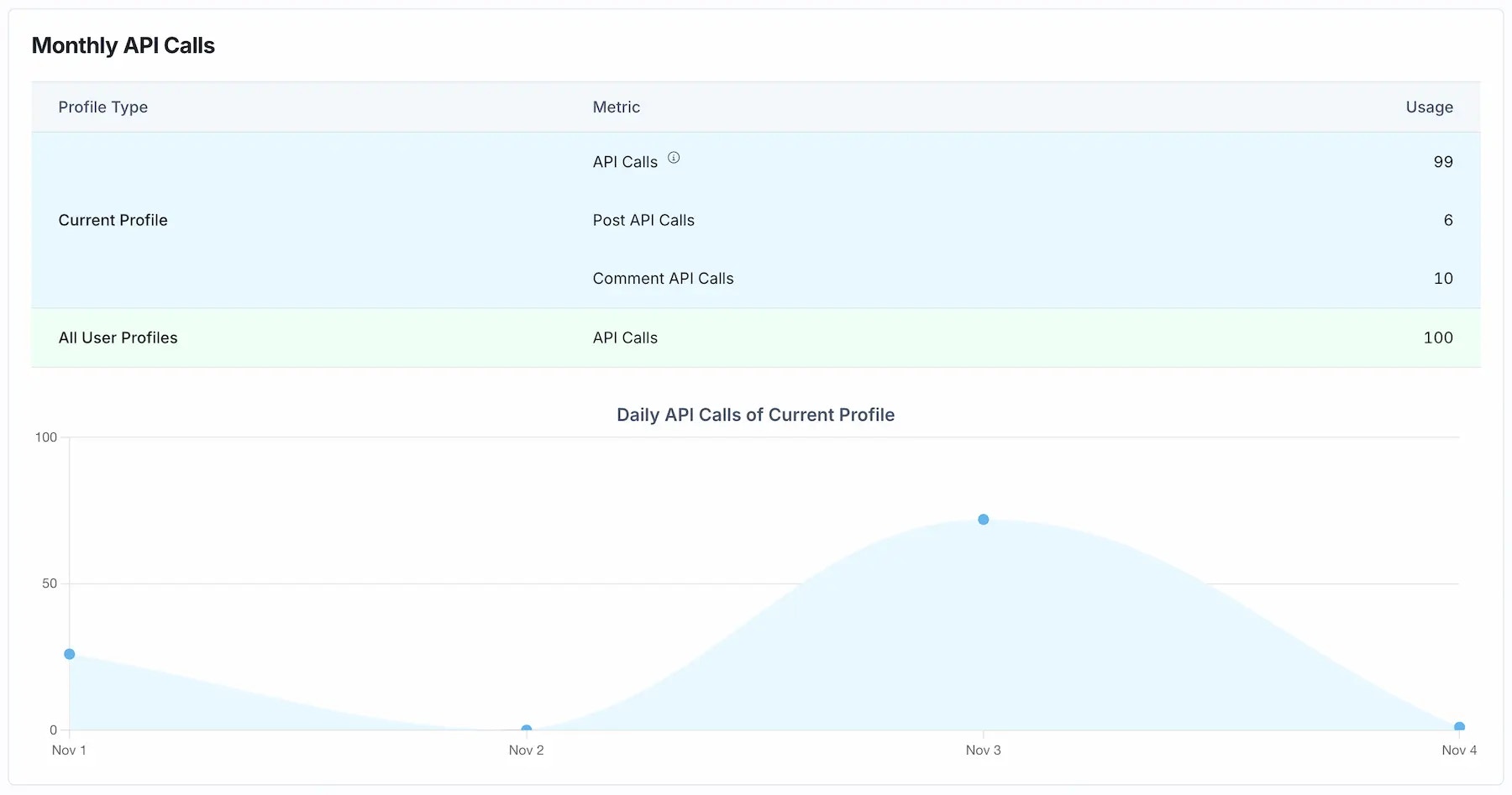
    **Dashboard**。在 Ayrshare 控制台的 API 页面新增 Monthly API Calls 概览，
    现在同时包含评论 API 调用和发帖 API 调用。
  </li>
</ul>

<img alt="Ayrshare Dashboard API Calls" class="center" src="https://mintcdn.com/ayrshare-docs/Nmrhj2Gh7WSf62Bh/images/additional/whats-new/api_calls_dashboard.webp?fit=max&auto=format&n=Nmrhj2Gh7WSf62Bh&q=85&s=b5087b496157040d3dfb3200744bf7cd" width="1800" height="947" data-path="images/additional/whats-new/api_calls_dashboard.webp" />

<ul className="custom-bullets">
  <li>
    **PyPi 包**。[Python PyPi
    包](https://pypi.org/project/social-post-api/1.2.1/) 已更新，
    加入了新的接口。
  </li>
</ul>

## 2024 年 9 月

<Frame>
  <iframe title="Recapping the Ayrshare September 2024 Release" height="150" width="100%" src="https://www.podbean.com/player-v2/?from=embed&i=ceg78-16fb364-pb&share=1&download=0&fonts=Arial&skin=654771&font-color=auto&rtl=0&logo_link=&btn-skin=fb0584&size=150" />
</Frame>

<ul className="custom-bullets">
  <li>
    **Facebook 分析**。[History Get All Posts](/apis/history/history-platform) 和
    [Analytics](/apis/analytics/post) 接口现在会返回点赞了 Facebook 帖子的用户。
    每个用户会返回用户名和用户 ID。
  </li>

  <li>
    **内容审核**。新增 [Moderation](/apis/validate/moderation) 接口，
    用于检查内容是否有害或不当。该接口
    同时支持文本和图片。
  </li>

  <li>
    **LinkedIn 关联**。此前连接 LinkedIn 公司主页需要
    用户是该主页的 Super Admin。现在管理 LinkedIn 公司主页的
    Content Admin 也可以连接，从而进行发帖、获取分析和
    管理评论。
  </li>

  <li>
    **用户管理**。[User 接口](/apis/user/profile-details) 现在会
    为 Facebook 和 Instagram 同时返回 Page ID 和 User ID。
  </li>

  <li>
    **Dashboard**。Web 控制台的 Post 页面现在会在
    帖子来源于 RSS 订阅时显示一个图标提示。
  </li>

  <li>
    **Facebook Reviews**。[Facebook Reviews](/apis/reviews/get-reviews) 现在会返回
    评论者的头像。
  </li>

  <li>
    **Google Reviews**。[Google Business Profile Reviews](/apis/reviews/get-reviews) 现在会返回你所有
    的评论，即使有成千上万条。
  </li>
</ul>

## 2024 年 8 月

<Frame>
  <iframe title="Recapping the Ayrshare August 2024 Release" height="150" width="100%" src="https://www.podbean.com/player-v2/?from=embed&i=m4w23-16c5170-pb&share=1&download=0&fonts=Arial&skin=654771&font-color=auto&rtl=0&logo_link=&btn-skin=fb0584&size=150" />
</Frame>

<ul class="custom-bullets">
  <li>
    **LinkedIn 历史**。现在你可以获取 [LinkedIn 个人
    主页的帖子历史](/apis/history/history-platform)。此前只有 LinkedIn 公司主页会返回历史。
    需要重新关联 LinkedIn 与 Ayrshare。
  </li>

  <li>
    **LinkedIn 分析**。为 LinkedIn 个人和公司主页新增了[可用的
    数据点](/apis/analytics/social)，包括
    `likedBy` 和 `comment` 详情。
  </li>

  <li>
    **LinkedIn 查询**。[brand 接口](/apis/listen/brand-user) 现在允许
    查询个人或公司。这可以用来查看谁点赞了
    你的帖子。
  </li>

  <li>
    **Facebook 历史**。你可以将 [Facebook Page
    历史](/apis/history/history-platform) 的结果限制为仅显示该 Page 自己
    发布的帖子，从而过滤掉所有并非由该 Page
    发布的内容。
  </li>

  <li>
    **用户配置**。[user 接口](/apis/user/overview) 现在返回一个新的
    字段，即上次为该用户配置发起 API 调用的时间戳。
  </li>

  <li>
    **X 长文**。你可以为 [Premium X
    账户发布长文](/apis/post/social-networks/x-twitter)。长文最多可
    25,000 个字符。你也可以在调用分析或历史时
    [获取完整的长文数据](/apis/history/history-platform)，
    包括长文正文中的完整内容和 URL。
  </li>

  <li>
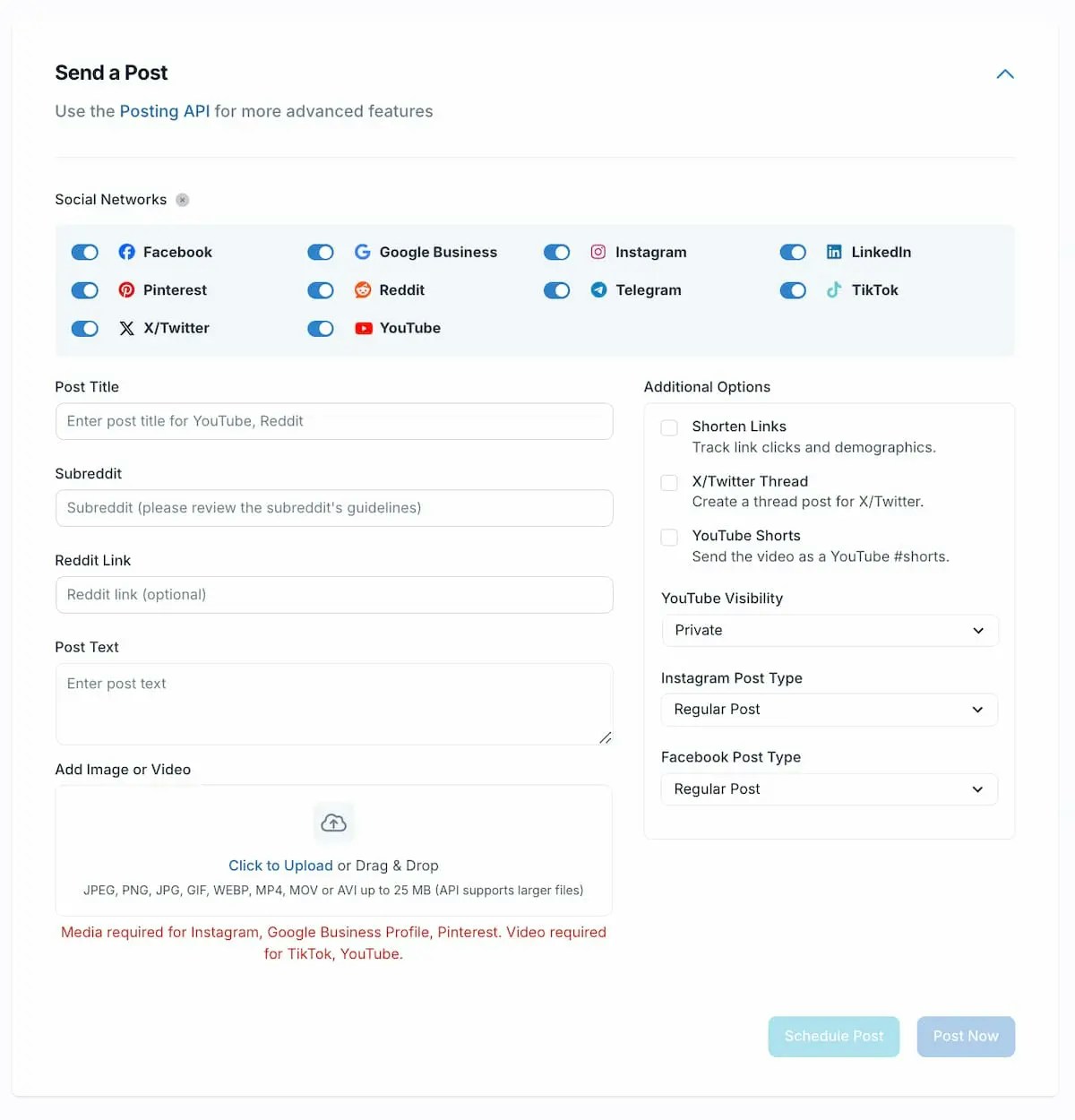
    **Web Dashboard**。改进了发帖页面设计，并新增多个内容类型。
    你现在可以直接从控制台发布 Facebook 与 Instagram Reels 或 Stories，或 YouTube Shorts。
  </li>
</ul>

<img alt="Updated API Dashboard" class="center" src="https://mintcdn.com/ayrshare-docs/Nmrhj2Gh7WSf62Bh/images/additional/dash-new.webp?fit=max&auto=format&n=Nmrhj2Gh7WSf62Bh&q=85&s=ce086ccc927a845ebaf789301e9b1474" width="1200" height="1250" data-path="images/additional/dash-new.webp" />

<ul class="custom-bullets">
  <li>
    **团队管理**。[邀请团队
    成员](/multiple-users/manage-user-profiles#team-member-status) 时，现在可以看到他们
    是否接受了邀请，或从 Dashboard 的 User Profiles 页面重新发送邀请。
  </li>

  <li>
    **AI 视频标题**。[视频转录](/apis/generate/transcribe-video)
    现在会附带一个建议标题。这对上传 YouTube 视频很有用——
    YouTube 每次上传视频都要求提供标题。（需 Max Pack）
  </li>

  <li>
    **暂停帖子**。你可以通过 post 接口[暂停和恢复定时
    帖子](/apis/post/overview#pause-scheduled-posts)。
  </li>

  <li>
    **情感分析**。[generate 接口](/apis/generate/sentiment) 现在
    可以为帖子或评论生成情感分析，判断是负面、正面还是中性。
    结果还包括改进建议。
  </li>

  <li>
    **Instagram 分析**。[Instagram 分析](/apis/analytics/social) 已
    增强，可返回互动受众的更多人口统计数据。
  </li>

  <li>
    **TikTok 图片**。你现在可以[使用图片在 TikTok
    发帖](/apis/post/social-networks/tiktok#tiktok-image-post)。此前必须是视频。
  </li>
</ul>

## 2024 年 7 月

<Frame>
  <iframe title="Recapping the Ayrshare July 2024 Release" height="150" width="100%" src="https://www.podbean.com/player-v2/?from=embed&i=u48ns-169485b-pb&share=1&download=0&fonts=Arial&skin=654771&font-color=auto&rtl=0&logo_link=&btn-skin=fb0584&size=150" />
</Frame>

<ul className="custom-bullets">
  <li>
    **帖子历史。** [按社交网络平台、帖子是即时还是定时以及状态筛选 history 接口](/apis/history/get-history)。
  </li>

  <li>
    **Web Dashboard。** 现在可以按标题或创建日期排序用户
    配置列表，同时改进了发帖的排期弹窗。
  </li>

  <li>
    **Webhook。** 如果初始的 webhook 未获得成功响应，[Webhook 现在会
    自动重试两次](/apis/webhooks/overview#webhook-retries)，使用相同的
    hookId。
  </li>

  <li>
    **Reddit。** 根据 subreddit 名称[检查 subreddit 是否存在](/apis/validate/check-subreddit)。
  </li>

  <li>
    **Facebook Stories。** [通过 history 接口返回的
    Facebook Story](/apis/history/history-platform) 现在会包含封面图片和
    视频的直接 URL。
  </li>

  <li>
    **图片裁剪。** 图片调整大小新增了 “[crop” 模式选项](/apis/media/overview)。现在
    你可以指定尺寸和起始坐标来裁剪图片。
  </li>

  <li>
    **Demo 社交发帖应用。** 我们发布了一个[演示 React +
    Node.js Web 应用](https://github.com/ayrshare/social-api-demo)的代码，
    用户可以在其中编写、排期并同时向多个社交媒体
    平台发帖。
  </li>

  <li>
    **多平台帖子。** post 接口已增强，可让你在
    单次 API 调用中[为不同社交网络自定义帖子
    内容和媒体](/apis/post/overview#multi-platform-posts-and-media)。
  </li>

  <li>
    **Instagram 分析。** Instagram 主页分析现在提供
    [每日历史时间序列](/apis/analytics/social)。
  </li>

  <li>
    **LinkedIn 评论。** [从 LinkedIn 获取评论](/apis/comments/get-comments)
    现在会返回评论媒体链接（图片或视频）。
  </li>
</ul>

## 2024 年 6 月

<Frame>
  <iframe title="Messaging API & Recapping the Ayrshare June 2024 Release" height="150" width="100%" src="https://www.podbean.com/player-v2/?from=embed&i=ps6di-1659f6b-pb&share=1&download=0&fonts=Arial&skin=654771&font-color=auto&rtl=0&logo_link=episode_page&btn-skin=fb0584&size=150" />
</Frame>

<ul className="custom-bullets">
  <li>
    **Ayrshare Messaging API**。[Ayrshare Messaging
    附加功能](https://www.ayrshare.com/social-media-messenger-apis/) 是一个可选的付费附加功能，
    让你的平台可以管理用户的私信，包括 Facebook Messenger、
    Instagram Messaging 和 X/Twitter Messaging。
  </li>

  <li>
    **YouTube 评论**。你现在可以通过 YouTube 评论 ID [在
    YouTube 上删除评论](/apis/comments/delete-comments)。
  </li>

  <li>
    **自动话题标签**。全新重构的[自动话题标签
    系统](/apis/hashtags/auto-hashtags) 会给出更相关的话题标签，且不再对
    帖子长度设限。每条帖子的话题标签数量上限也提升到 10 个。
  </li>

  <li>
    **Web Dashboard**。控制台 UI 已更新：可以一键
    移除发帖页面中所有目标社交网络，同时 API Key 页面新增
    代码示例区域。
  </li>

  <li>
    **用户配置管理**。[Profiles 接口已
    增强](/apis/profiles/get-profiles)，允许你按拥有活跃社交账户或
    包含特定平台的配置过滤结果。
  </li>
</ul>

## 2024 年 5 月

<Frame>
  <iframe src="https://open.spotify.com/embed/episode/52MMduudowOhmAxLM64FPx" width="100%" height="352" frameborder="0" allowtransparency="true" allow="encrypted-media" />
</Frame>

<ul className="custom-bullets">
  <li>
    **Google Business**。你现在可以[更新你的 Google Business Profile
    位置](/apis/user/update-user) 数据，包括电话号码、网站 URL、地图位置等。
  </li>

  <li>
    **历史搜索**。使用 History 接口，你现在可以在你所有用户配置中[搜索
    帖子 ID](/apis/history/get-history-id)。当你有一个帖子 ID
    但不知道它属于哪个用户配置时非常有用。
  </li>

  <li>
    **用户配置标签**。[为用户配置添加你自己的标签](/apis/profiles/create-profile)，
    以便更好地组织和管理配置。Web 控制台也允许你在 User Profiles 页面
    查看已分配的标签并按标签搜索。
  </li>

  <li>
    **YouTube 字幕**。使用 SRT 或 SVB 文件为 YouTube 视频[添加你
    自己的自定义字幕](/apis/post/social-networks/youtube#subtitles-captions-for-videos)。
  </li>

  <li>
    **NPM 包**。发布了更新的 Node.js [NPM
    包](https://www.npmjs.com/package/social-media-api)，新增了接口
    并提供了更详细的文档。该包也已改名为
    social-media-api。
  </li>

  <li>
    **Facebook 评论**。你现在可以在 Facebook 评论中[将图片作为
    评论的一部分](/apis/comments/post-comment)。
  </li>

  <li>
    **LinkedIn 评论**。LinkedIn Comments 现在会返回该[具体评论的
    点赞数](/apis/comments/get-comments)。
  </li>

  <li>
    **LinkedIn Brands**。用于查询 [LinkedIn
    数据](/apis/listen/brand-user) 的 Brands 接口新增了账户的本地化名称、
    公司专长和公司描述等信息。
  </li>

  <li>
    **禁用评论**。你可以在 Instagram、LinkedIn 和 TikTok 的帖子上
    [禁用评论](/apis/comments/overview#disable-comments)。适用于新帖或已发布的帖子。
  </li>

  <li>
    **历史帖子**。可以[获取来自 TikTok 且并非通过 Ayrshare 发布的
    帖子的历史数据](/apis/history/get-history-id)。
  </li>

  <li>
    **Instagram 分析**。为 [Instagram
    Stories](/apis/analytics/post) 新增了可用数据点，包括回复、分享和退出计数。
  </li>

  <li>
    **AI 生成**。使用 AI 基于一张或多张图片[生成社交媒体
    帖子文本](/apis/generate/post-text)。也可以用来写图片说明。
  </li>

  <li>
    **Web Dashboard**。控制台中列出的每个用户配置，你都可以查看
    其已连接的社交网络。将鼠标悬停在每个社交网络图标上可查看
    在该社交网络上的名称。
  </li>

  <li>
    **社交关联**。在 Web 控制台和你的社交关联页面上，现在会在 Page 或公司名称旁显示
    对应主页的头像。
  </li>
</ul>

## 2024 年 4 月

<Frame>
  <iframe src="https://open.spotify.com/embed/episode/0CsNxd3eSL4LPiM5LTxXER" width="100%" height="352" frameborder="0" allowtransparency="true" allow="encrypted-media" />
</Frame>

<ul className="custom-bullets">
  <li>
    **Auto-Schedule**。增强以允许选择[自动排期发布](/apis/auto-schedule/set-schedule) 的具体星期几，或选择特定日期作为排除项。
  </li>

  <li>
    **Facebook 分析**。[Facebook 帖子分析](/apis/analytics/social) 现在
    包含 impressions。
  </li>

  <li>
    **Instagram 评论**。[Instagram 获取评论](/apis/comments/get-comments)
    响应现在包含额外的回复信息，例如用户名、点赞数
    和隐藏状态。
  </li>

  <li>
    **Facebook Page 位置**。你现在可以为帖子标注[Facebook Page
    位置](/apis/post/social-networks/facebook#location-tagging)。
  </li>

  <li>
    **Facebook 受众定位**。在 Facebook 上创建 Page 帖子时，你
    可以选择[通过年龄、地区、教育等不同人口特征来限定其
    可见范围](/apis/post/social-networks/facebook#audience-targeting)。
  </li>

  <li>
    **LinkedIn 评论**。来自公司主页的 [LinkedIn 评论](/apis/comments/get-comments)
    现在包含更多字段，包括组织类型、公司
    网站和公司描述。
  </li>

  <li>
    **Instagram 历史**。Instagram 的历史现在会返回轮播中的所有
    [图片和视频](/apis/history/history-platform)。
  </li>

  <li>
    **YouTube 分析**。获取频道级别的[YouTube 分析每日
    细分数据](/apis/analytics/social)。
  </li>
</ul>

## 2024 年 3 月

<Frame>
  <iframe src="https://open.spotify.com/embed/episode/7bBatzGkz3t2nknCR12lPz" width="100%" height="352" frameborder="0" allowtransparency="true" allow="encrypted-media" />
</Frame>

<ul className="custom-bullets">
  <li>
    **Instagram 协作者**。Instagram 协作允许你与其他账户共同创作内容。公开的原作者
    可以将另一个私密或公开账户标记为协作者。[为媒体帖子添加 Instagram 协作者](/apis/utils/instagram-get-collaborator)。
  </li>

  <li>
    **Google Business Profile**。现在可以获取更多 [Google Business
    Profile](/apis/user/profile-details) 数据，包括指向评论和地图的
    链接、place Id 等。要获取这些额外数据需要重新关联
    Google Business Profile。
  </li>

  <li>
    **Facebook Page、Instagram、Google Profile 位置**。在 Page 关联
    界面上，你现在可以为 Facebook Page、Instagram 账户和 Google Business
    Profile [显示 Page 位置](/multiple-users/manage-user-profiles#display-page-location)。
  </li>

  <li>
    **Facebook Profile 分析**。[Facebook 社交主页
    分析](/apis/analytics/social-by-id) 现在最多返回 4 个季度的数据。
    你可以选择返回聚合数据或按天数据。
  </li>

  <li>
    **Facebook 历史**。Facebook Stories 现在也会由 [Get All History
    接口](/apis/history/history-platform) 返回。
  </li>

  <li>
    **社交关联页面**。Ayrshare 社交关联页面现在[支持
    跳转](/multiple-users/api-integration-business#opening-and-closing-the-social-linking-url)
    到最初打开它的标签或窗口。
  </li>

  <li>
    **Facebook Reviews**。你现在可以[回复 Facebook 上的评论](/apis/reviews/reply-review)。
  </li>

  <li>
    **Instagram Followers**。[Instagram Get Followers
    Online](/apis/analytics/instagram-follower-count) 已增强 UTC 格式。
    该数据返回每小时 Instagram 在线粉丝的历史总数，
    从而帮助你为最大化互动优化发帖时机。
  </li>

  <li>
    **Instagram 轮播**。现在可以在 [Instagram
    轮播](/apis/post/social-networks/instagram#carousel-of-images-and-videos) 中同时发布视频和图片。
    最多可包含 10 项组合媒体。
  </li>

  <li>**TikTok**。TikTok caption 现在支持使用 "\n" 字符换行。</li>
</ul>

## 2024 年 2 月

<Frame>
  <iframe src="https://open.spotify.com/embed/episode/1bb3YQmdshDeSYuMXSYLxs" width="100%" height="352" frameborder="0" allowtransparency="true" allow="encrypted-media" />
</Frame>

<ul className="custom-bullets">
  <li>
    **Reviews**。使用新的 [/reviews](/apis/reviews/get-reviews) 接口获取、回复和删除 Google Business Profile 和 Facebook Pages 上的评论。
  </li>

  <li>
    **LinkedIn 评论**。对于在 Ayrshare 之外发出的评论，可通过评论 ID 获取
    [LinkedIn 评论](/apis/comments/get-comments)。
  </li>

  <li>
    **LinkedIn 提及**。评论和评论回复中的 [LinkedIn
    提及](/apis/post/social-networks/linkedin#linkedin-mentions)
    现在会解析为对应的组织 handle。
  </li>

  <li>
    **公开主页数据**。你现在可以在 [brand 接口](/apis/listen/search/fb-page-search)
    中搜索 Facebook Page 和 LinkedIn 名称。查询用户或公司
    的社交媒体公开信息，例如粉丝、
    头像和网站。这些用户和公司无需是
    已关联的 Ayrshare 用户。
  </li>

  <li>
    **Facebook 评论**。用于 [Facebook
    评论](/apis/comments/get-comments) 的评论接口现在会在响应体中直接返回
    回复。
  </li>

  <li>
    **Instagram 被封禁的话题标签**。可通过新的 [API
    接口](/apis/hashtags/check-hashtags) 或新的 [Web
    工具](https://app.ayrshare.com/instagram-banned-hashtag-checker) 检查被封禁的话题标签。
    这可以帮助你避免账户被暂停或隐性封禁。
  </li>

  <li>
    **Facebook Groups**。Facebook 宣布将移除 Facebook Groups 的 API 访问权限。[了解
    详情](https://www.ayrshare.com/blog/facebook-removes-groups-api-access-impact-and-implications/)。
  </li>
</ul>

## 2024 年 1 月

<Frame>
  <iframe src="https://open.spotify.com/embed/episode/5VpSM1C0iFMmScODQlwWJa" width="100%" height="352" frameborder="0" allowtransparency="true" allow="encrypted-media" />
</Frame>

<ul className="custom-bullets">
  <li>
    **更长的 Instagram 视频**。[Instagram 视频帖子](/media-guidelines/instagram) 现在
    支持最长 15 分钟、1 GB。此前上限为 60 秒和 100 MB。
  </li>

  <li>
    **翻译帖子文本**。在 100 多种语言中选择要将[你的帖子文本
    翻译成什么语言](/apis/generate/translate-post)。例如可以从英语翻译到法语，或从西班牙语翻译到德语。
    源语言会被自动检测。
  </li>

  <li>
    **错误信息翻译**。错误信息可以[自动
    翻译](/errors/errors-ayrshare#error-message-translation) 为你选择的语言。
    当你希望以用户偏好的语言直接向他们展示错误时，这非常有用。
  </li>

  <li>
    **Pinterest 分析**。[获取全部历史](/apis/history/history-platform) 时可以拿到更多的
    [Pinterest 数据点](/apis/history/history-platform)，包括帖子标题、备注和 board id。
  </li>

  <li>
    **检查帖子长度**。[Check Post Length
    接口](/apis/validate/check-post-length) 现在包含对 Facebook、Google Business Profile、LinkedIn、Pinterest 和 YouTube 的校验。
  </li>

  <li>
    **新的用户批量接口**。当你需要大量数据集时，批量
    接口是一个很好的选择。你可以使用批量接口[获取所有用户配置的
    json 文件](/apis/user/batch-all-users)，然后使用
    [webhook 在文件准备好时通知你](/apis/webhooks/actions#batch-action)。
  </li>

  <li>
    **LinkedIn 历史帖子**。获取[在 Ayrshare 之外发布的 LinkedIn
    帖子的历史数据](/apis/history/history-social-id)。
  </li>

  <li>
    **LinkedIn 帖子反应**。LinkedIn 的 [Get All Post
    接口](/apis/history/history-platform) 现在会返回帖子的
    反应，例如 Likes、Praise、Maybe 和 Appreciation。
  </li>

  <li>
    **上次 API 调用时间**。在 Web 控制台的 API Key 区域可以查看你
    上次使用该 API Key 的时间。
  </li>

  <li>
    **Ayrshare Dashboard 历史**。Web 控制台现在允许你通过新的 “Load more” 按钮
    加载所有历史帖子或 webhook 日志。
  </li>

  <li>
    **Webhook 错误**。查看你 webhook 的[错误率](/apis/webhooks/overview#webhook-logs)，
    了解成功与错误响应的比例。
  </li>
</ul>

## 更早的更新

请查看 [Update Archive](/whatsnew/archive) 查看更早的更新。