

Validate
Validate JSON
यह सत्यापित करने के लिए JSON भेजें कि क्या सही ढंग से format किया गया है
POST
यह सत्यापित करने के लिए JSON भेजें कि क्या सही ढंग से format किया गया है।
आप या तो online linter, जैसे https://jsonlint.com/ या Postman का उपयोग करके अपने JSON को सत्यापित कर सकते हैं।
यदि आप कोई no-code tool जैसे Bubble या Make का उपयोग करते हैं या 500 “Bad Request” response प्राप्त करते हैं, तो यह endpoint JSON request को debug करने के लिए उपयोगी है।
Header Parameters
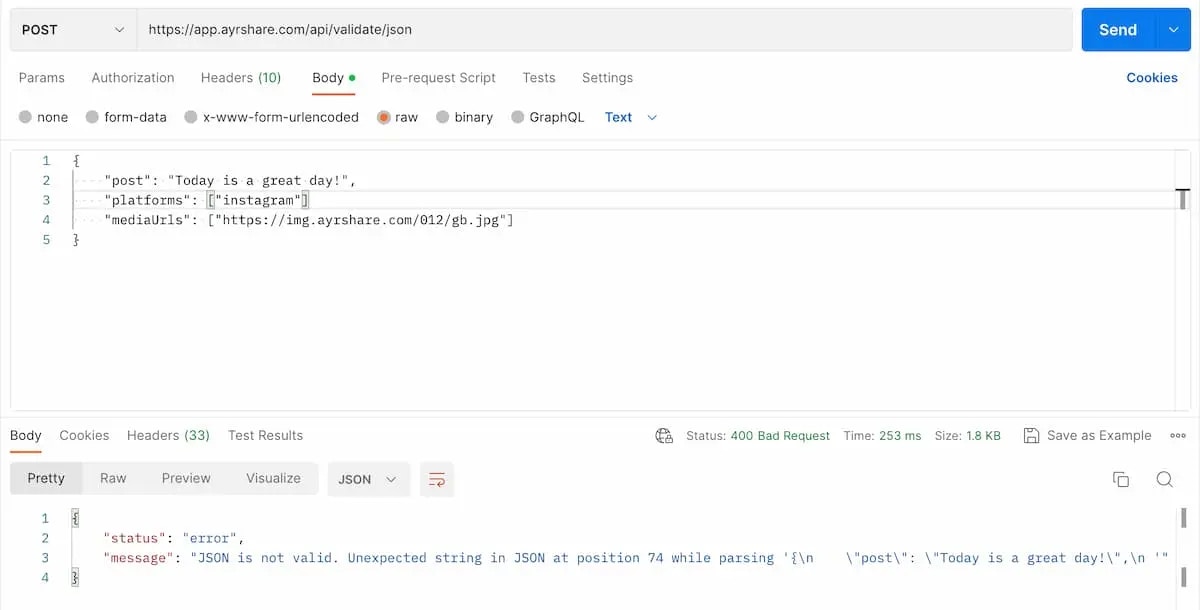
- डेटा को text के रूप में भेजें। यदि Postman का उपयोग कर रहे हैं, तो कृपया सुनिश्चित करें कि आप प्रकार के रूप में “Text” चुनें।
"Content-Type": "text/plain"सेट करें।
Request उदाहरण
इसे सत्यापित करने के लिए इस endpoint को कोई भी json भेजें। नीचे Postman का उपयोग करके अमान्य JSON का एक उदाहरण है। क्या आप इसे पहचान सकते हैं? दूसरे parameterplatforms के अंत में एक comma गुम है।
सुनिश्चित करें कि header में Content-Type को text/plain के रूप में सेट करें और भेजते समय “Text” चुनें।