

Validate
Validar JSON
Envie JSON para validar se está formatado corretamente
POST
Envie JSON para validar se está formatado corretamente.
Você pode validar seu JSON usando um linter online, como https://jsonlint.com/, ou usando o Postman.
Se você utiliza uma ferramenta no-code como Bubble ou Make ou recebe uma resposta 500 “Bad Request”, este endpoint é útil para depurar a requisição JSON.
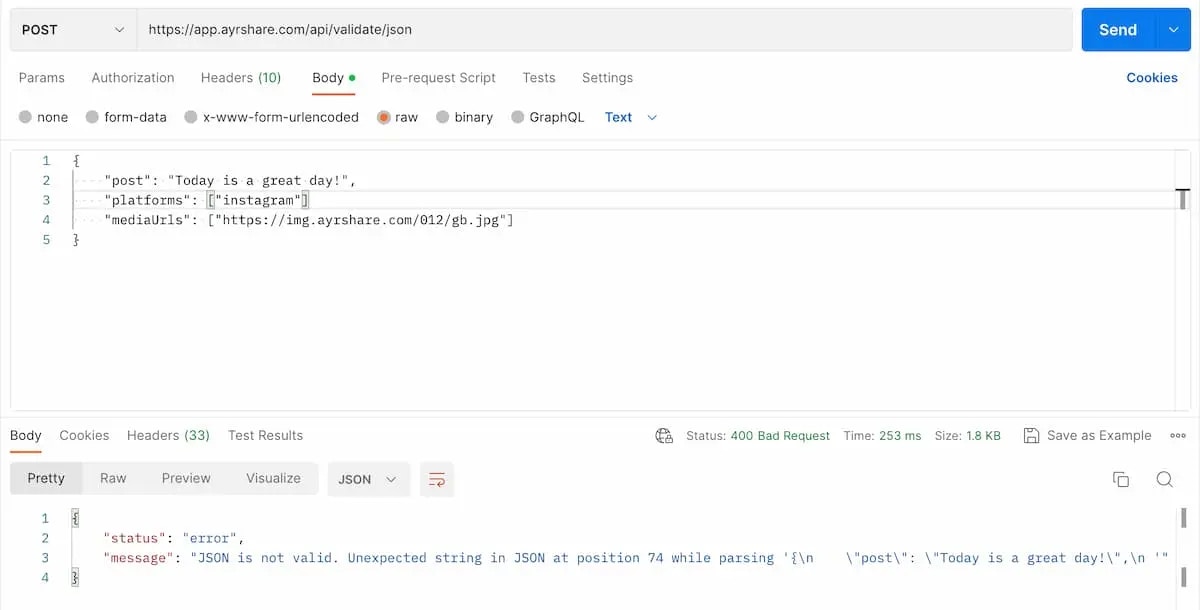
Parâmetros do cabeçalho
- Envie os dados como texto. Se estiver usando o Postman, selecione “Text” como tipo.
- Defina o
"Content-Type": "text/plain".
Exemplos de requisição
Envie qualquer JSON para este endpoint para validá-lo. Abaixo, um exemplo de JSON inválido usando o Postman. Consegue identificar? Falta uma vírgula ao final do segundo parâmetroplatforms.
Certifique-se de definir o Content-Type no cabeçalho como text/plain e selecionar “Text” ao enviar.