

Validate
Validar JSON
Envía JSON para validar si tiene el formato correcto
POST
Envía JSON para validar si tiene el formato correcto.
Puedes validar tu JSON usando un linter en línea como https://jsonlint.com/ o usando Postman.
Si utilizas una herramienta no-code como Bubble o Make, o recibes una respuesta 500 “Bad Request”, este endpoint es útil para depurar la petición JSON.
Parámetros de cabecera
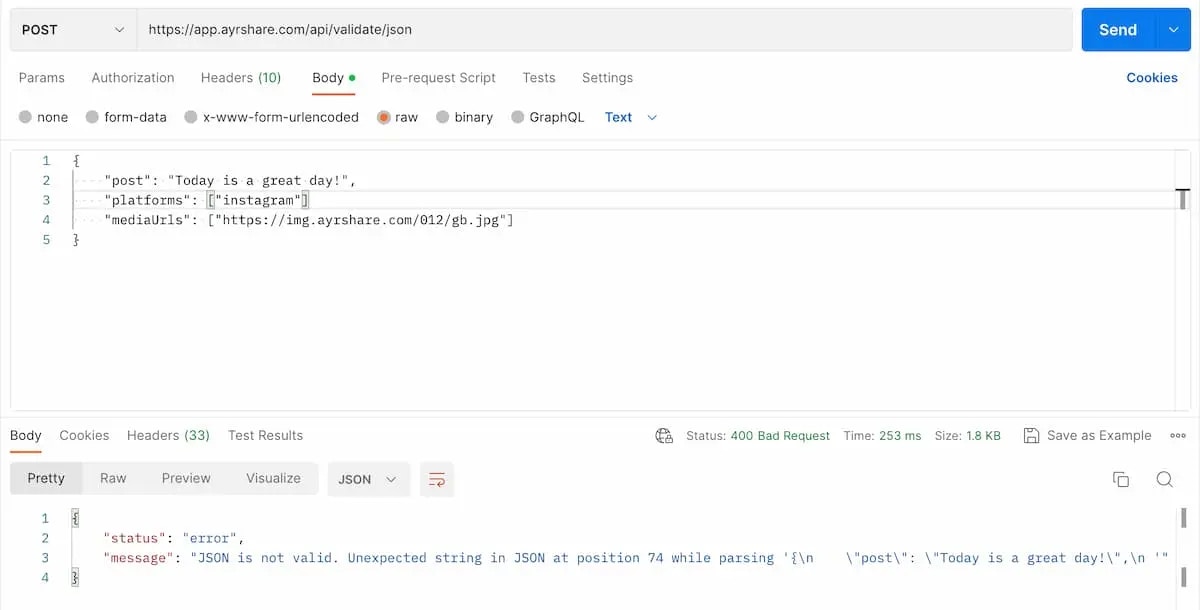
- Envía los datos como texto. Si utilizas Postman, asegúrate de seleccionar “Text” como tipo.
- Establece
"Content-Type": "text/plain".
Ejemplos de solicitud
Envía cualquier json a este endpoint para validarlo. A continuación se muestra un ejemplo de JSON no válido usando Postman. ¿Puedes detectarlo? Falta una coma al final del segundo parámetroplatforms.
Asegúrate de establecer el Content-Type en la cabecera como text/plain y de seleccionar “Text” al enviarlo.