Ayrshare Is Now Native in Claude Code
June 30, 2026
5 min read
Author: Anh Le

Article content
Share Article
Ask AI about this article
Opens your AI assistant in a new tab with this article preloaded.
TL;DR
The Ayrshare plugin for Claude Code is live as a native plugin, so an AI agent can take a social post from first draft to published across 14+ networks without anyone writing per-platform integration code. It bundles the /ayrshare:setup command, two agents you drive in plain language, and 27 MCP tools. Writing was never the hard part for an agent; publishing without breaking something in public is, and that is the gap this closes.
- Install the plugin, then run /ayrshare:setup to connect your API key. It adds two agents, social-manager and profile-manager, plus skills that trigger on intent, so you describe what you want instead of memorizing command syntax.
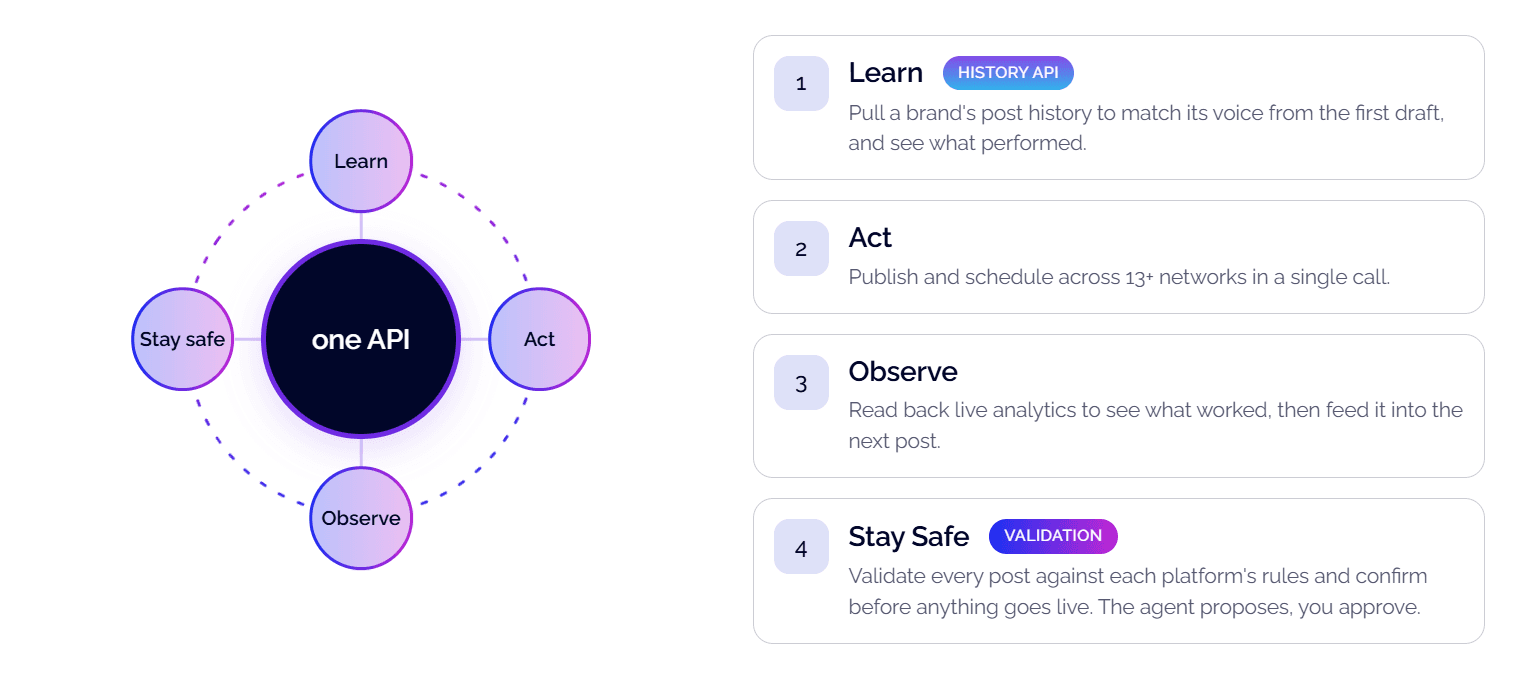
- The agent loop is learn, act, observe, stay safe: read a brand's post history to learn its voice and see what performed, publish or schedule across 14+ networks in one call, read back live analytics, and validate every post against the platform's rules.
- Nothing publishes automatically. The agent drafts, validates, and asks you to approve first. Validation reports what is wrong while the content is still a draft, which turns "post and pray" into draft, validate, fix, then publish.
- The integration is multi-tenant from the ground up: one API key, with an optional Profile-Key to scope any call to a specific managed account, so it grows with your customer list. Platforms that require your own keys, like X under the 2026 mandate, are handled too.
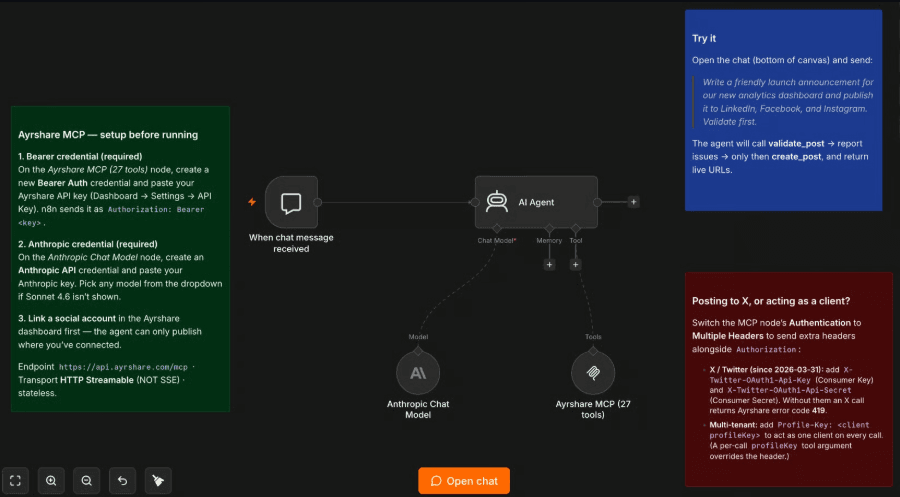
- The plugin wraps the same hosted Ayrshare MCP Server, so the loop is not limited to Claude Code. Point n8n's MCP Client Tool node at the server and your AI Agent gets the same 27 tools, validation included.
The Ayrshare plugin for Claude Code is live. It's now a native plugin, which means an AI agent can take a social post from first draft to published across 14+ networks, with no one writing custom integration code for each platform's API. Here's what shipped, and why one API beats maintaining a separate integration for every network.
The Publishing Step Is Where AI Agents Often Break
Ask an agent to draft a launch announcement and it does a good job. Ask it to actually post that announcement across your accounts and you are one malformed payload, one oversized image, one platform-specific quirk away from finding out in public. Writing was never the hard part. Publishing without breaking something is.
That's the gap the Ayrshare plugin closes. It gives an agent inside Claude Code the ability to publish across 14+ networks, without you writing custom integration code for every platform's rules.
What We Shipped
The plugin bundles three things. There's a command you run directly, /ayrshare:setup, to connect your API key. There's an agent you drive in plain language, so you describe what you want instead of memorizing command syntax. And the server includes 27 MCP tools, which is what lets the agent validate, publish, pull history, and read engagement as one loop.
The Agent Loop: Learn, Act, Observe, and Stay Safe
The plugin is built around four things an agent does:
- Learn a brand's voice from its post history, and see what performed.
- Act by publishing and scheduling across 14+ networks in one call.
- Observe by reading back live analytics to see what worked.
- Stay safe by validating every post against each platform's rules and confirming before anything goes live.
One Production-Ready API Instead of Maintaining 13 Integrations
You could wire an agent straight into one platform's API. It works until it doesn't, and the places it doesn't are the expensive ones.
Publishing and analytics are table stakes for any social API; two capabilities set Ayrshare apart. The first is a History API. Your agent pulls a brand's full posting history to learn its voice from the first draft and see what performed, instead of guessing. The second is validation. Before a post goes out, Ayrshare checks it against the target platform's rules and tells your agent what is wrong while it can still fix it, which turns "post and pray" into draft, validate, fix, then publish. For platforms that require you to bring your own keys, like X under the 2026 mandate, that is handled too.
The integration is multi-tenant from the ground up: one API key, with an optional Profile-Key to scope any call to a specific managed account, so the system grows with your customer list. And each platform's evolving rules, formats, and failure modes are built into the API, so your agent inherits them instead of rediscovering each limit the hard way. We handle 30M+ API calls a day, so platform changes are our problem, not your agent's.
The plugin is the publishing layer your agent can be trusted with.
Install in Two Commands
bash
bash
claude plugin install github:ayrshare/ayrshare-social-media-api-claude-pluginThen connect your account:
bash
bash
/ayrshare:setupFrom there, a prompt is all it takes. Tell the agent to post something and validate it first, and it runs the dry run, reads the result, and publishes only once the content checks out. The same flow covers history and engagement, with no per-platform branching on your side.
Not Using Claude Code? The Same Server Works in n8n
The plugin wraps the same hosted Ayrshare MCP Server, so the agent loop isn't limited to Claude Code. In n8n, point the built-in MCP Client Tool node at the server and your AI Agent gets the same 27 tools, validation included. See the n8n integration guide for the setup.
What's Next for the MCP Server
Validation is the first piece of the domain expertise we're building into the MCP Server, and there's a lot more coming.
Install the Ayrshare Plugin for Claude Code
bash
bash
claude plugin install github:ayrshare/ayrshare-social-media-api-claude-plugin/ayrshare:setup
For the full list of MCP tools and parameters, see the MCP action server documentation. New to Ayrshare? The quick start guide gets your first post out in a few minutes.
FAQs About the Ayrshare Plugin for Claude Code
What commands and agents does the plugin add to Claude Code?
The plugin adds the /ayrshare:setup command to connect your API key, two agents named social-manager and profile-manager, and skills that trigger on intent so the agent can handle posting, history, analytics, and client profiles in plain language.
Does the agent publish automatically, or do I approve first?
The agent does not publish automatically. It drafts the post, validates it, and asks you to approve first, so nothing goes live without your confirmation.
What happens when a post fails validation?
When a post fails validation, Ayrshare tells the agent what's wrong against the platform's rules while the content is still a draft, so the agent can fix it and re-check before anything publishes.
Can the plugin schedule posts for later?
Yes, the plugin can schedule posts for later as well as publish them immediately, across the 14+ supported networks in a single call.
Can I use the Ayrshare plugin outside Claude Code?
Yes, you can use the Ayrshare plugin outside Claude Code. It runs on the same hosted MCP Server, so you can connect the same 27 tools in n8n through its MCP Client Tool node, or in any other client that speaks MCP.
Written by: Anh Le
Anh Le is Head of Marketing at Ayrshare, the social media API platform. She leads brand, content, and growth, and writes about social media marketing, the APIs behind it, and how developers and teams put social into their products.
Ask AI about this article
Opens your AI assistant in a new tab with this article preloaded.