WhatsApp API Now Available in Ayrshare: Send and Receive WhatsApp Messages
August 26, 2026
4 min read
Author: Ayrshare Team

Article content
Share Article
Ask AI about this article
Opens your AI assistant in a new tab with this article preloaded.
TL;DR
WhatsApp is now part of Ayrshare's Messaging API, alongside the Instagram, Facebook and X DMs it already handled. You can link a WhatsApp Business Account through Meta's embedded signup, reply with free-form messages inside the 24-hour customer service window, receive inbound messages and media, and pull stored conversations. Access is enabled per account while we scale up.
- Users connect their own WhatsApp Business Account through Meta's embedded signup flow. Ayrshare verifies ownership, completes registration and subscribes the account to webhooks, so you never build the Meta integration or handle a registration PIN.
- Free-form replies are only allowed inside WhatsApp's 24-hour customer service window, which opens when a customer messages the business. Outside it, Meta requires pre-approved template messages.
- Inbound texts, images and other media arrive through the API, and stored conversations can be retrieved for threading, analytics, or grounding an AI agent in how a business actually talks to its customers.
- It is the same Messaging API that covers Instagram, Facebook and X, so adding WhatsApp does not mean another integration, another webhook format, or another token refresh cycle.
- WhatsApp has 3.3 billion monthly active users and is available on plans that include the Messaging API. Email lotty@ayrshare.com with a short note on what you are building to get it enabled.
The Ayrshare API now includes WhatsApp. The Messaging API, which already handles DMs on Instagram, Facebook, and X, now supports WhatsApp too. If you send DMs through Ayrshare now, WhatsApp works the same way.
WhatsApp has been the most requested messaging channel since we launched the Messaging API, and for good reason: in most of the world, it’s where customers expect to talk to a business. Email lotty@ayrshare.com to get WhatsApp enabled on your account.
What the WhatsApp API Supports
WhatsApp covers the core conversation loop between your business and your customers:
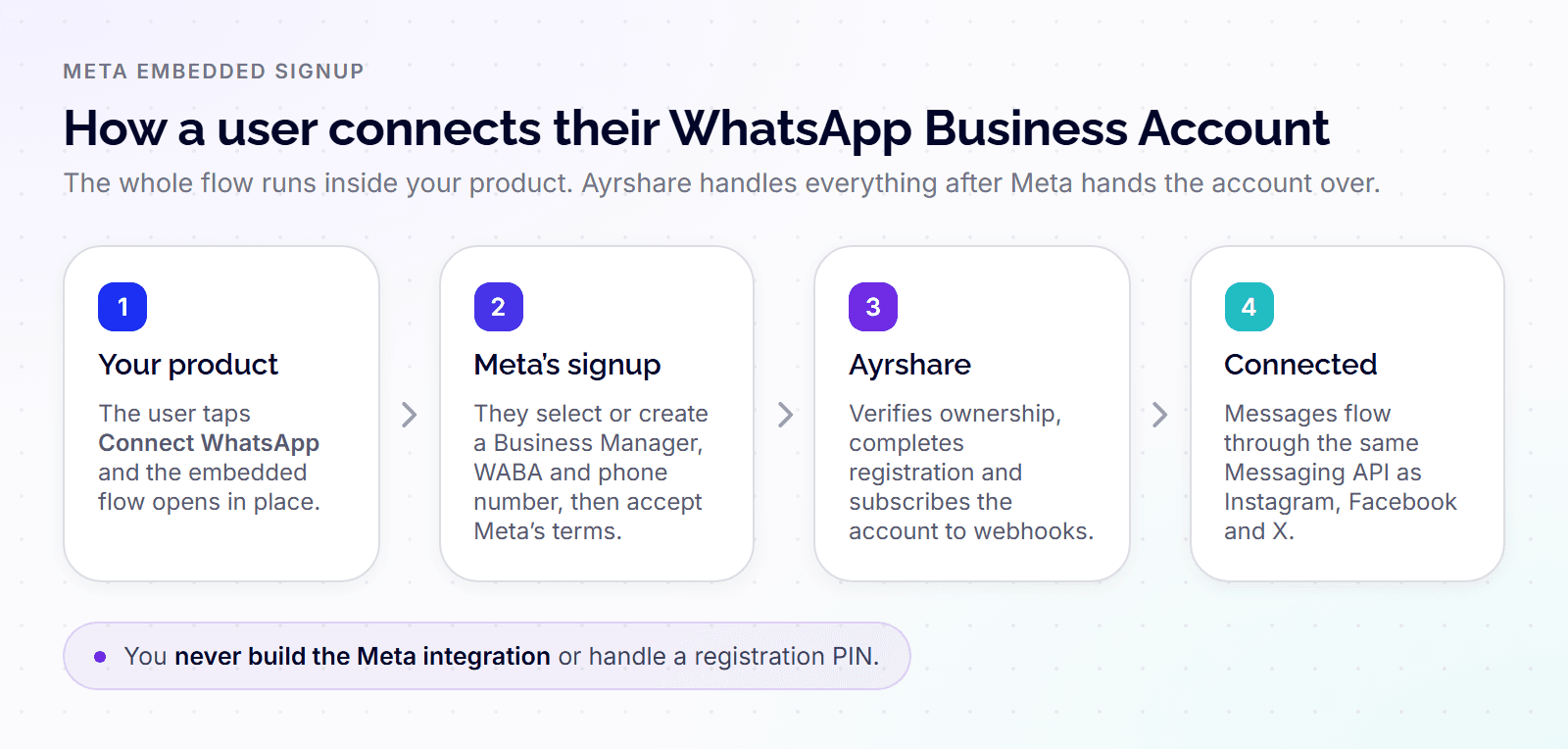
Link a WhatsApp Business Account through Meta’s embedded signup flow. Your users connect their own WhatsApp Business Account inside the flow, which walks them through selecting or creating their Meta Business Manager, WABA, and phone number, and accepting Meta’s terms. Ayrshare then verifies ownership, completes registration, and subscribes the account to webhooks. You never build the Meta integration or handle a registration PIN.
Send free-form WhatsApp messages during the 24-hour customer service window. When a customer messages a business on WhatsApp, Meta opens a 24-hour window in which the business can reply with free-form text. The Messaging API sends those replies programmatically, which is what a support product, CRM, or AI agent needs to hold a real conversation.
Receive incoming WhatsApp messages and media. Inbound texts, images, and other media arrive through the API, so your product sees the full conversation rather than the half it sends.
Retrieve stored WhatsApp conversations. Pull conversation history for context, threading, analytics, or grounding an AI agent in how a business actually talks to its customers.
What Is the 24-Hour Customer Service Window?
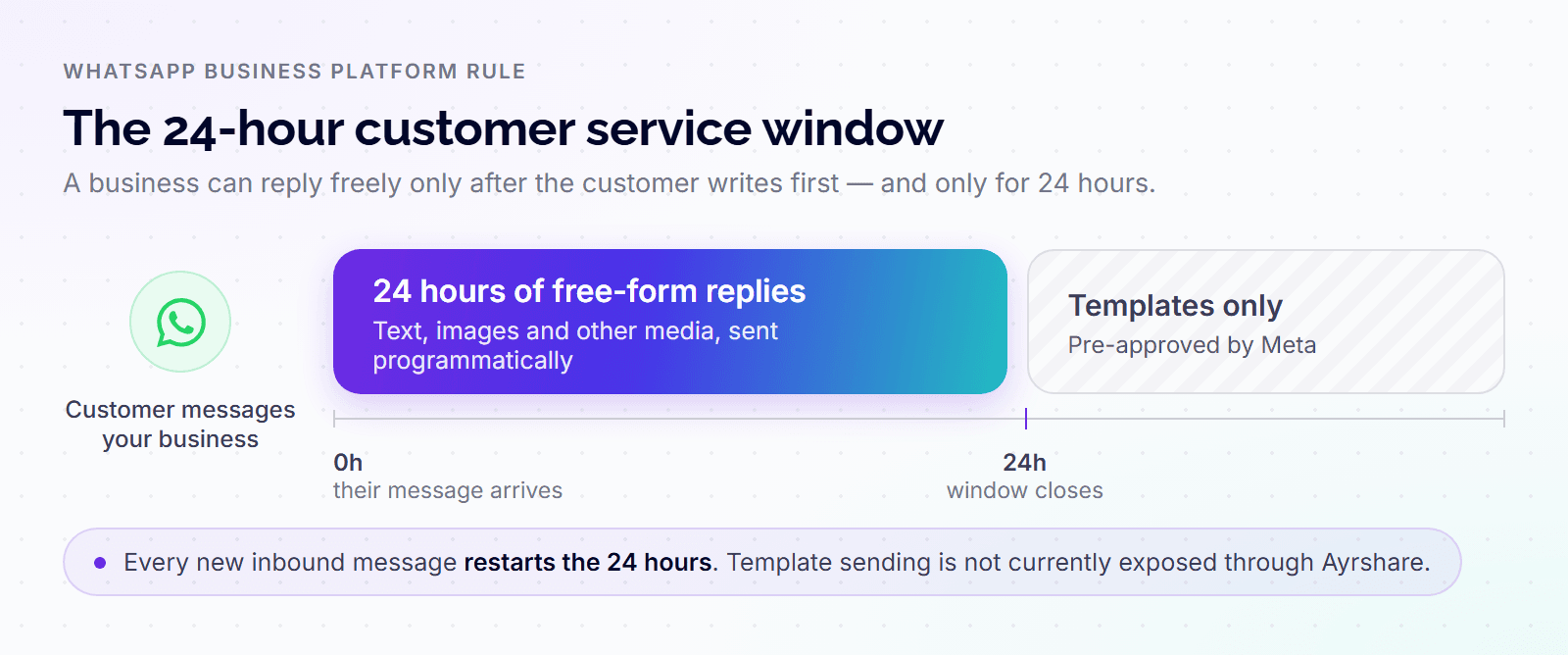
The customer service window is a WhatsApp Business Platform rule: after a customer messages a business, the business has 24 hours to reply with free-form messages. Outside that window, Meta requires pre-approved template messages.
If you’re new to the WhatsApp Business API, this rule shapes everything you build. WhatsApp messaging on Ayrshare focuses on messaging inside the window, which covers the highest-value use case: responding to customers who reach out. Support conversations, sales follow-ups, order questions, AI-agent replies. If a customer messaged you, you can answer them through the API.
Why Add WhatsApp to a Social Media API?
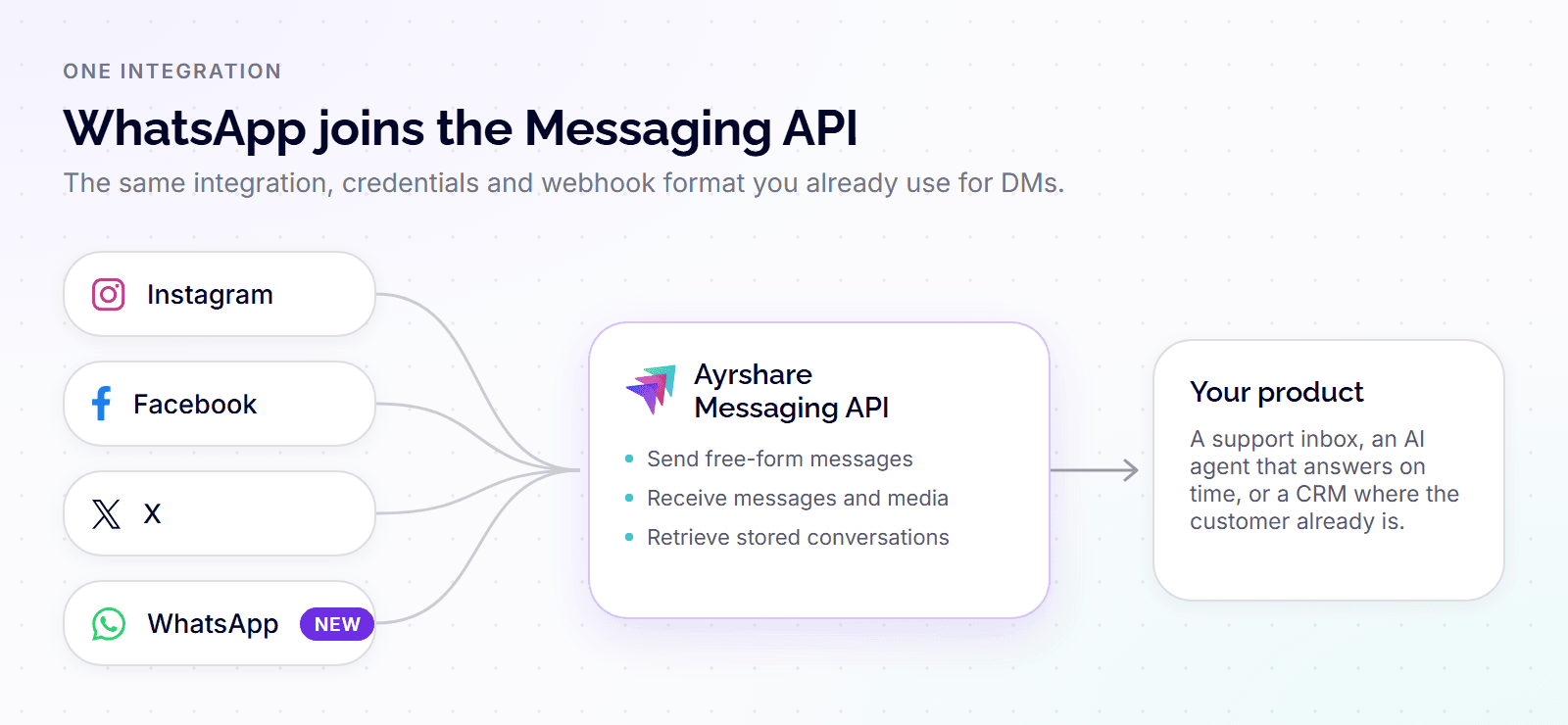
Most platforms force you to use different vendors for social publishing and customer messaging. But splitting them up just creates more technical debt: another integration to maintain, a new webhook format to parse, and yet another token refresh cycle to manage.
Ayrshare’s Messaging API already handles DMs for Instagram, Facebook, and X. Now, we’re adding the biggest one of them all.
With 3.3 billion monthly active users, WhatsApp is massive. Adding it into Ayrshare brings our single, streamlined integration to the channel where real customer conversations actually happen globally.
If you’re building AI agents, this setup is a no-brainer. To work properly, an agent needs to catch inbound messages, understand the context, and reply on time. Ayrshare’s WhatsApp integration covers all the bases: inbound messages and media, easy retrieval of past conversations, and free-form outbound replies.
Who Should Use the WhatsApp API
WhatsApp messaging is a fit if you’re building:
- Customer support or inbox products that need WhatsApp alongside Instagram and Facebook DMs
- AI agents that respond to customer messages, with conversation history available for context
- Multi-tenant SaaS platforms whose users connect their own WhatsApp Business Accounts through embedded signup
- CRMs and sales workflows where WhatsApp is where the customer already is
How to Get WhatsApp API Access
WhatsApp is available on plans that include the Messaging API, and we enable it per account while we scale up. Email lotty@ayrshare.com with a short note on what you’re building. Setup steps, WhatsApp-specific behavior, and media limits live in the Messages API docs.
Written by: Ayrshare Team
Guides and stories from the Ayrshare team, the unified social media API trusted by more than 10,000 teams.
Ask AI about this article
Opens your AI assistant in a new tab with this article preloaded.
Frequently Asked Questions
Yes. The Ayrshare Messaging API supports WhatsApp. Approved accounts can send free-form messages during the 24-hour customer service window, receive incoming messages and media, and retrieve stored conversations.
You can link a WhatsApp Business Account through Meta’s embedded signup flow, send free-form messages inside the 24-hour window, receive incoming messages and media, and retrieve stored WhatsApp conversations, all through the same Messaging API that handles Instagram, Facebook, and X DMs.
After a customer messages a business, WhatsApp allows the business to reply with free-form messages for 24 hours. Outside that window, Meta requires pre-approved template messages. Ayrshare currently covers free-form messaging inside the window.
Through Meta’s embedded signup flow, which runs inside your product. It walks the user through selecting or creating their Business Manager, WABA, and phone number, then Ayrshare completes registration automatically.
WhatsApp is in private beta and enabled per account. Access is granted on request while we scale capacity, and the API and docs are stable enough to build against today.
Not yet. Template sending, which Meta requires for messages outside the 24-hour window, isn’t currently exposed through Ayrshare. If templates matter for your use case, mention it when you request access.
Email lotty@ayrshare.com with your use case. Access is granted per account.